# Remove unmute button

**URL:** https://forum.babylonjs.com/t/remove-unmute-button/27577
**Category:** Questions
**Created:** [February 11, 2022, 3:02pm UTC](https://forum.babylonjs.com/t/remove-unmute-button/27577 "2022-02-11T15:02:30Z")
**Posts on this page:** 20
**Page:** 1

<div class="post-metadata">

### Author: ![VictorBwD](https://sea2.discourse-cdn.com/flex024/user_avatar/forum.babylonjs.com/victorbwd/32/16203_2.png) [@VictorBwD](https://forum.babylonjs.com/u/VictorBwD)
#### Post date: [February 11, 2022, 3:02pm UTC](https://forum.babylonjs.com/t/remove-unmute-button/27577/1 "2022-02-11T15:02:30Z")

</div>

Hi again, how are you?

I have a problem more related to the browser than Babylon… I think. If I put a sound in Babylon to play this button appears:  
 ![image](https://us1.discourse-cdn.com/flex024/uploads/babylonjs/original/3X/2/4/24daa1c6238ef7cbf7738939b2b0ed36e6eb3c4e.png)

Before, when the sound was made in HTML, there was no such problem. I just changed it for it to work directly through Babylon and I already have an audio on/off controller.

Google Chrome, Windows 10.

edit: If there is no way to fix this, can you tell me some condition with which I can control it? Well, it’s rendering two audios.

---

<div class="post-metadata">

### Author: ![roland](https://sea2.discourse-cdn.com/flex024/user_avatar/forum.babylonjs.com/roland/32/38940_2.png) [@roland](https://forum.babylonjs.com/u/roland)
#### Post date: [February 11, 2022, 3:07pm UTC](https://forum.babylonjs.com/t/remove-unmute-button/27577/2 "2022-02-11T15:07:01Z")

</div>

Hi!

```auto
if (Engine.audioEngine) {
  Engine.audioEngine.useCustomUnlockedButton = true
}

```

🖖

---

<div class="post-metadata">

### Author: ![VictorBwD](https://sea2.discourse-cdn.com/flex024/user_avatar/forum.babylonjs.com/victorbwd/32/16203_2.png) [@VictorBwD](https://forum.babylonjs.com/u/VictorBwD)
#### Post date: [February 11, 2022, 3:21pm UTC](https://forum.babylonjs.com/t/remove-unmute-button/27577/3 "2022-02-11T15:21:55Z")

</div>

Thank you! But I put this in sceneComponent.tsx where the Engine is and now the sound doesn’t work anymore. But the button is gone.

edit: Here the code I used to get the music from Babylon and called inside navbar:  
 ![image](https://us1.discourse-cdn.com/flex024/uploads/babylonjs/original/3X/4/3/43b334f0816de5a7dbac21f9ca97d1d8a4c8b4ca.png)

sceneRef receive scene and get by name of sound.

---

<div class="post-metadata">

### Author: ![roland](https://sea2.discourse-cdn.com/flex024/user_avatar/forum.babylonjs.com/roland/32/38940_2.png) [@roland](https://forum.babylonjs.com/u/roland)
#### Post date: [February 11, 2022, 3:29pm UTC](https://forum.babylonjs.com/t/remove-unmute-button/27577/4 "2022-02-11T15:29:45Z")

</div>

There can be multiple reasons for not playing your audio. Did you turn on your speakers? 😃 Ok, just joking!

So, did you try to debug the part of your code where you start the music? Is the condition met and does it run the `getMusic.play()` function? Is the `getMusic` variable correctly set? Is the audio ready to be played?

Handling the ‘ready to play’ callback function:

> **[Audio | Babylon.js Documentation](https://doc.babylonjs.com/divingDeeper/audio/playingSoundsMusic#handling-the-ready-to-play-callback-function)**
>
> Dive into everything you could want to know about using the Babylon.js sound engine for simple to advanced audio.

EDIT:

```auto
    // this will not work
    var music = new BABYLON.Sound("Violons", "sounds/violons11.wav", scene, null, { loop: true, autoplay: false });
    music.play()

    // this will
    var music = new BABYLON.Sound("Violons", "sounds/violons11.wav", scene, () => {
        music.play()
    }, { loop: true, autoplay: false });

```

You can try it out here:

> **[Babylon.js Playground](https://playground.babylonjs.com/#PCY1J%23214)**
>
> Babylon.js playground is a live editor for Babylon.js WebGL 3D scenes

---

<div class="post-metadata">

### Author: ![VictorBwD](https://sea2.discourse-cdn.com/flex024/user_avatar/forum.babylonjs.com/victorbwd/32/16203_2.png) [@VictorBwD](https://forum.babylonjs.com/u/VictorBwD)
#### Post date: [February 11, 2022, 3:46pm UTC](https://forum.babylonjs.com/t/remove-unmute-button/27577/5 "2022-02-11T15:46:11Z")

</div>

Here my code to make sound works:  
 ![image](https://us1.discourse-cdn.com/flex024/uploads/babylonjs/original/3X/0/b/0b2ac5c933aeb2ebcb68c47f636d5175dc2e9c5c.png)  
This is called inside Babylon 3D ambient.

It starts normally, and I can start and stop the music from the controller. However, when I put it that piece of code doesn’t work anymore, nor does the autoplay. I don’t know what it could be.

---

<div class="post-metadata">

### Author: ![roland](https://sea2.discourse-cdn.com/flex024/user_avatar/forum.babylonjs.com/roland/32/38940_2.png) [@roland](https://forum.babylonjs.com/u/roland)
#### Post date: [February 11, 2022, 4:02pm UTC](https://forum.babylonjs.com/t/remove-unmute-button/27577/6 "2022-02-11T16:02:14Z")

</div>

Obviously. I bet you don’t unlock the audio manually.

Add this:

```auto
      Engine.audioEngine?.unlock()

```

This must be called for example from a click event on the page. User interaction is needed here.

EDIT: Sorry, I could tell you about this earlier 😛

---

<div class="post-metadata">

### Author: ![labris](https://sea2.discourse-cdn.com/flex024/user_avatar/forum.babylonjs.com/labris/32/12576_2.png) [@labris](https://forum.babylonjs.com/u/labris)
#### Post date: [February 11, 2022, 4:04pm UTC](https://forum.babylonjs.com/t/remove-unmute-button/27577/7 "2022-02-11T16:04:46Z")

</div>

Or you can use something like that - [https://playground.babylonjs.com/#PCY1J#216](https://playground.babylonjs.com/#PCY1J#216)  
Here the music is playing after the any first pointer event since in order to play user has to interact with the page first.

---

<div class="post-metadata">

### Author: ![VictorBwD](https://sea2.discourse-cdn.com/flex024/user_avatar/forum.babylonjs.com/victorbwd/32/16203_2.png) [@VictorBwD](https://forum.babylonjs.com/u/VictorBwD)
#### Post date: [February 11, 2022, 4:51pm UTC](https://forum.babylonjs.com/t/remove-unmute-button/27577/8 "2022-02-11T16:51:16Z")

</div>

When I put this “Engine.audioEngine?.unlock()” the project crash…

---

<div class="post-metadata">

### Author: ![VictorBwD](https://sea2.discourse-cdn.com/flex024/user_avatar/forum.babylonjs.com/victorbwd/32/16203_2.png) [@VictorBwD](https://forum.babylonjs.com/u/VictorBwD)
#### Post date: [February 11, 2022, 4:52pm UTC](https://forum.babylonjs.com/t/remove-unmute-button/27577/9 "2022-02-11T16:52:18Z")

</div>

Thank you. I did some mechanics like point n click using this method. If nothing works I’ll try this…

---

<div class="post-metadata">

### Author: ![roland](https://sea2.discourse-cdn.com/flex024/user_avatar/forum.babylonjs.com/roland/32/38940_2.png) [@roland](https://forum.babylonjs.com/u/roland)
#### Post date: [February 11, 2022, 5:21pm UTC](https://forum.babylonjs.com/t/remove-unmute-button/27577/10 "2022-02-11T17:21:28Z")

</div>

Try this. Create an index.html file on your disk and simply open it in a browser. It just works 🙂

```auto
<!DOCTYPE html>
<html xmlns="http://www.w3.org/1999/xhtml">
  <head>
    <meta http-equiv="Content-Type" content="text/html; charset=utf-8" />
    <title>Babylon Template</title>

    <style>
      html,
      body {
        overflow: hidden;
        width: 100%;
        height: 100%;
        margin: 0;
        padding: 0;
      }

      #renderCanvas {
        width: 100%;
        height: 100%;
        touch-action: none;
      }
    </style>

    <script src="https://cdn.babylonjs.com/babylon.js"></script>
    <script src="https://cdn.babylonjs.com/loaders/babylonjs.loaders.min.js"></script>
    <script src="https://code.jquery.com/pep/0.4.3/pep.js"></script>
  </head>

  <body>
    <button onclick="unlockAudio()" id="unlockButton" disabled style="padding: 20px; margin: 20px">Loading music...</button>

    <canvas id="renderCanvas" touch-action="none"></canvas>
    <!-- touch-action="none" for best results from PEP -->

    <script>
      let music
      function unlockAudio() {
        BABYLON.Engine.audioEngine.unlock()
        music.play()
      }
      const canvas = document.getElementById('renderCanvas') // Get the canvas element
      const engine = new BABYLON.Engine(canvas, true) // Generate the BABYLON 3D engine

      if (BABYLON.Engine.audioEngine) {
        BABYLON.Engine.audioEngine.useCustomUnlockedButton = true
      } else {
        alert('No audio engine detected')
      }

      // Add your code here matching the playground format
      const createScene = function() {
        const scene = new BABYLON.Scene(engine)

        BABYLON.MeshBuilder.CreateBox('box', {})

        const camera = new BABYLON.ArcRotateCamera('camera', -Math.PI / 2, Math.PI / 2.5, 15, new BABYLON.Vector3(0, 0, 0))
        camera.attachControl(canvas, true)
        const light = new BABYLON.HemisphericLight('light', new BABYLON.Vector3(1, 1, 0))

        return scene
      }

      const scene = createScene() //Call the createScene function

      music = new BABYLON.Sound(
        'music',
        'https:/playgrounds.babylonjs.xyz/boss_time.mp3',
        scene,
        () => {
          const btn = document.getElementById('unlockButton')
          btn.disabled = false
          btn.innerHTML = 'Unlock audio and start music'
        },
        { loop: true, autoplay: false }
      )

      // Register a render loop to repeatedly render the scene
      engine.runRenderLoop(function() {
        scene.render()
      })

      // Watch for browser/canvas resize events
      window.addEventListener('resize', function() {
        engine.resize()
      })
    </script>
  </body>
</html>

```

EDIT:  
Or here is a version online:  
[https://playgrounds.babylonjs.xyz/audio.html](https://playgrounds.babylonjs.xyz/audio.html)

There is a slight delay in the audio itself at the beginning.

---

<div class="post-metadata">

### Author: ![VictorBwD](https://sea2.discourse-cdn.com/flex024/user_avatar/forum.babylonjs.com/victorbwd/32/16203_2.png) [@VictorBwD](https://forum.babylonjs.com/u/VictorBwD)
#### Post date: [February 11, 2022, 9:24pm UTC](https://forum.babylonjs.com/t/remove-unmute-button/27577/11 "2022-02-11T21:24:38Z")

</div>

Still didn’t work… see this monday. Thanks for the replies!

---

<div class="post-metadata">

### Author: ![roland](https://sea2.discourse-cdn.com/flex024/user_avatar/forum.babylonjs.com/roland/32/38940_2.png) [@roland](https://forum.babylonjs.com/u/roland)
#### Post date: [February 11, 2022, 9:47pm UTC](https://forum.babylonjs.com/t/remove-unmute-button/27577/12 "2022-02-11T21:47:52Z")

</div>

Are you willing to share you code in private? If this simple example doesn’t help you I am sorry, but I can’t help you more without seeing your code.

---

<div class="post-metadata">

### Author: ![jeremy-coleman](https://sea2.discourse-cdn.com/flex024/user_avatar/forum.babylonjs.com/jeremy-coleman/32/15493_2.png) [@jeremy-coleman](https://forum.babylonjs.com/u/jeremy-coleman)
#### Post date: [February 12, 2022, 3:16pm UTC](https://forum.babylonjs.com/t/remove-unmute-button/27577/13 "2022-02-12T15:16:08Z")

</div>

You need to create a ref and use scene.current if you’re using it in react

---

<div class="post-metadata">

### Author: ![VictorBwD](https://sea2.discourse-cdn.com/flex024/user_avatar/forum.babylonjs.com/victorbwd/32/16203_2.png) [@VictorBwD](https://forum.babylonjs.com/u/VictorBwD)
#### Post date: [February 16, 2022, 6:15pm UTC](https://forum.babylonjs.com/t/remove-unmute-button/27577/14 "2022-02-16T18:15:59Z")

</div>

Update: I managed, with a teammate, to get the above methods that @roland passed on to work. I had to use the “Engine.audioEngine.useCustomUnlockedButton = true” in the component where the 3D was running and the “unlock” method in the component where there was the start and stop button for the music. Now the only problem is that the music doesn’t start when you click on the scene. Thanks to everyone who has responded so far!

---

<div class="post-metadata">

### Author: ![VictorBwD](https://sea2.discourse-cdn.com/flex024/user_avatar/forum.babylonjs.com/victorbwd/32/16203_2.png) [@VictorBwD](https://forum.babylonjs.com/u/VictorBwD)
#### Post date: [February 16, 2022, 6:16pm UTC](https://forum.babylonjs.com/t/remove-unmute-button/27577/15 "2022-02-16T18:16:38Z")

</div>

I forgot to tell… im using React

---

<div class="post-metadata">

### Author: ![roland](https://sea2.discourse-cdn.com/flex024/user_avatar/forum.babylonjs.com/roland/32/38940_2.png) [@roland](https://forum.babylonjs.com/u/roland)
#### Post date: [February 16, 2022, 6:16pm UTC](https://forum.babylonjs.com/t/remove-unmute-button/27577/16 "2022-02-16T18:16:56Z")

</div>

You’re welcome!

---

<div class="post-metadata">

### Author: ![carolhmj](https://sea2.discourse-cdn.com/flex024/user_avatar/forum.babylonjs.com/carolhmj/32/25918_2.png) [@carolhmj](https://forum.babylonjs.com/u/carolhmj)
#### Post date: [March 17, 2022, 10:51am UTC](https://forum.babylonjs.com/t/remove-unmute-button/27577/17 "2022-03-17T10:51:45Z")

</div>

Hello @VictorBwD just checking in, was your question answered? 🙂

---

<div class="post-metadata">

### Author: ![trusktr](https://sea2.discourse-cdn.com/flex024/user_avatar/forum.babylonjs.com/trusktr/32/840_2.png) [@trusktr](https://forum.babylonjs.com/u/trusktr)
#### Post date: [August 11, 2023, 8:52pm UTC](https://forum.babylonjs.com/t/remove-unmute-button/27577/18 "2023-08-11T20:52:52Z")

</div>

> [@labris](#):
>
> Or you can use something like that - [https://playground.babylonjs.com/#PCY1J#216](https://playground.babylonjs.com/#PCY1J#216)  
> Here the music is playing after the any first pointer event since in order to play user has to interact with the page first.

That doesn’t work:
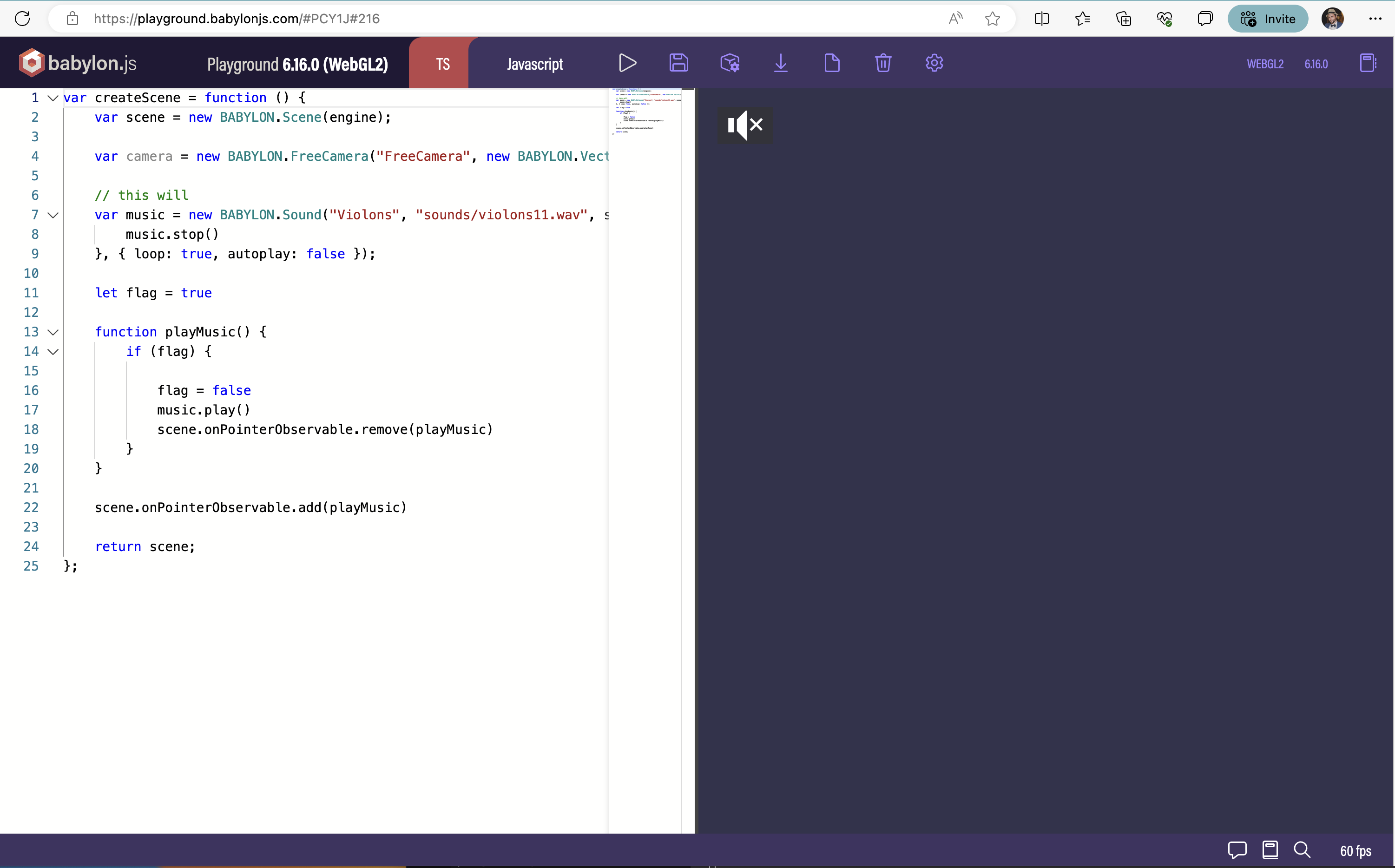
 ![Screenshot 2023-08-11 at 1.51.27 PM](https://us1.discourse-cdn.com/flex024/uploads/babylonjs/original/3X/0/c/0cfbea61d174d06bf12841e9cb23b7335900b3a3.png)

F.e., once you load that demo, click on the demo, then in MS Edge (based on Chrome) hit refresh. Then, without moving the mouse, click the demo. It will be muted, and the icon will appear.

---

<div class="post-metadata">

### Author: ![aWeirdo](https://sea2.discourse-cdn.com/flex024/user_avatar/forum.babylonjs.com/aweirdo/32/52_2.png) [@aWeirdo](https://forum.babylonjs.com/u/aWeirdo)
#### Post date: [August 11, 2023, 9:05pm UTC](https://forum.babylonjs.com/t/remove-unmute-button/27577/19 "2023-08-11T21:05:07Z")

</div>

@trusktr  
If you refresh the webpage, it is a new “session”, and a user input is required again for sounds to play.  
**Nobody** wants to visit a website and be blasted with music and sounds without consent 🙂

---

<div class="post-metadata">

### Author: ![trusktr](https://sea2.discourse-cdn.com/flex024/user_avatar/forum.babylonjs.com/trusktr/32/840_2.png) [@trusktr](https://forum.babylonjs.com/u/trusktr)
#### Post date: [August 11, 2023, 9:31pm UTC](https://forum.babylonjs.com/t/remove-unmute-button/27577/20 "2023-08-11T21:31:41Z")

</div>

On the contrary, all good experiences that I have _ever_ tried in _any_ browser _always_ start with sound enabled as soon as possible. Never the opposite!

Babylon currently prevents this, because even _after_ user interaction, sounds stay muted! That’s a bad experience considering that the user is already interacting with the experience.

Here’s the solution:

> [@Unmute Icon remove](https://forum.babylonjs.com/t/unmute-icon-remove/257/25):
>
> That’s not the problem. Babylon should simply enable sound inside a user interaction by default, rather than showing an unmute button and requiring users to press it. (Imagine if every game you ever played always started muted by default, that’s not the experience users expect). The solution so you can get rid of the unmute button once and for all is simple in userland (though Babylon should just do it by default!): // make your scene, as usual: const engine = new BABYLON.Engine(canvas, true);…

[Next page](https://forum.babylonjs.com/t/remove-unmute-button/27577.md?page=2)
