Babylon.js meets Google Maps and Mapbox!

Pyramid mapbox example:

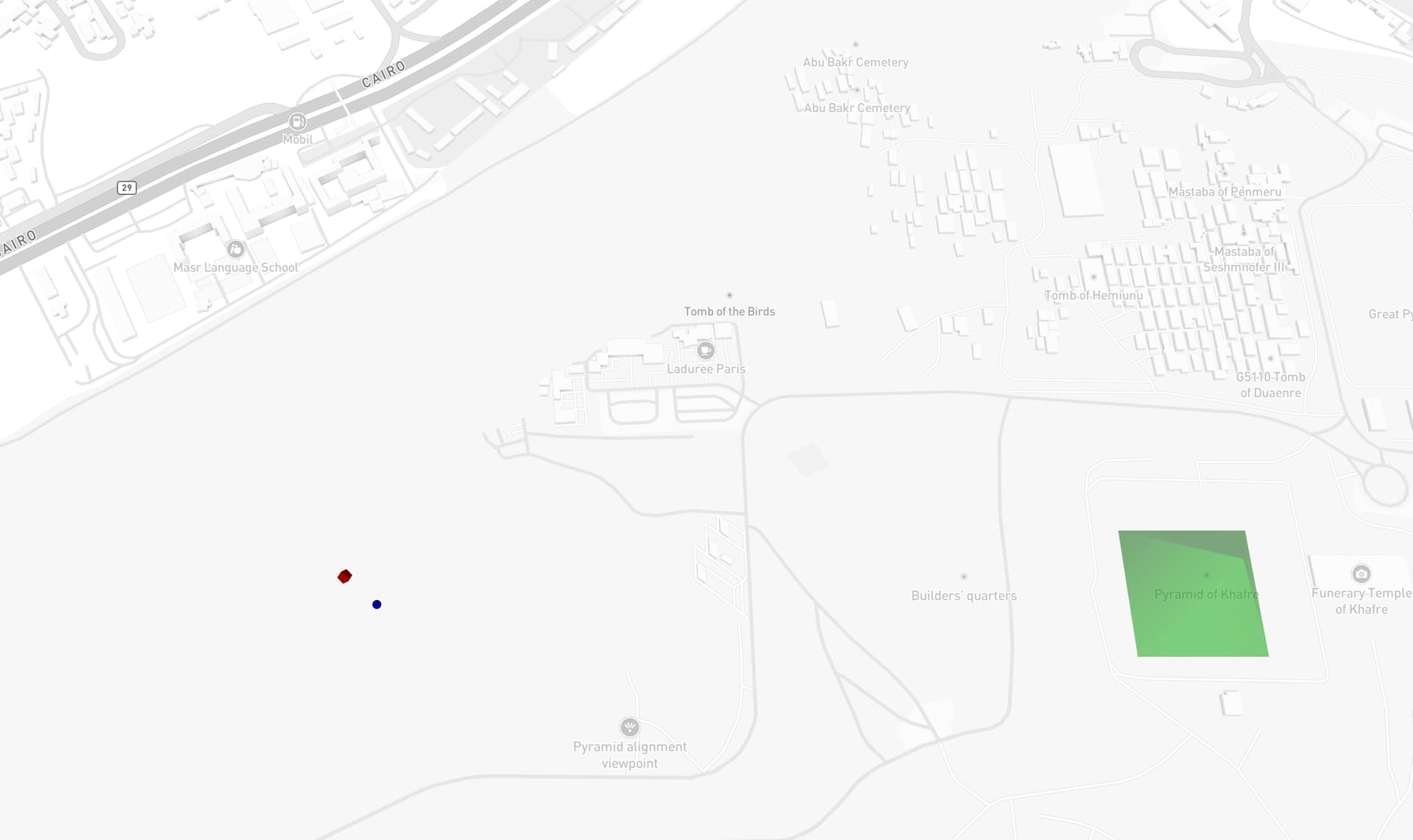
Create the map and set the anchor and center of the map near the pyramid site. The anchor is basically our [0,0,0] in babylon.js. The anchor is set slightly to the left where the small blue sphere and the red box are located just to demonstrate what x value will we get for our mesh.

const mapOptions: MapOptions = {
    container: "map",
    style: "mapbox://styles/mapbox/standard",
    config: {
      basemap: {
        theme: "monochrome",
      },
    },
    zoom: 18,
    center: [31.12054933420165, 29.97597456565051],
    pitch: 60,
    antialias: true,
  };

  const map = new mapboxgl.Map(mapOptions);
  const anchor = {
    lng: 31.12054933420165,
    lat: 29.97597456565051,
  };

Let’s add the pyramid of Khafre which is located at lng: 31.13084933520165, lat: 29.97597456565051

  const pyramidPosition = latLngToVector3Relative(
    { lng: 31.13084933520165, lat: 29.97597456565051, altitude: 0 }, 
    { ...anchor, altitude: 0 }
  );
  const pyramid = CreateCylinder(
    "pyramid",
    {
      diameterTop: 0,
      diameterBottom: 215.5,
      height: 143.5,
      tessellation: 4,
    },
    scene
  );
  pyramid.position = pyramidPosition;
  pyramid.rotation = new Vector3(0, Math.PI / 4, 0);
  const pyramidMaterial = new StandardMaterial("pyramid-material", scene);
  pyramidMaterial.diffuseColor = new Color3(0, 1, 0);
  pyramidMaterial.alpha = 0.5;
  pyramid.material = pyramidMaterial;
2 Likes

@tibotiber Hello! I’ve updated and renamed the repo. You can find the new link to the repo in my first post. Check out the examples npm run dev

1 Like

Sorry, I’m packed this week, but I hope to get to test this next weekend :slight_smile:

1 Like

Slick, might have to start building urbanwiki .org…

1 Like

Hey @roland I finally took some time to try this. Works perfectly, super simple to setup, well done mate!

Here is my repo using your module: GitHub - tibotiber/mapbox-babylonjs: Use a Mapbox custom style layer to render a BabylonJS 3D scene

And here is a quick demo:

4 Likes

when i am adding boundary to mapbox its only shows when i interect with map.

    map.on("load", () => {

      if (boundry) {

const boundaryLonLat = invertLatLon(boundry);


map.addSource("boundary", {

type: "geojson",

data: {

type: "Feature",

properties: {},

geometry: {

type: "Polygon",

coordinates: [boundaryLonLat]

            }

          }

        });


map.addLayer({

id: "boundary-fill",

type: "fill",

source: "boundary",

paint: {

"fill-color": "#0080ff",

"fill-opacity": 0.5

          }

        });


map.addLayer({

id: "boundary-line",

type: "line",

source: "boundary",

paint: {

"line-color": "#000",

"line-width": 3

          }

        });

      }


// Add your Babylon custom layer after the style is ready

    });

It would be even better if the base map image of the map could support Tianmap or CEISUM imagery