Hi,
I’m trying to spawn an mesh object (car), triggered by a websocket event.
I’m using vue with a store, to connect to the websockets and hold the data from the websocket. For the first try out, I have also a static object list at a json file, which is loaded at start up. The 4 objects are loaded fine at start. If I create a websocket event, the visualization breaks.
I tried 2 different ways. Cloning and loading the mesh again with AssetsManager. The solution with AssetsManager works, but I get a load screen, when the fifth car spawns and the performance is really bad, because of reloading the same mesh multiple times. Cloning will be the solution, for the performance problem.
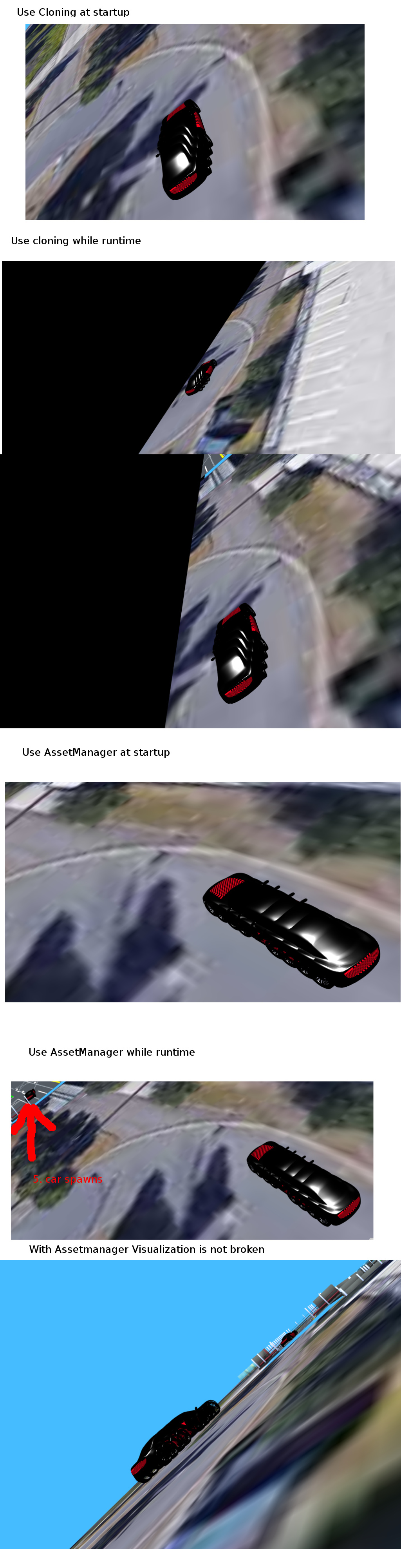
All functions are in ParkdeckVisualization.vue
Here is the code, with the AssetsManager:
methods: {
  ...
        createCarObject(vehicle_id) {
            console.log('ParkdeckVisualization.vue createCar called with vehicle_id:', vehicle_id)
            let vehicle = this.$store.getters.vehiclesDict[vehicle_id]
            let position = vehicle.pose.position
            let standardPos = new Vector3(position[0], position[2], position[1])

            let loader = new AssetsManager(this.scene);
            loader.useDefaultLoadingScreen = true;  // Set to false to remove the default loading
            let carModelLink = this.babylonFiles.carModel
            console.log('carModelLink:',carModelLink)
            let vehicle_loaded_task = loader.addMeshTask("loading " + vehicle_id, 'car', '', carModelLink);

            vehicle_loaded_task.onSuccess = function (task) {
                let m = task.loadedMeshes[0]
                console.log("Loaded!", vehicle_id);
                console.log("Load mesh:", task.loadedMeshes);
                m.position = standardPos;
                m.rotation = this.calcQuaternion(vehicle.pose.quaternion);
                console.log(m);
                this.car_meshs[vehicle_id] = m
                this.carPool.push(m)
            };

            let scene = this.scene
            let engine = this.engine

            loader.onFinish = function () {
                console.log("onFinish!", vehicle_id);
                engine.runRenderLoop(function () {
                    scene.render();
                });
            };

            loader.load();
Here is the same function, with cloning the mesh:
methods: {
  ...
        createCarObject(vehicle_id) {
            console.log('ParkdeckVisualization.vue createCar called with vehicle_id:', vehicle_id)
            let vehicle = this.$store.getters.vehiclesDict[vehicle_id]
            let position = vehicle.pose.position
            let standardPos = new Vector3(position[0], position[2], position[1])

            if (this.carModel) {
                console.log('this.carModel:', this.carModel)
                var carClone = this.carModel.clone(vehicle.id)
                console.log('pos for vehclie:', vehicle_id, standardPos)
                carClone.position = standardPos

                carClone.rotationQuaternion = this.calcQuaternion(vehicle.pose.quaternion)
                console.log('quat for vehclie:', vehicle_id, carClone.rotation.toQuaternion())

                carClone.material.freeze()
                carClone.isVisible = true
                this.car_meshs[vehicle_id] = carClone
                this.carPool.push(carClone)
            } else {
                console.warn('car model is not loaded')
            }
The createCarObject function is triggered from checkForNewVehicles function.
methods: {
  ...
       checkForNewVehicles() {
            console.log('ParkdeckVisualization.vue checkForNewVehicles called')
            if (!this.car_meshs) {
                console.log('ParkdeckVisualization.vue init this.car_meshs')
                this.car_meshs = {};
            }
            try {
                let car_meshs = this.car_meshs;
                //check for new cars in vehiclesDict
                for (let key in this.$store.getters.vehiclesDict) {
                    if (!(key in car_meshs)) {
                        this.createCarObject(key);
                    }
                }
            } catch (e) {
                // Anweisungen für jeden Fehler
                console.log('ParkdeckVisualization.vue checkForNewVehicles error:', e)
            }
        },
The function checkForNewVehicles is triggered from two different functions. While runtime, I connected the vehiclesDict getter from store to my ParkdeckVisualization.vue
watch: { //observers
      ...
       vehiclesDict() {
            console.log('ParkdeckVisualization.vue Watch vehiclesDict called')
            this.checkForNewVehicles()

            try {
                //check for cars removed in vehiclesDict, but still shown in car_meshs
                for (let key in this.car_meshs) {

                    if (!(key in this.$store.getters.vehiclesDict)) {
                        this.destroyCarObject(key)
                    }
                }

            } catch (e) {
                // Anweisungen für jeden Fehler
                console.log('ParkdeckVisualization.vue Watch vehiclesDict check for removed vehicles error:', e)
            }

            return this.$store.getters.vehiclesDict
        },
At startup, I loading the json file to the store, but at this time the mesh is not loaded. I place the cars, after the mesh has been loaded:
methods: {
...
   loadCar() {
            let scene = this.scene

            let loader = new AssetsManager(scene);
            loader.useDefaultLoadingScreen = false;  // Set to false to remove the default loading
            let carModelLink = this.babylonFiles.carModel
            console.log('carModelLink:', carModelLink)
            let vehicle_loaded_task = loader.addMeshTask("loadingCarMesh" , 'car', '', carModelLink);

            var carModel = null
            vehicle_loaded_task.onSuccess = function (task) {
                console.log("vehicle_loaded_task onSuccess!");
                carModel = task.loadedMeshes[0];
                carModel.isVisible = false;

            };
            let engine = this.engine
            var self = this

            loader.onFinish = function () {
                console.log("onFinish!");
                self.positionCar(carModel)
                engine.runRenderLoop(function () {
                    scene.render();
                });
            };

            loader.load();

        },
        positionCar(carMesh) {
            console.log('ParkdeckVisualization.vue positionCar called')
            this.carModel = carMesh;
            this.checkForNewVehicles()
       },
As you can see, I’m using the same function “checkForNewVehicles” at startup, as at runtime. At startup, the cloning works, I’m getting the 4 car meshs, at the position, defined in my json file. While runtime, the cloning is not working. Because of, I’m not a js programmer, I have not really an idea, why it is not working.
From my experience from other languages and gui programming, I would say it is a threading problem, but I have no idea to solve it in js.
 )
) but he has also no idea.