I can only +1 on @Deltakosh answer 
1 Like
I think the main issue is that implmenting AI is too specific to the individual project. I went through all major approaches starting with Behaviour Trees, followed by GOAP and UtilityAi. There is open source repos for each approach on GitHub. This stuff is in good supply
So it is more like getting the behaviour out of AI agents the way you want with whatever AI approach.
I do not think there is a way around trial and error.  In my case, it took me 5 or so rewrites of my AI code and I eventually settled with a GOAP/UtilityAi mix.
Version 0.0.154 is now live.
It’s been quite a while since my last update, but the project has been in active development ever since the last post.
Other than programming, I have also been working on game design document for a project which I intend to build using the engine.
I will be posting more regarding that project on my website www.sealdragon.com
But lets get back to the code!
State Machines
XState https://xstate.js.org/ is now part of the project, at least server-side.
It runs the machines for the current modes (editor, roam, social and team-deathmatch), and it also runs the bot machine.
I have been very happy with the integration of it, and I am glad I didn’t start building my own.
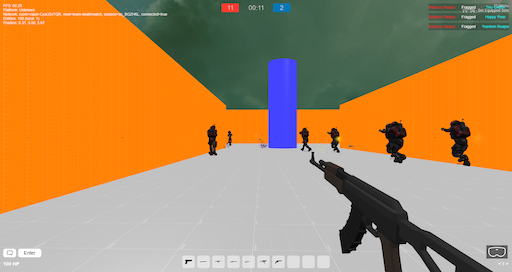
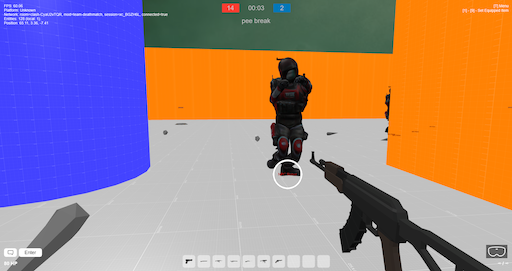
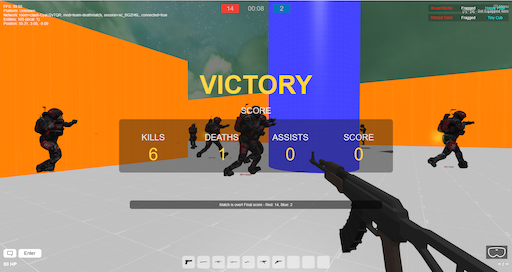
Team Deathmatch www.vrampage.com now runs team-deathmatch, it has 3 states (PRE, ACTIVE, POST).
I started with creating a simple diagram using UMLet extension for Visual Studio Code ( UMLet - Visual Studio Marketplace )

(And yes, I have been too lazy to update the diagram after adding more logic to the state machine)
The state machine running on the server-side also communicates to the client, which for example controls the various UI that will be shown for the PRE, ACTIVE and POST states:
Event-driven Entity Component System
So the initial implementation of the entity component system, had no performance optimization in mind, it was made quick and dirty, just how stuff usually tends to be when you start a new project.
Now it is event-driven, and other systems can now subscribe to entity component system, and listen for various events, such as:
onEntityAcquire(dto: EntityDTO, isClientOnly: boolean): void;
onEntityRelease(dto: EntityDTO, isClientOnly: boolean): void;
onEntityLocalUpdate(dto: EntityDTO, isClientOnly: boolean): void;
onEntityRemoteUpdate(dto: EntityDTO, isClientOnly: boolean): void;
onEntityComponentRelease(
entityId: string,

dto: EntityComponentDTO,

isClientOnly: boolean,
): void;
onEntityComponentAcquire(
entityId: string,

dto: EntityComponentDTO,

isClientOnly: boolean,
): void;
onEntityComponentLocalUpdate(
entityId: string,

dto: EntityComponentDTO,

isClientOnly: boolean,
): void;
onEntityComponentRemoteUpdate(
entityId: string,

dto: EntityComponentDTO,

isClientOnly: boolean,
): void;
For example the transform-system subscribes to the transform component and updates the transform node accordingly.
Editor
The editor functionality is still limited, and I still do a fair share of scene editing in JSON.
But now it is possible to use various editor tools, which are available if you enter the construct scene from the main menu (Press T).
The tools are:
Physics Tool (Select/Drag with left mouse, Change gizmo (position, rotation, scale) with right mouse)

Clone Tool (Left mouse to add clone, Right mouse to select entity to clone, R to randomize)

Remove Tool (Left mouse to remove entity, Right mouse to undo)

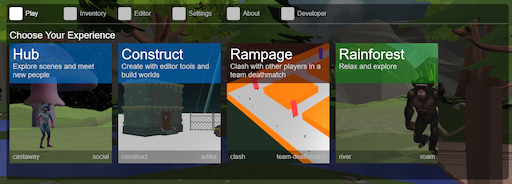
Play Tab
The first tab in the main menu (T) now shows the available experiences which you can choose to try out
Scoreboard
Scoreboard has been added to [TAB] and is currently primarily used for the team deathmatch.

Kill feed shows the latest kills in team deathmatch
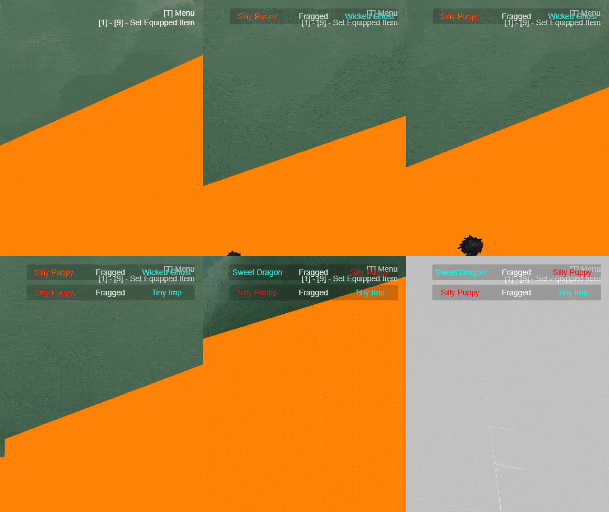
Loading
When systems are in loading state or assets are being loaded, there is no longer a full loading screen, instead there is a spinner in the center of the screen.

2 Likes
I have been working on a new scene called Compact.
It is small and made for fast-paced team deathmatch.


I made it possible to define the amount of pellets a weapon should fire, for example the shotgun fires 12 pellets.

A whole separation of which entities to sync has now been implemented. That means static entites are not included in the state from 180.248 KB to 13.45 KB (92.5% reduction). Future goal will be excluding components which change infrequently.
Mod can now be defined as query parameter in the url, which makes it possible to start vrampage with editor mod, for example: https://vrampage.com?mod=editor
I am having an issue with Recast, where I can’t get it to work with the right parameters.
Currently these are my parameters:
{
cs: 1,

ch: 1,

walkableSlopeAngle: 90,

walkableHeight: 1,

walkableClimb: 1,

walkableRadius: 1,

maxEdgeLen: 12,

maxSimplificationError: 1.3,

minRegionArea: 8,

mergeRegionArea: 20,

maxVertsPerPoly: 6,

detailSampleDist: 6,

detailSampleMaxError: 1,

borderSize: 1,
};
and I get this result, where the navigation mesh hovers over the ground:


If I instead use the parameters from Babylonjs documentation:
{
cs: 0.2,
ch: 0.2,
walkableSlopeAngle: 35,
walkableHeight: 1,
walkableClimb: 1,
walkableRadius: 1,
maxEdgeLen: 12,
maxSimplificationError: 1.3,
minRegionArea: 8,
mergeRegionArea: 20,
maxVertsPerPoly: 6,
detailSampleDist: 6,
detailSampleMaxError: 1,
};
I get much better result, but now my agents can’t use the navigation mesh and ends up stuck at 0,0,0


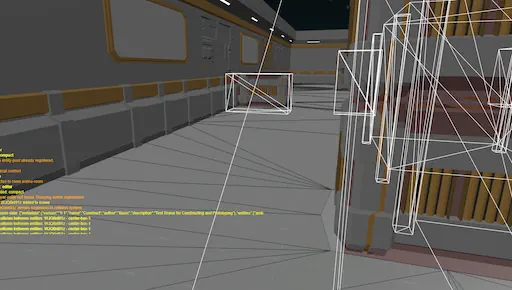
4 Likes
You are killing it dude!
1 Like
Epic!!
I believe it’s expected for the navmesh to hover above the ground. Though it’s strange how the agents are stuck at 0,0,0 for the second configuration.. I see that the walkableSlopeAngle is lower for the second configuration, though I wouldn’t expect that to have such a drastic effect
If you could share an image of the agents stuck at 0,0,0 with the navmesh debug drawing, that could give hints about the issue
Yep I also believe that to be the case, it’s just way too much with my current parameters, and the agents float too high above the ground.
Here you can see they get stuck:

Code:
const pos = this.navigationPlugin.getClosestPoint(context.newTargetPosition);
Logger.debug(
tag,

\`Agent ${context.index} (${context.entity.entityId}) moving to new position ${pos} (requested: ${context.newTargetPosition})\`,
);
this.crowd.agentGoto(
context.index,

pos,
);
Current working parameters, but with too much hovering:
[8:21:59:007] (navigation-mesh-builder) Navigation mesh built successfully with 47 meshes logger.ts:39:17
[8:22:0:306] (navigation-ground-system) Agent 4 (bot-bot-5-npc-0.es9krunw2e4) moving to new position {X: -13 Y: 1 Z: -22} (requested: {X: -13 Y: 3 Z: -22}) logger.ts:39:17
[8:22:0:533] (navigation-ground-system) Agent 2 (bot-bot-3-npc-0.qqb2eo2v4sq) moving to new position {X: -13 Y: 1 Z: -22} (requested: {X: -13 Y: 3 Z: -22}) logger.ts:39:17
[8:22:1:169] (navigation-ground-system) Agent 2 (bot-bot-3-npc-0.qqb2eo2v4sq) moving to new position {X: -13.711043357849121 Y: 1 Z: -23.56527328491211} (requested: {X: -13.71104314308213 Y: 3.014062552452087 Z: -23.56527355949351}) logger.ts:39:17
[8:22:1:337] (navigation-ground-system) Agent 2 (bot-bot-3-npc-0.qqb2eo2v4sq) moving to new position {X: -16.809349060058594 Y: 1 Z: -25.00363540649414} (requested: {X: -16.809348129075595 Y: 3.0149414423108096 Z: -25.003636274000442}) logger.ts:39:17
[8:22:1:532] (navigation-ground-system) Agent 1 (bot-bot-2-npc-0.afv2usxefh) moving to new position {X: -13 Y: 1 Z: 22} (requested: {X: -13 Y: 3 Z: 22}) logger.ts:39:17
[8:22:1:740] (navigation-ground-system) Agent 2 (bot-bot-3-npc-0.qqb2eo2v4sq) moving to new position {X: -22.697105407714844 Y: 1 Z: -20.881555557250977} (requested: {X: -22.798763821189006 Y: 3.0149999982129607 Z: -19.76331559668801})
Ideal parameters that does not work:
[8:21:0:283] (navigation-mesh-builder) Navigation mesh built successfully with 47 meshes
[8:21:1:143] (navigation-ground-system) Agent 4 (bot-bot-5-npc-0.qzkuhu7bxd) moving to new position {X: 0 Y: 0 Z: 0} (requested: {X: 4.684074932927061 Y: 3.0149999999999997 Z: -31.23396888193514}) logger.ts:39:17
[8:21:1:346] (navigation-ground-system) Agent 2 (bot-bot-3-npc-0.ngkxfntv81) moving to new position {X: 0 Y: 0 Z: 0} (requested: {X: 4.6749876665207335 Y: 3.0149999999999997 Z: -31.23410552797595}) logger.ts:39:17
[8:21:1:951] (navigation-ground-system) Agent 0 (bot-bot-1-npc-0.rb3hacg9eod) moving to new position {X: 0 Y: 0 Z: 0} (requested: {X: 4.6749520301818865 Y: 3.0149999999999997 Z: -31.234106063842773}) logger.ts:39:17
[8:21:2:572] (navigation-ground-system) Agent 3 (bot-bot-4-npc-0.7ixg9m4dp0t) moving to new position {X: -0.0002593994140625 Y: 0.20000028610229492 Z: 0.0003814697265625} (requested: {X: -0.0002593994140625 Y: 0.20004301070730435 Z: 0.0003814697265625}) logger.ts:39:17
[8:21:2:778] (navigation-ground-system) Agent 2 (bot-bot-3-npc-0.ngkxfntv81) moving to new position {X: 0 Y: 0 Z: 0} (requested: {X: 5.380539597396804 Y: 3.0149999999999997 Z: -31.21123640756205}) logger.ts:39:17
[8:21:2:983] (navigation-ground-system) Agent 4 (bot-bot-5-npc-0.qzkuhu7bxd) moving to new position {X: 0 Y: 0 Z: 0} (requested: {X: 8.427067311837057 Y: 3.0149999999999997 Z: -28.748845314018894}) logger.ts:39:17
[8:21:3:179] (navigation-ground-system) Agent 2 (bot-bot-3-npc-0.ngkxfntv81) moving to new position {X: 0 Y: 0 Z: 0} (requested: {X: 9.252386356929343 Y: 3.0149999999999997 Z: -28.596998313591367}) logger.ts:39:17
[8:21:3:401] (navigation-ground-system) Agent 0 (bot-bot-1-npc-0.rb3hacg9eod) moving to new position {X: 0 Y: 0 Z: 0} (requested: {X: 9.253120332755685 Y: 3.0149999999999997 Z: -28.59690285894364}) logger.ts:39:17
[8:21:3:591] (navigation-ground-system) Agent 4 (bot-bot-5-npc-0.qzkuhu7bxd) moving to new position {X: 0 Y: 0 Z: 0} (requested: {X: 9.256124608521889 Y: 3.0149999999999997 Z: -28.596902903576442}) logger.ts:39:17
[8:21:5:207] (navigation-ground-system) Agent 1 (bot-bot-2-npc-0.j0bjrp55bc) moving to new position {X: 0 Y: 0.20000028610229492 Z: 0} (requested: {X: -3.2359679444877937e-59 Y: 0.20000028610229492 Z: 5.476253444517805e-59})
I’m having a bit of trouble understanding what’s happening in the image  Are the white boxes physics colliders? I also don’t seem to see a navmesh debug drawing
Yep, the white boxes are physics colliders.
The navigation mesh is dark gray on the ground with black lines. It’s close to the ground, and the result looks good.
But the thing is when I use the parameters with cs and ch to 0.2 instead of 1.0, every time I use navigationPlugin.getClosestPoint it will return 0,0,0 as shown in the logging.
Just to make sure, reposting this: Digesting Duck: Recast Settings Uncovered Important to distinguish voxel units vs world units.
As for 0,0,0: Could this be a “query-failed” result?
1 Like
Thanks for sharing @Joe_Kerr, that is very good information. I am also confident it is because of a failed query.
Right now I don’t have precisely matching sizes between my UniversalCamera, Agent Parameters and models + colliders. (For example the “eyes” of the camera does not match the “eyes” on the models.)
I think I will have to look into ensuring all those have proper setups, and then take a look on the navigation mesh generation afterwards.

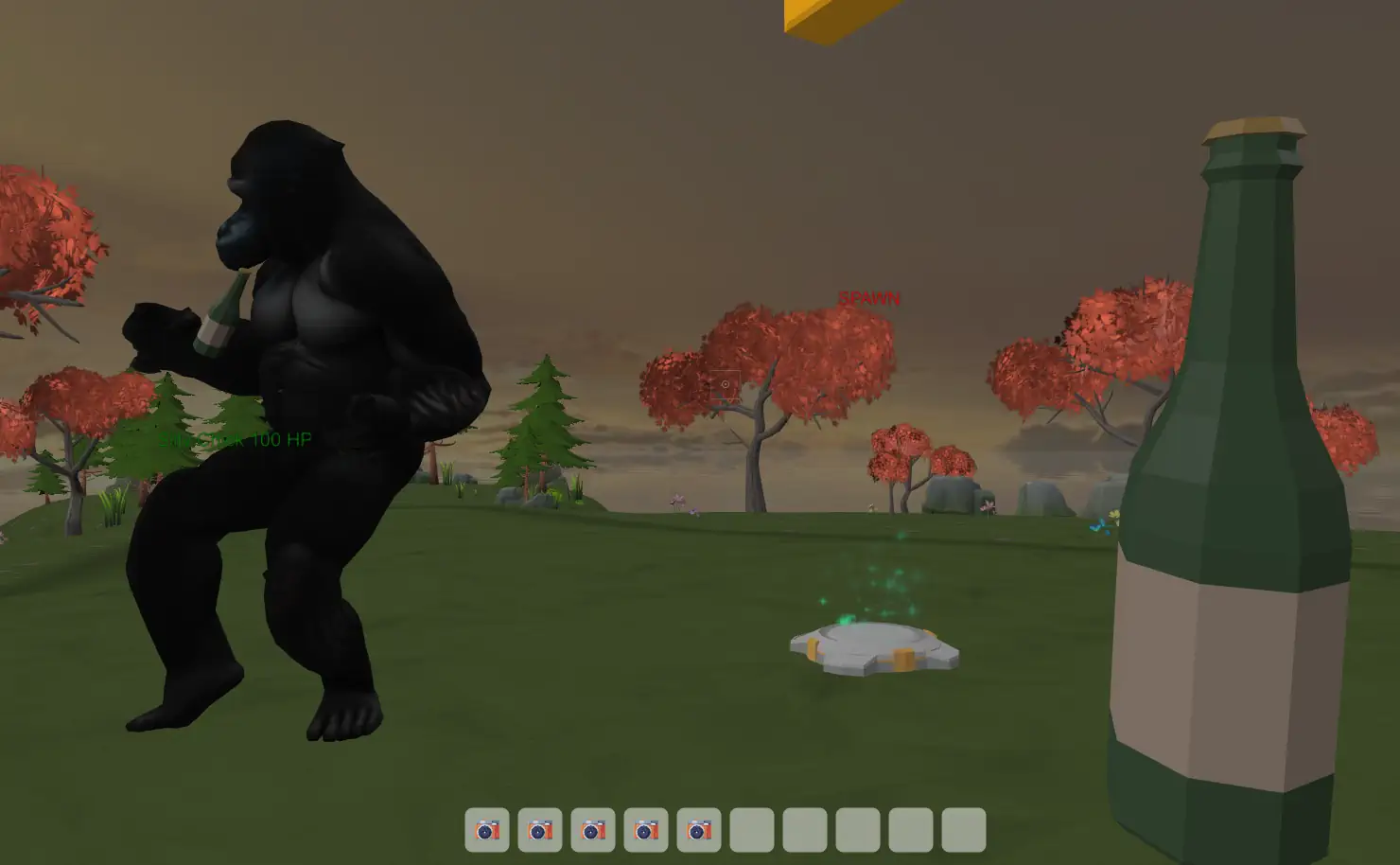
All work and no play makes jack a dull boy, so of course instead of fixing my navigation issues, I worked on functionality for showing the equipped item of the player/npc.
Currently it’s only for the items that is being hold in the hands, but the same functionality will be extended to include other types of items that would be related to head, chest, legs, feet slots.
Can be tried out at vreboot.com
Cheers!
1 Like
With help from the article @Joe_Kerr provided I have tweaked my navigation parameters to:
agentParameters = {
  radius: 0.4,

  height: 2,

  maxAcceleration: 4.0,

  maxSpeed: 5.0,

  collisionQueryRange: 1,

  pathOptimizationRange: 0,

  separationWeight: 1.0,
};
parameters = {
  cs: 0.2,

  ch: 0.1,

  walkableSlopeAngle: 45,

  walkableHeight: 1,

  walkableClimb: 1,

  walkableRadius: 2,

  maxEdgeLen: 16,

  maxSimplificationError: 1.3,

  minRegionArea: 8,

  mergeRegionArea: 20,

  maxVertsPerPoly: 6,

  detailSampleDist: 6,

  detailSampleMaxError: 1,

  borderSize: 1,
};
The navigation mesh is now much better and my agents now walk “slightly” better, but I suspect the current issues is now because of the way I have implemented physics for my agents.

So I started working on my physics implementation, and started out with implementing the Physics character controller https://doc.babylonjs.com/features/featuresDeepDive/physics/characterController/
It feels so good being able to jump and having proper physics compared to the UniversalCamera, I love the examples provided by Babylonjs!


Next task on the physics todo list will be to optimize physics for agents and projectiles using PhysicsImposter and grouping/masks.
7 Likes
I felt like sharing the progress of the project, even through the latest changes are not published to stage or production yet for public testing.
But I feel like I am closing in on reaching one of the major milestones I had in mind for the engine, and that is scriptable mods/gamemodes.
I want the engine to be able to support a variety of game genres, such as battle royale, rpg, deathmatch, pve.
I started out with XState, which is a state management and orchestration solution for JavaScript and TypeScript apps. But I felt it was getting too hardcoded and hard to reuse code between gamemodes, and most important of all, it wouldn’t make it possible for users to make their own gamemodes.
So I started to look into LUA implementation, and I found https://github.com/fengari-lua/fengari
After 2 weeks doing tinkering in late evenings due to being busy doing consultant work, the power of micro-actions has rewarded me with a lua system, where I can register APIs, such as EntityApi that opens up for ECS functionality. A hook system, where I can hook up to etc UserConnect and Tick. And loading lua mods with dependencies to other mods.
It is still under development, and currently I am battle testing it with implementing my Horde Mod (Basically a PVE coop invasion game) and migrating all functionality I had in my XState Horde Machine to LUA.
So far I havn’t tested the performance, but I am sure it is more expensive to run than XState, but that is the tradeoff I am willing to trade for running LUA code.
I also noticed there’s a bigger chance of it breaking the server if I screw up with the various lua functions, such as set, push and pop. (It’s running entirely on the server)
But here is the current LUA code for the Horde Mod, running without any problems.
I would say I am 60-70% on migrating all the functionality from the XState implementation to LUA.
I am VERY happy with the result, and it is already MUCH more FUN to create gamemodes with the engine now 
print("[Horde] Mod is now loading...")

Horde = {
    waveState = "pre",
    waveNumber = 0,
    enemiesToSpawn = 0,
    enemiesAlive = 0,
    enemiesKilled = 0,

    wavePreTimerLimit = 1000,   -- 10 seconds
    wavePostTimerLimit = 1000,  -- 10 seconds
    wavePreTimer = 0,
    wavePostTimer = 0,

    minParticipants = 4,
    invaderBotId = "invader-bot",
    matchEntityId = "match",
    killLog = {},

    friendlySpawnPositions = {},
    enemySpawnPositions = {},
    users = {}
}

function Horde:init()
  self:initSpawnPositions()

  self:gotoPreWave()
end

function Horde:initSpawnPositions()
    -- spawn_point, transform, factions
    local entities = api.entity.getEntitiesWithComponents({ "spawn_point", "transform", "factions" })

    for _, entity in pairs(entities) do
        local transformComp = api.entity.getComponent(entity.id, "transform")
        local factionsComp = api.entity.getComponent(entity.id, "factions")

        for _, faction in pairs(factionsComp.factions) do
            if faction == "blue" then
                table.insert(self.friendlySpawnPositions, transformComp.position)
            elseif faction == "red" then
                table.insert(self.enemySpawnPositions, transformComp.position)
            end
        end
    end

    -- Print spawn positions
    print("Friendly Spawn Positions:")
    for _, pos in pairs(self.friendlySpawnPositions) do
        print("  x: " .. pos.x .. ", y: " .. pos.y .. ", z: " .. pos.z)
    end
    print("Enemy Spawn Positions:")
    for _, pos in pairs(self.enemySpawnPositions) do
        print("  x: " .. pos.x .. ", y: " .. pos.y .. ", z: " .. pos.z)
    end
end

function Horde:gotoPreWave()
  print("Going to pre-wave state...")
    self.waveState = "pre"
    self.wavePreTimer = 0
    api.core.toast("Wave " .. (self.waveNumber + 1) .. " starting soon!")
end

function Horde:gotoActiveWave()
  print("Starting active wave " .. (self.waveNumber + 1))
    self.waveState = "active"
    self.waveNumber = self.waveNumber + 1
    self.enemiesToSpawn = self.waveNumber * 5
    self.enemiesAlive = self.enemiesToSpawn
    self.enemiesKilled = 0

    for _, userId in ipairs(self.users) do
        self:spawnUser(userId)
    end

    api.core.toast("Wave " .. self.waveNumber .. " has begun!")

    -- Spawn enemies
    for i = 1, self.enemiesToSpawn do
        self:spawnInvader()
    end
end

function Horde:gotoPostWave()
    self.waveState = "post"
    self.wavePostTimer = 0
    api.core.toast("Wave " .. self.waveNumber .. " completed!")
end

function Horde:spawnUser(id)
    local spawnPosition = self.friendlySpawnPositions[math.random(#self.friendlySpawnPositions)]
    api.entity.teleport(id, spawnPosition)

    self:setFullHealth(id)

    -- FX
        api.entity.createEntity(
             {
                id = "player-spawn-fx",
                prefab = "player-spawn-fx",
                tag = "",
                revision = 0,
                components = {
                    transform = {
                        type = "transform",
                        position = spawnPosition,
                        rotation = { x = 0, y = 0, z = 0 },
                        scale = { x = 1, y = 1, z = 1 }
                    }
                }
            },
            nil
        )
end

function Horde:assignLoadout(entityId)
    local inventoryComponent = ItemHelper.createInventory()
    api.entity.updateComponent(entityId, inventoryComponent)
end

function Horde:spawnInvader()
    local spawnPosition = self.enemySpawnPositions[math.random(#self.enemySpawnPositions)]

    api.entity.createEntity(
         {
            id = "npc",
            prefab = "npc-hostile",
            tag = "",
            revision = 0,
            components = {
                transform = {
                    type = "transform",
                    position = { x = spawnPosition.x, y = spawnPosition.y, z = spawnPosition.z },
                    rotation = { x = 0, y = 0, z = 0 },
                    scale = { x = 1, y = 1, z = 1 }
                },
                owner = {
                    type = "owner",
                    id = self.invaderBotId
                },
                factions = {
                    type = "factions",
                    factions = { "red" }
                }
            }
        },
        self.invaderBotId
    )
end

function Horde:setFullHealth(entityId)
    local healthComponent = api.entity.getComponent(entityId, "health")

    if healthComponent ~= nil then
        healthComponent.health = 100
        api.entity.updateComponent(entityId, healthComponent)
    end
end

function Horde:onEntityHit(attackerId, victimId, damage, damageEntityId)
    local result = EntityHitEventHelper.handleEntityHit(attackerId, victimId, damage, damageEntityId)

    if not result.success then
        return
    end

    api.entity.removeEntity(damageEntityId)

    -- Spawn Impact FX
    api.entity.createEntity(
         {
            id = "impact_fx",
            prefab = "impact_fx",
            tag = "",
            revision = 0,
            components = {
                transform = {
                    type = "transform",
                    position = result.hitPosition,
                    rotation = { x = 0, y = 0, z = 0 },
                    scale = { x = 1, y = 1, z = 1 }
                }
            }
        },
        nil
    )

    if result.shouldVictimDie then
        -- Spawn Death FX
        api.entity.createEntity(
             {
                id = "player_die_fx",
                prefab = "player_die_fx",
                tag = "",
                revision = 0,
                components = {
                    transform = {
                        type = "transform",
                        position = result.hitPosition,
                        rotation = { x = 0, y = 0, z = 0 },
                        scale = { x = 1, y = 1, z = 1 }
                    }
                }
            },
            nil
        )

        self:onEntityDie(victimId, attackerId)
    end
end

function Horde:onEntityDie(victimId, attackerId)
  print("Entity died:", victimId, "killed by:", attackerId)

    local result = EntityDieEventHelper.handleEntityDie(attackerId, victimId, nil)

    if not result.success then
        return
    end

    if result.incrementScoreForFactionId then
        if result.incrementScoreForFactionId == "blue" then
            self.enemiesKilled = self.enemiesKilled + 1
            self.enemiesAlive = self.enemiesAlive - 1

            if self.enemiesKilled >= self.enemiesToSpawn and self.waveState == "active" then
                self:gotoPostWave()
            end
        end
    end

    if result.incrementKillsForId then
        StatsHelper.incrementStatForId(result.incrementKillsForId, "kills")
    end

    if result.incrementDeathsForId then
        StatsHelper.incrementStatForId(result.incrementDeathsForId, "deaths")
    end


    if result.entityToRemoveId then
        api.entity.removeEntity(result.entityToRemoveId)
    end

    if result.victimType == "user" then
        self:spawnUser(victimId)
    end

    -- self.enemiesKilled = self.enemiesKilled + 1
    -- self.enemiesAlive = self.enemiesAlive - 1

    -- if self.enemiesKilled >= self.enemiesToSpawn and self.waveState == "active" then
    --     self:gotoPostWave()
    -- end
end

function Horde:tick(dt)
  if self.waveState == "pre" then
        self.wavePreTimer = self.wavePreTimer + dt
        if self.wavePreTimer >= self.wavePreTimerLimit then
            self:gotoActiveWave()
        end
    elseif self.waveState == "post" then
        self.wavePostTimer = self.wavePostTimer + dt
        if self.wavePostTimer >= self.wavePostTimerLimit then
            self:gotoPreWave()
        end
    end

end

function Horde:onUserConnect(id)
  print("User joined:", id)

   table.insert(self.users, id)

  api.core.toast("Welcome " .. id .. " to Virtual Redneck!")

  local entity = api.entity.getEntity(id)

    local models = {
        "sealdragon/ai/characters/daisy-mae.glb",
        "sealdragon/ai/characters/ellie-mae.glb",
        "sealdragon/ai/characters/billy-bob.glb",
        "sealdragon/ai/characters/cletus.glb"
    }

    local randomModel = models[math.random(#models)]

    -- Find "mesh_rendering" component
    local meshRendering = api.entity.getComponent(id, "mesh_rendering")
    if (meshRendering ~= nil) then
       -- get meshes[0].type
        local meshType = meshRendering.meshes[1].type
        -- Check if meshType is "model"
        if meshType == "model" then
            meshRendering.meshes[1].modelPath = randomModel
            api.entity.updateComponent(entity.id, meshRendering)
        end
    end

    -- Find "factions" component
    local factionsComp = api.entity.getComponent(id, "factions")
    if (factionsComp ~= nil) then
        factionsComp.factions = { "blue" }
        api.entity.updateComponent(entity.id, factionsComp)
    end

    self:assignLoadout(id)

    self:spawnUser(id)
end

function Horde:onUserDisconnect(id)
  print("User left:", id)

    -- Remove user from users table
     for i, userId in ipairs(users) do
         if userId == id then
             table.remove(users, i)
             break
         end
     end

  api.core.toast("Goodbye " .. id .. "!")
end

-- EntityHitEventHelper

EntityHitEventHelper = {}

function EntityHitEventHelper.handleEntityHit(attackerId, victimId, damage, damageEntityId)
    -- Validate that attacker

    local attacker = api.entity.getEntity(attackerId)
    local attackerType = api.entity.getType(attackerId)
    local attackerOwnerId = nil

    if attacker == nil or attackerType == nil then
        return { success = false }
    end

    -- Check if entity belongs to a bot
    if attackerType == "dynamic" then
        local ownerComponent = api.entity.getComponent(attackerId, "owner")
        if ownerComponent ~= nil then
            local bot = api.entity.getEntity(ownerComponent.id)
            if bot ~= nil then
                attackerType = "bot"
                attackerOwnerId = ownerComponent.id
            end
        end
    end

    local victim = api.entity.getEntity(victimId)
    local victimType = api.entity.getType(victimId)
    local victimOwnerId = nil

    if victim == nil or victimType == nil then
        return { success = false }
    end

    -- Check if entity belongs to a bot
    if victimType == "dynamic" then
        local ownerComponent = api.entity.getComponent(victimId, "owner")
        if ownerComponent ~= nil then
            local bot = api.entity.getEntity(ownerComponent.id)
            if bot ~= nil then
                victimType = "bot"
                victimOwnerId = ownerComponent.id
            end
        end
    end

    -- Prevent self-harm
    if attackerId == victimId then
        return { success = false }
    end

    -- Prevent friendly fire
    local attackerFactionsComponent = api.entity.getComponent(attackerId, "factions")
    local victimFactionsComponent = api.entity.getComponent(victimId, "factions")
    if attackerFactionsComponent ~= nil and victimFactionsComponent ~= nil then
        for _, attackerFaction in ipairs(attackerFactionsComponent.factions) do
            for _, victimFaction in ipairs(victimFactionsComponent.factions) do
                if attackerFaction == victimFaction then
                    return { success = false }
                end
            end
        end
    end

    -- Take damage
    local shouldVictimDie = EntityHitEventHelper.applyDamageToEntity(victimId, damage)

    -- Get hit position
    local damageEntity = api.entity.getEntity(damageEntityId)
    local transformComponent = api.entity.getComponent(damageEntityId, "transform")
    local hitPosition = { x = 0, y = 0, z = 0 }
    if transformComponent ~= nil then
        hitPosition = transformComponent.position
    end

    return {
        success = true,
        shouldVictimDie = shouldVictimDie,
        hitPosition = hitPosition
    }
end

function EntityHitEventHelper.applyDamageToEntity(entityId, damage)
    local healthComponent = api.entity.getComponent(entityId, "health")
    if healthComponent == nil then
        return false
    end

    healthComponent.health = healthComponent.health - damage
    if healthComponent.health <= 0 then
        healthComponent.health = 0
        api.entity.updateComponent(entityId, healthComponent)
        return true
    else
        api.entity.updateComponent(entityId, healthComponent)
        return false
    end
end

-- EntityDieEventHelper

EntityDieEventHelper = {}

function EntityDieEventHelper.handleEntityDie(killerId, victimId, weaponId)
    local victim = api.entity.getEntity(victimId)
    local victimType = api.entity.getType(victimId)
    local victimOwnerId = nil

    if victim == nil or victimType == nil then
        return { success = false }
    end

    -- Check if entity belongs to a bot
    if victimType == "dynamic" then
        local ownerComponent = api.entity.getComponent(victimId, "owner")
        if ownerComponent ~= nil then
            local bot = api.entity.getEntity(ownerComponent.id)
            if bot ~= nil then
                victimType = "bot"
                victimOwnerId = ownerComponent.id
            end
        end
    end

    local killer = api.entity.getEntity(killerId)
    local killerType = api.entity.getType(killerId)
    local killerOwnerId = nil

    -- Check if entity belongs to a bot
    if killerType == "dynamic" then
        local ownerComponent = api.entity.getComponent(killerId, "owner")
        if ownerComponent ~= nil then
            local bot = api.entity.getEntity(ownerComponent.id)
            if bot ~= nil then
                killerType = "bot"
                killerOwnerId = ownerComponent.id
            end
        end
    end

    local entityToRemoveId = nil
    local incrementKillsForId = nil
    local incrementScoreForFactionId = nil
    local incrementDeathsForId = nil

    -- Get first faction from killer
    local killerFactionsComponent = api.entity.getComponent(killerId, "factions")
    if killerFactionsComponent ~= nil and #killerFactionsComponent.factions > 0 then
        incrementScoreForFactionId = killerFactionsComponent.factions[1]
    end

    -- Only remove entity if victim is Dynamic or Bot
    if victimType == "dynamic" or victimType == "bot" then
        entityToRemoveId = victimId
    end

    -- Increment kills for the user who owns/controls the killer
    if killerType == "user" then
        incrementKillsForId = killerId
    elseif killerType == "bot" then
        incrementKillsForId = killerOwnerId
    end

    -- Increment deaths for the user who owns/controls the victim
    if victimType == "user" then
        incrementDeathsForId = victimId
    elseif victimType == "bot" then
        incrementDeathsForId = victimOwnerId
    end

    return {
        success = true,
        entityToRemoveId = entityToRemoveId,
        incrementKillsForId = incrementKillsForId,
        incrementDeathsForId = incrementDeathsForId,
        incrementScoreForFactionId = incrementScoreForFactionId,
        killerType = killerType,
        killerOwnerId = killerOwnerId,
        victimType = victimType,
        victimOwnerId = victimOwnerId
    }
end

-- ItemHelper

ItemHelper = {}

function ItemHelper.createInventory()
    local inventory = {
        type = "inventory",
        revision = 0,
        items = {}
    }

    table.insert(inventory.items, ItemHelper.createPistolItem())
    table.insert(inventory.items, ItemHelper.createShotgunItem())
    table.insert(inventory.items, ItemHelper.createSubmachineGunItem())
    table.insert(inventory.items, ItemHelper.createSniperItem())

    return inventory
end

function ItemHelper.createPistolItem()
    local item = {
        properties = {
        id = "pistol",  -- Should this be set to a unique ID when the item is created
        name = "Pistol",
        type = "weapon",
        rarity = ItemHelper.randomRarity(),
        isEquipped = false,
        damage = 40,
        attackSpeed = 0.633,
        reloadTime = 0.8,
        zoomLevel = 1,
        spread = 0.01,
        maxAmmoCapacity = 12,
        projectileBehavior = "projectile",
        projectilePrefab = "projectile",
        muzzlePosition = { x = -1.2, y = 0.25, z = 0.1 },
        muzzleRotation = { x = 0, y = -1.5, z = 0 },
        recoil = {
            horizontalRecoil = 0,
            verticalRecoil = 0,
            recoverySpeed = 0
        },
        sound = {
            fireSound = "weapon/sci-fi-pistol/shoot-0.wav",
            reloadSound = "assets/sounds/sci-fi-pistol/reload-0.wav",
            emptySound = "assets/sounds/weapons/pistol-empty.mp3"
        },
        visual = {
            muzzleFlash = "assets/sprites/effects/muzzle-flash.webp",
            trailEffect = "assets/sprites/effects/bullet-trail.webp",
            impactEffect = "assets/sprites/effects/bullet-impact"
        },
        weaponType = "ranged",
        isStackable = false,
        sprite = "assets/sprites/items/pistol-1.webp",
        firstPersonPrefab = "first-person/sci-fi-pistol",
        thirdPersonPrefab = "third-person/sci-fi-pistol"
    },
        stackQuantity = 1
    }

    return item
end

function ItemHelper.createSubmachineGunItem()
    local item = {
        properties = {
        id = "submachine-gun",  -- Should this be set to a unique ID when the item is created
        name = "Submachine Gun",
        type = "weapon",
        rarity = ItemHelper.randomRarity(),
        isEquipped = false,
        damage = 28,
        attackSpeed = 0.4,
        reloadTime = 1.5,
        zoomLevel = 1,
        spread = 0.03,
        maxAmmoCapacity = 30,
        projectileBehavior = "projectile",
        projectilePrefab = "projectile",
        muzzlePosition = { x = -1.2, y = 0.3, z = 0.1 },
        muzzleRotation = { x = 0, y = -1.5, z = 0 },
        recoil = {
            horizontalRecoil = 0,
            verticalRecoil = 0,
            recoverySpeed = 0
        },
        sound = {
            fireSound = "weapon/sci-fi-smg/shoot-0.wav",
            reloadSound = "assets/sounds/sci-fi-smg/reload-0.wav",
            emptySound = "assets/sounds/weapons/pistol-empty.mp3"
        },
        visual = {
            muzzleFlash = "assets/sprites/effects/muzzle-flash.webp",
            trailEffect = "assets/sprites/effects/bullet-trail.webp",
            impactEffect = "assets/sprites/effects/bullet-impact"
        },
        weaponType = "ranged",
        isStackable = false,
        sprite = "assets/sprites/items/submachine-gun.webp",
        firstPersonPrefab = "first-person/sci-fi-submachine-gun",
        thirdPersonPrefab = "third-person/sci-fi-submachine-gun"
    },
        stackQuantity = 1
    }

    return item
end

function ItemHelper.createSniperItem()
    local item = {
        properties = {
        id = "sniper-rifle",  -- Should this be set to a unique ID when the item is created
        name = "Sniper Rifle",
        type = "weapon",
        rarity = ItemHelper.randomRarity(),
        isEquipped = false,
        damage = 140,
        attackSpeed = 2.5,
        reloadTime = 2.5,
        zoomLevel = 1,
        spread = 0.005,
        maxAmmoCapacity = 8,
        projectileBehavior = "projectile",
        projectilePrefab = "projectile",
        muzzlePosition = { x = -4.1, y = 0.24, z = 0.3 },
        muzzleRotation = { x = 0, y = -1.5, z = 0 },
        recoil = {
            horizontalRecoil = 0,
            verticalRecoil = 0,
            recoverySpeed = 0
        },
        sound = {
            fireSound = "weapon/sci-fi-sniper/shoot-0.wav",
            reloadSound = "assets/sounds/sci-fi-sniper/reload-0.wav",
            emptySound = "assets/sounds/weapons/pistol-empty.mp3"
        },
        visual = {
            muzzleFlash = "assets/sprites/effects/muzzle-flash.webp",
            trailEffect = "assets/sprites/effects/bullet-trail.webp",
            impactEffect = "assets/sprites/effects/bullet-impact"
        },
        weaponType = "ranged",
        isStackable = false,
        sprite = "assets/sprites/items/sniper-rifle.webp",
        firstPersonPrefab = "first-person/sci-fi-sniper",
        thirdPersonPrefab = "third-person/sci-fi-sniper"
    },
        stackQuantity = 1
    }

    return item
end

function ItemHelper.createShotgunItem()
    local item = {
        properties = {
        id = "0",  -- Should this be set to a unique ID when the item is created
        name = "Shotgun",
        type = "weapon",
        rarity = ItemHelper.randomRarity(),
        isEquipped = false,
        damage = 13,
        pellets = 12,
        attackSpeed = 1.5,
        reloadTime = 2,
        zoomLevel = 1,
        spread = 0.1,
        maxAmmoCapacity = 6,
        projectileBehavior = "projectile",
        projectilePrefab = "projectile",
        muzzlePosition = { x = -1.8, y = 0.25, z = 0.2 },
        muzzleRotation = { x = 0, y = -1.5, z = 0 },
        recoil = {
            horizontalRecoil = 0,
            verticalRecoil = 0,
            recoverySpeed = 0
        },
        sound = {
            fireSound = "weapon/sci-fi-shotgun/shoot-0.wav",
            reloadSound = "assets/sounds/sci-fi-shotgun/reload-0.wav",
            emptySound = "assets/sounds/weapons/pistol-empty.mp3"
        },
        visual = {
            muzzleFlash = "assets/sprites/effects/muzzle-flash.webp",
            trailEffect = "assets/sprites/effects/bullet-trail.webp",
            impactEffect = "assets/sprites/effects/bullet-impact"
        },
        weaponType = "ranged",
        isStackable = false,
        sprite = "assets/sprites/items/shotgun.webp",
        firstPersonPrefab = "first-person/sci-fi-shotgun",
        thirdPersonPrefab = "third-person/sci-fi-shotgun"
    },
        stackQuantity = 1
    }

    return item
end

function ItemHelper.randomRarity()
    local rarities = { "common", "uncommon", "rare", "epic", "legendary", "mythic", "unique" }
    return rarities[math.random(#rarities)]
end

-- StatsHelper

StatsHelper = {}


function StatsHelper.incrementStatForId(userId, statName)
    local statsComponent = api.entity.getComponent(userId, "stats")
    if statsComponent == nil then
        return
    end

    for _, stat in ipairs(statsComponent.stats) do
        if stat.id == statName then
            if stat.type == "number" then
                stat.value = stat.value + 1
                statsComponent.revision = statsComponent.revision + 1
                api.entity.updateComponent(userId, statsComponent)
                return
            end
        end
    end
end

-- Hooks

hook_add("Initialize", function() Horde:init() end)
hook_add("Tick", function(dt) Horde:tick(dt) end)
hook_add("UserConnect", function(id) Horde:onUserConnect(id) end)
hook_add("UserDisconnect", function(id) Horde:onUserDisconnect(id) end)
hook_add("EntityHit", function(attackerId, victimId, damage, damageEntityId) Horde:onEntityHit(attackerId, victimId, damage, damageEntityId) end)

print("[Horde] Mod fully loaded!")
.
Disclaimer: This is the first time i am making a web game, and the first time working with typescript and webpack, so I am learning and making adjustments along the way.
Now I knew that the bundle was growing in size, and I don’t really know what is considered small and large. All I know is that I was tired of installing games on my computer that is 100+ GB (Helldivers 2 I am looking at you).
My goal with my games is to have them as small possible while packing a lot of functionality, that way it will be a smooth and fast experience across devices, especially mobile devices.
So I tried out adding Brotli and Gzip compression
// npm install --save-dev compression-webpack-plugin

// webpack.prod.js
new CompressionPlugin({
      filename: '[path][base].gz',
      algorithm: 'gzip',
      test: /\.js$/,
      threshold: 10240,
    }),
    new CompressionPlugin({
      filename: '[path][base].br',
      algorithm: 'brotliCompress',
      test: /\.js$/,
      compressionOptions: { level: 11 },
      threshold: 10240,
    }),
The output results is:
8.607 KB bundle.js
1.870 KB bundle.js.gz (21.72% of original size)
1.355 KB bundle.js.br (15.74% of original size)
Incredible! 
(I have not yet tried the build in production, so I don’t know yet if it cause any issues)
Currently I am primarily using models from Quaternius,
where ~750 GLTF models is taking up 41.8MB.
I also want to ensure all audio files is OGG format (etc. right now I have one file with length 01:44 taking up 836 KB).
The same goes for sprites/textures, I will look into having them all in webp format and in some cases placed in spritesheets.
At last, it would also make sense to use gltfpack or gltf-transform for models, and then gzipping both OGG and GLTF files for further compression and size reduction.
Always good to have plans for the new year! For now I will continue focusing on LUA implementation 
1 Like
Such a cool update !!!
1 Like
Simple endless waves game mode (Horde) lua implementation is now live for testing at VIRTUAL REBOOT - Cross-Platform Virtual Reality and Interactive Experiences

It is now much faster to change the gameplay, for example I added info to the Rainforest mod

Displaying info with interval is as simple as:
Rainforest = {
infoInterval = 5000, – 5 seconds
infoTimer = 0,
info = {
“Tropical rainforests once covered 14% of Earth’s land but now cover only about 6%, with projections of complete loss by mid-century at current rates.”,
“In 2024, the world lost 6.7 million hectares of primary tropical rainforest—equivalent to 18 soccer fields per minute—largely driven by fires.”,
“Agriculture is the leading cause of rainforest deforestation, accounting for up to 80% of losses, followed by logging and infrastructure.”,
“Deforestation contributes to an estimated 137 plant, animal, and insect species going extinct daily in rainforests.”,
“Approximately 65-69% of the world’s primate species are currently threatened with extinction, according to recent IUCN assessments.”,
“Over 90% of primate species live in tropical rainforests, making habitat loss their primary threat.”,
“In Madagascar, a rainforest biodiversity hotspot, nearly 90% of primate species (mostly lemurs) face extinction.”,
“Hunting and the illegal wildlife trade exacerbate the crisis, affecting up to 26% of threatened primate species globally.”,
“Primates play key roles in rainforest ecosystems, such as seed dispersal, but their decline risks cascading biodiversity loss.”,
“Without urgent action, experts warn of a major primate extinction event this century, with 75-94% of species already in population decline.”
}
}function Rainforest:tick(dt)
self.infoTimer = self.infoTimer + dt
if self.infoTimer >= self.infoInterval then
self.infoTimer = 0
local randominfo = self.info[math.random(#self.info)]
api.core.toast(randominfo)
end
end
All mods are still in the prototype phase. It would make sense to focus on the team-deathmatch mod, since it’s logic is fairly simple.
I am working in a direction where eventually all gameplay will be data-driven. An idea I have in mind is to have a code editor available on the client, such as Monaco Editor, so clients can change the gameplay as they like, and build their own mods. (I need to decide what wording to go with etc. mod, game, project, experience et cetera)
Right now each mod has all their code in one lua file. The plan is to take advantage of dependencies and shared lua code, but also to be able to construct a mod using multiple lua files.
Overall I think the lua implementation seems to work pretty stable 
2 Likes