Hi, is there any update on the augmented reality demos in babylonjs? Are there any updates on its documentation as well?
I bet @RaananW has some updates 
The features are implemented, I just have to finalize the documentation and the demos. In the meantime you can check the XR features directory and see the three new modules - plane test, hit test, and anchors.
Hey guys,
I know I said that many times, but I have to say it one more time - the documentation is being written.
Having said that, I do have an interesting playground to share with you guys. Open it on your chrome canaray (or hope it works on latest stable chrome for mobile):
https://www.babylonjs-playground.com/#KVZI50#135
This has all 3 AR features - hit test, plane detection and anchors, in one single playground. Will be happy to answer any questions, documentation is coming very very very soon.
Hello @RaananW , I can test this exemple in my laptoop ( i have already google canary ) ?
Because i tried this and nothing showing .
Thanks for ur effort 
ar on the desktop doesn’t really work… you need an AR-able device. you can check it with the emulator, but it doesn’t support all features
Hi @RaananW,
I have tried an AR example https://www.babylonjs-playground.com/#1E9WL1#0 on my mobile and the demo works fine.
Then I connected my mobile to my laptop and using chrome://inspect/#devices, I tried to view logs of chrome browser from my mobile in my laptop, it shows a lot of errors

So, what is the reason behind these errors?
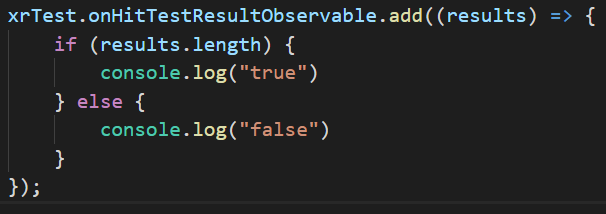
Actually, I want to identify the position where user has tapped on the plane detected in AR and then translate my object’s position to the tapped location, but the control doesn’t enter in the scope of xrTest.onHitTestResultObservable(add(results) => {}) which I assume is handling the hit test event. (Neither true is printed, nor false)
I have saved the playground project locally and hosted on heroku: webarexample.herokuapp.com for testing.
I can share my git repo as well if needed.
That’s because your desktop browser doesn’t support hit tests for obvious reasons 
The webxr emulator should support those features partly, but also not entirely. There is no escape from testing on your real device