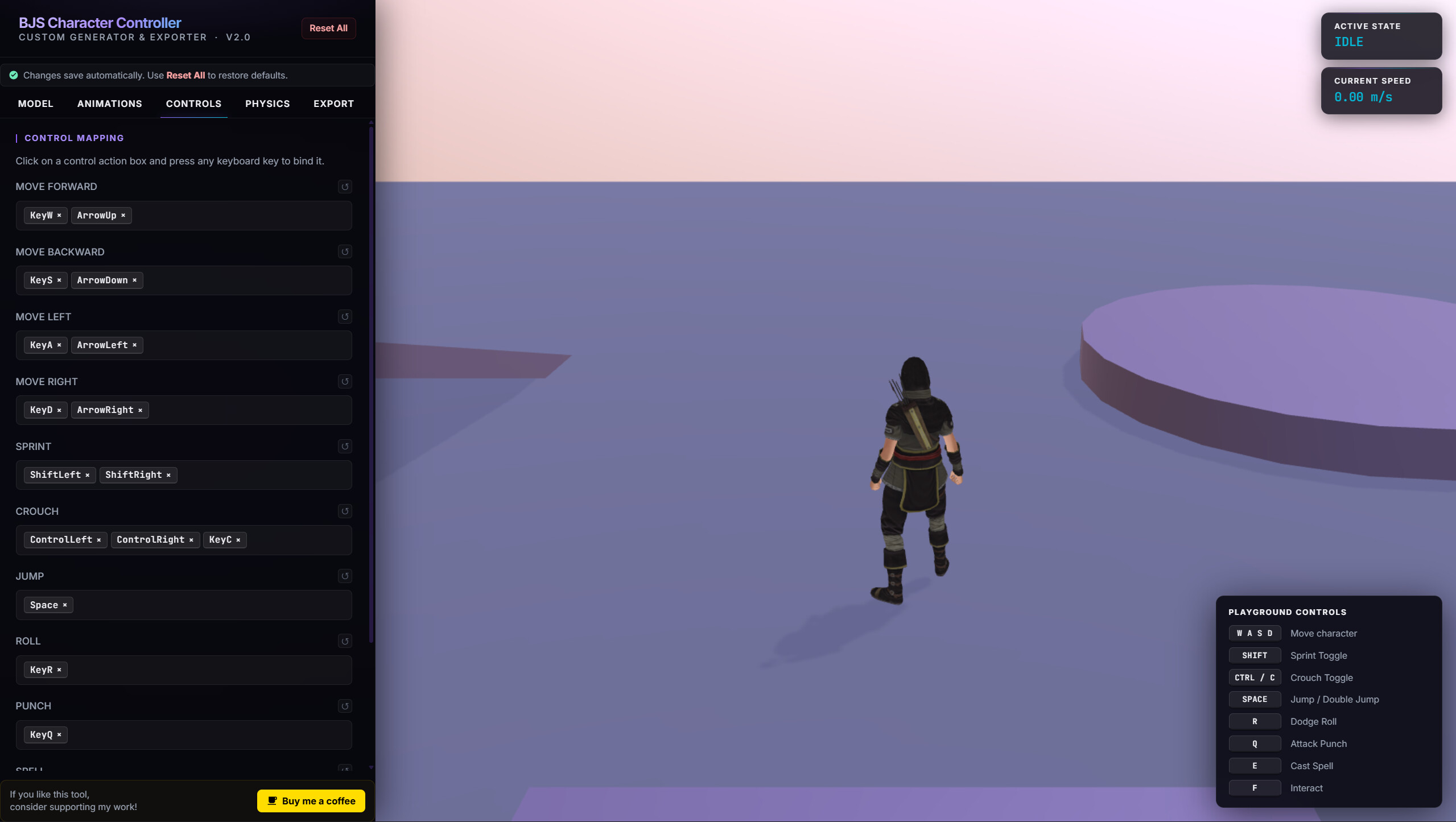
BJS Character Controller V2

Hi everyone,

I’d like to share an experimental third-person character controller I’ve been developing.

I’ve worked on several locomotion and character controller demos over the years, and this V2 is the most refined version so far.

The main focus has been achieving fluid and responsive movement with strong reactivity between player input, physical motion, and animation blending.

Technically, it’s an advanced kinematic character controller, closer in philosophy to Unity’s CharacterController, Unreal’s Character Movement Component, or Godot’s Kinematic Character Controller than to a rigidbody-based solution.

The controller uses a capsule collider, raycast-based ground detection, manual gravity and acceleration, collision handling through Babylon’s moveWithCollisions(), and a locomotion state machine. On top of that, it incorporates ground snapping, stair handling, visual suspension, procedural leaning, squash & stretch, contextual particles, dynamic camera effects, and configurable air control.

The goal is not realistic physics simulation, but rather responsive and believable third-person movement that works consistently and fluid across desktop and mobile devices.

Demo:
https://viseni.com/_demos_/bjs_character_controller_v2/

GitHub:
https://github.com/crazyramirez/BJS_Character_Controller_V2

Feedback, suggestions, and technical discussions are very welcome. :rocket:

12 Likes

It’s great. An improvement will be to make the camera not move back so gradually but remains at a distance as defined with the mouse wheel.
Currently, when you are walking or running, the camera is moving further and further away.

But otherwise it’s really good work.

1 Like

Nice improvement. Added DYNAMIC_FOV and DYNAMIC_FOV_MAX.

Now you can enable or disable them and set the value.

I’ve also added Lock Camera Follow (Real Third Person camera) and a function to calculate the normal movement when walking on ramps and some improvements for smoother, more fluid animations.

2 Likes

It looks better, the camera has a locked distance, but you can no longer rotate the character to the right or left with the mouse when the lock is activated. The distance is well locked, but also locks the lateral movement of the character with the mouse. You are therefore forced to rotate the character on the keyboard, which is more difficult.

1 Like

@Dad72 Amazing idea!
Done and Updated.
With this combination, you can now generate different types of Third Person controls.

1 Like

Yes, that’s good. You have created an excellent character controller.
It’s possible that I’ll try to integrate it into my editor. I just have to try to understand everything.

Do you plan to make a documentation for its uses step by step. Like, how to initialize, how to add animations, public functions that we can use. A kind of tutorial for integrating into our own projects

In any case, I really like your CharacterControler. It seems complete and well made.

1 Like

Thank you very much.

The most basic documentation is available on GitHub in the Readme.

Implementation is simple; check the app.js file and you’ll see a loadCharacter() function.

Simply copy that function to your code, the character-controller.js file. Assign the character:
charRes = await BABYLON.SceneLoader.ImportMeshAsync('', 'assets/', 'character_animated.glb', scene);
And it should work.

I initially tested it with Mixamo models and animations from a free library Quaternius • Universal Animation Library

For this, I used the merge_animations.js file, which allows you to merge your character and animations into a single file:
charPath = charPath || '../assets/character.glb';
animPath = animPath || '../assets/animations.glb';
outputPath = outputPath || ‘../assets/character_animated.glb’;

Also, if you’re going to use your own animations, you’ll need to assign them in character-controller.js and verify that you have all the necessary animations. If not, you’ll need to adapt the code to your requirements.

Progress update:

I’ve added several new locomotion and camera options to the controller:

  • Double Jump

  • Adjustable Air Control

  • Camera Pitch Lock

  • Vertical-Only Mobile Joystick

  • Camera Follow Pitch

  • Additional movement, animation, and camera tuning parameters

  • Mobile controls have been refined and are now fully functional.

The controller is gradually evolving into a fully configurable kinematic locomotion framework, allowing different movement styles and gameplay behaviors through configuration rather than code changes.

Feedback is always welcome.

I’m reposting the access points for anyone interested:

GITHUB

LIVE DEMO

3 Likes

I tryed to ahieve similar result … but you are the best , take a look to here , walking over the stairs is great.

1 Like

Thank you so much for your feedback and great work on the Space Freestyle project!
The main idea is to design a “flexible” character controller that can adapt to different third-person game modes.

I’m still working on it and would like to simplify the implementation even more.

Feel free to use and modify it as you wish.

1 Like

Wow! this is super nice! Animation is great and visuals are so polished. Great job.

1 Like

Ahhh I wish this was there before I started my project. My custom camera controls are nowhere near this good! Will be using this for future projects for sure!

Awesome work :clap:!

1 Like

Hi, I have a question or a proposal. Are there any functions to reassign animations? for example : setWalkAnim(), setRunAnim(), setIdleAnim(), setAnimationRanges() .... and other.

It would allow us to change the animations as we wish. And it would also allow you to modify an existing animation at any time. For example, the setWalkAnim might at one point receive an animation to climb a ladder or whatever you want and then go back to the normal walking animation…

Would it be possible to have this if it doesn’t exist yet ?

Hi @Dad72!

Hi, you can download the updated code again.

If you go to app.js, line 79, you’ll see a commented test showing how to modify the character’s Walk animation.

animCtrl.setWalkAnim(filteredGroups[22]);

:rocket: Physics Update

I’ve been working on adding physics support to the Character Controller.

The controller can now operate in two different modes:

  • Kinematic Mode using Babylon.js native moveWithCollisions().
  • Physics Mode using the Havok Physics engine.

Both modes are fully integrated into the same controller and can be switched directly from the HUD. The selected mode is automatically saved to localStorage and restored on the next visit.

Kinematic Mode (moveWithCollisions)

  • Lightweight and highly performant.
  • No physics engine required.
  • Excellent compatibility across desktop and mobile devices.
  • Ideal for projects focused on character movement rather than physics interactions.
  • Deterministic and easy to debug.

Havok Physics Mode (Still Working)

  • Full rigid-body physics simulation.
  • Natural interaction with dynamic scene objects.
  • Better suited for physics-driven gameplay and advanced environmental interactions.
  • Uses the Havok WebAssembly runtime.

Automatic Mode Detection

The controller now includes automatic engine selection.

If no mode has been explicitly selected through the HUD and no localStorage preference exists, the system automatically determines the most appropriate movement mode based on the capabilities of the current device and browser.

Selection priority:

  1. HUD override.
  2. localStorage preference.
  3. Automatic detection.

This provides the best of both worlds: modern devices can benefit from Havok Physics, while older devices and browsers can fall back to the kinematic controller for maximum compatibility and performance.

The complete flow is now:

  • createDemoScene() resolves the final usePhysics value (override → auto-detect).
  • The selected mode is passed to both loadCharacter() and the HUD.
  • The HUD toggle continues to save the preference to localStorage and reloads the page when switching modes, ensuring Havok resources are fully released before reinitialization.

This should make the controller much more flexible for developers targeting a wide range of devices, from older mobile hardware to modern desktop systems.

LIVE DEMO

:rocket: NEW UPDATE
I’ve added an app-minimal.js file for easy review of the character controller implementation and an app-complex.js version for viewing a more complex collision scenario.

I’ve also added an info viewer to the custom-hud
The custom-hud is optional and its function is purely for development purposes.

牛逼!!!

:rocket: NEW UPDATE

The codebase has been significantly refactored and simplified, making integration and customization much easier.

Quick Setup

There are three demo implementations available, showcasing different levels of complexity:

  • app.js – Standard implementation

  • app-minimal.js – Minimal setup

  • app-complex.js – Advanced implementation

Simply switch the script reference in index.html to load the desired demo.

Simplified Character Loading

Character initialization has been streamlined into a much cleaner API:

async function loadCharacter(scene, shadow, camera, usePhysics) {
    return setupCharacter(scene, camera, usePhysics, { shadow });
}

Animation Improvements

  • Smoother animation blending and transitions.

  • Enhanced movement responsiveness.

  • Improved overall character behavior.

New Movement Features

Several new movement combinations and actions have been added:

  • Jump

  • Double Jump

  • Jump / Double Jump + Roll combinations

  • Improved movement transitions

  • Speed Multiplier Controller (movement and animations)

Physics & Collision Enhancements

Powered by Havok Physics:

  • Improved collision detection

  • More reliable ground detection

  • Character stand-up validation (prevents standing up in restricted spaces)

  • Enhanced environment interaction

  • Better overall physics stability

HUD System

The HUD has been fully migrated to JavaScript.

  • custom-hud.js is completely optional.

  • All HUD-related functions are exposed through character-controller.js.

  • Easy to customize or replace.

Integrated Information Viewer

A built-in information panel provides:

  • Control mappings

  • Integration examples

  • Physics debugging information

  • Character controller data and diagnostics

This release focuses on cleaner architecture, easier integration, improved movement mechanics, and a more robust physics-driven character controller.

LIVE DEMO

:rocket: NEW UPDATE - BUILDER

builder.html using NodeJS Server can now generate a ready-to-use custom-character-controller.js.

The builder allows you to visually configure the controller without editing code:

  • Import Character
  • Import Animations and merge
  • Assign controls and key bindings.
  • Configure animations, new animations and animation mappings.
  • Tune physics, movement and camera settings.
  • Customize gameplay parameters through a GUI.
  • Export Model with custom animations
  • Export custom Character-Contoller js

The Export tab downloads a preconfigured custom-character-controller.js with all settings baked in, making it easy to reuse and distribute custom controller setups across projects.

Feedback is welcome! :rocket:

3 Likes

:rocket: Character Controller V4 Progress Update

What started as Character Controller V2 has already evolved into V4, and development is moving fast.

:bone: Skeleton Generation & Auto-Rigging (Beta)

The Builder (localhost:3000/builder) now includes a skeleton generation and modification system with auto-rigging support.

Current results with Mixamo skeletons are very promising. I’ve also been testing workflows with AccuRig, exporting to both Unity and Blender. Overall compatibility is working well, although there are still a few inconsistencies to iron out.

:clapper_board: Animation Events & Gameplay Markers

Animations can now contain gameplay-aware markers for:

  • :footprints: Footsteps
  • :crossed_swords: Hits
  • :sparkles: Casts
  • :speaker_high_volume: Sounds
  • :fireworks: Particle effects

Markers are triggered automatically whenever playback crosses their assigned frame. While previewing an animation in the viewport, you can see events firing in real time through toast notifications and console logs, making setup and debugging much easier.

:test_tube: Physics Presets & Debugging Tools

I’ve also added several physics presets and debugging utilities to speed up iteration and help diagnose character-controller behavior during development.

:package: Export Options

Characters can now be exported in multiple formats:

  • GLB with all built-in animations
  • custom animation-controller.js for integration into your own projects
  • JSON configuration files containing controller preferences, allowing settings to be reused across different character models

The goal is to make character setup, animation workflows, and runtime integration as streamlined as possible while keeping everything portable between tools and engines.

Still a lot to do, but it’s starting to feel like a complete character pipeline rather than just a controller.

Quick Demo (Character exported using Reallusion AccuRig)

More functionalities

Demo:

GitHub:

2 Likes

cc @Evgeni_Popov