Correct. The problem stems from bad vertex code, regardless of frame graph or not AND only when rendering multiple materials to the same mesh. 
This statement probably doesn’t sum it up correctly, but what the heck. 
Correct. The problem stems from bad vertex code, regardless of frame graph or not AND only when rendering multiple materials to the same mesh.
This statement probably doesn’t sum it up correctly, but what the heck.
My custom frame graph task works in webgl but webgpu complains, there are a whole bunch of errors and I isolated the key.
a) Repro: Babylon.js Playground
Comment out this.createTestPass(); at line 118, the error does not show. Is there a limit to how many effect wrappers can be declared in a custom task for webgpu or somesuch?
b) Repro: Babylon.js Playground
Seems like webgpu does not like ping pong textures even in a js loop, getting a whole bunch of invalid renders stemming from context._effectRenderer.render(customPass, tex[index]) in pass.setExecuteFunc.
Snipped the logs below.
BJS - [12:37:51]: WebGPU uncaptured error (2): [object GPUValidationError] - [Invalid ShaderModule "fragment"] is invalid.
 - While validating fragment stage ([Invalid ShaderModule "fragment"], entryPoint: "main").
 - While validating fragment state.
 - While calling [Device "BabylonWebGPUDevice31"].CreateRenderPipeline([RenderPipelineDescriptor ""RenderPipeline_rgba16float_depth32float_samples1_textureState0""]).

(anonymous) @ webgpuEngine.ts:714Understand this warning
(index):1 [Invalid ShaderModule "fragment"] is invalid.
 - While validating fragment stage ([Invalid ShaderModule "fragment"], entryPoint: "main").
 - While validating fragment state.
 - While calling [Device "BabylonWebGPUDevice31"].CreateRenderPipeline([RenderPipelineDescriptor ""RenderPipeline_rgba16float_depth32float_samples1_textureState0""]).
Understand this warning
logger.ts:107 BJS - [12:37:51]: WebGPU uncaptured error (3): [object GPUValidationError] - [Invalid RenderPipeline "RenderPipeline_rgba16float_depth32float_samples1_textureState0"] is invalid.
 - While encoding [RenderPassEncoder "tex0 - RenderPass"].SetPipeline([Invalid RenderPipeline "RenderPipeline_rgba16float_depth32float_samples1_textureState0"]).
 - While finishing [CommandEncoder "render"].

Debug group stack:
 > "render target pass (tex0)"

(anonymous) @ webgpuEngine.ts:714Understand this warning
logger.ts:107 BJS - [12:37:51]: WebGPU uncaptured error (4): [object GPUValidationError] - [Invalid CommandBuffer from CommandEncoder "render"] is invalid.
 - While calling [Queue].Submit([[CommandBuffer from CommandEncoder "upload"], [Invalid CommandBuffer from CommandEncoder "render"]])
Is there a recommended workaround? I’ve tried super ugly ones but none worked. 
You have two closing } in:
        BABYLON.ShaderStore.ShadersStoreWGSL["testFragmentShader"] = `
			@fragment
			fn main(input : FragmentInputs) -> FragmentOutputs {
				fragmentOutputs.color = vec4f(1.);
			}
        }`;
Once the double } is fixed, there are no more errors in your PG.
Bloody hell !  Thanks for the catch! My god, I’m blind!!
What’s a recommended tool for debugging wgsl shaders? I’m using engine.dbgShowShaderCode = true; but the dump is excessive. Eg: on local dev, I’m getting
BJS - [19:22:20]: WebGPU uncaptured error (1): [object GPUValidationError] - Error while parsing WGSL: :989:1 error: struct member color not found
fragmentOutputs.color= vec4f(0.,0.,0.,1.0);
^^^^^^^^^^^^^^^^^^^^^
 - While calling [Device "BabylonWebGPUDevice0"].CreateShaderModule([ShaderModuleDescriptor ""fragment""]).
but the previous shader is a line fragment.fx and it works fine w/o frame graph. So it couldn’t have been from said fx. W/o a better tool, I’m flying blind here. Any recommendations?
I also use engine.dbgShowShaderCode when such errors occur…
I will try to pass the name of the shader being compiled to the underlying WebGPU APIs, in order to make it easier to identify the cause of the error.
I never knew about dbgShowShaderCode that is going to be so useful.
webgl: Babylon.js Playground
needDepthPrePass vs FrameGraphGeometryRendererTask in webgl
Repro: https://playground.babylonjs.com/#CG7I9R#1
needDepthPrePass vs FrameGraphGeometryRendererTask in webgpu
Identical pg, console throws same error as the previous post about struct member color not found fragmentOutputs.color= vec4f(0.,0.,0.,1.0); wai?
edit: also similar error if using MaterialPlugin in webgpu with needDepthPrePass=true
GPU error log could not have been more obscure. 
no 
needDepthPrePass is not compatible with the geometry renderer task, so I’ll have to figure out how to get rid of this error…
This PR will fix the problem:
Thanks! Tested in v8.26.1, all is wai! Cheers!
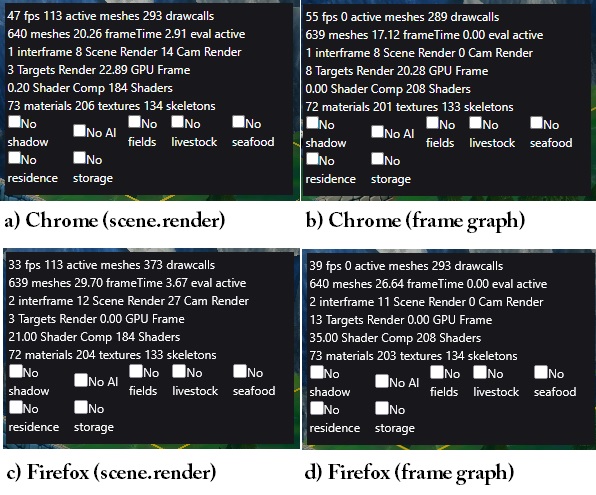
I did a perf test with stress scene in Seedborn against frame graph in webgl2. The frame graph should be a 1 for 1 match against scene.render(), with the exception that the FrameGraphCascadedShadowGeneratorTask is using shadowMaxZ instead of autoCalcDepthBounds.
a) No visible change or improvement, similar result as past.
b) Hovering aroung 40fps.
c) Definite improvement in the latest ffox release.
d) Hovering aroung 30fps
It seems my frame graph is not as performant as I thought it was. Nothing jumps out at me from the profiler. Is there a way to perf chk each pass in the frame graph? Or did I miss some optimization flags?
I’m a little surprised by these figures, because the frame graph version shouldn’t be slower than the standard scene.render code path, as long as both versions do the same thing.
You could use Spector and compare the two snapshots to see if there are any additional renderings in the case of the frame graph. You could also try comparing a performance snapshot (in Chrome dev tools) between the two versions. Maybe something will show up…
Many thanks for helping hunt down the issue. Updated my latest perf compare against the same stress scene in Seedborn in webgl2.
Kudos to @Evgeni_Popov for all the hard work put into frame graphs! 
For me, the primary lesson learnt: lights interaction with frame graph tasks work a little different from the usual scene.render case. I’m happy with how stuff turned out in the end, its really satisfying when the hard work pays off.
Repro: https://playground.babylonjs.com/#9YU4C5#104
Run the repro. Disposing the instance does not update the shadows in frame graph. The csm task and the render task are using the same objectList. wai?
Thanks for reporting, another bug fixed
I didn’t forget!
Here’s an example on how to use a ping/pong texture to implement a onion skin renderer (see the FrameGraphOnionSkinObjectRendererTask class - it’s heavily based on the TAA renderer task implementation):
I will use this example in the doc to explain how to create a custom rendering task as well as how history textures work, but you can maybe find something useful from it even without the doc.
Thanks! Haven’t looked too closely but initial thoughts here:
a) I’d skimmed the taa class b4 but never realized the history textures meant ping pong textures. Is there any particular reason for the nomenclature? It might be a source of confusion for future devs.
b) It appears the ping pong is handled per frame, ie, ping tex for frame n, pong tex for frame n+1. My use case requires the ping/pong in 1 frame for N times where N is a low number. Like I said, haven’t looked too closely but wondering if its possible.
Yes, “history texture” is the name used by other engines, as there may be more than two textures. The ping/pong texture is a special case of history texture with two textures. I will make sure to clarify this in the documentation.
That’s not possible at the moment, but I’ll see how it can be handled.
ok, no worries!
This is not a high priority, understand the frame graph needs to cater first to inbuilt processes and native designed workflows rather than custom user processes.