When you’re dealing with hundreds or even thousands of GLB files , manually uploading and capturing screenshots becomes inefficient and time-consuming. GLB ScreenShoter batch processing automates this workflow, enabling:
Time savings: Generate hundreds of previews in minutes.
Consistency: Apply uniform lighting, camera angles, and resolution across all outputs.
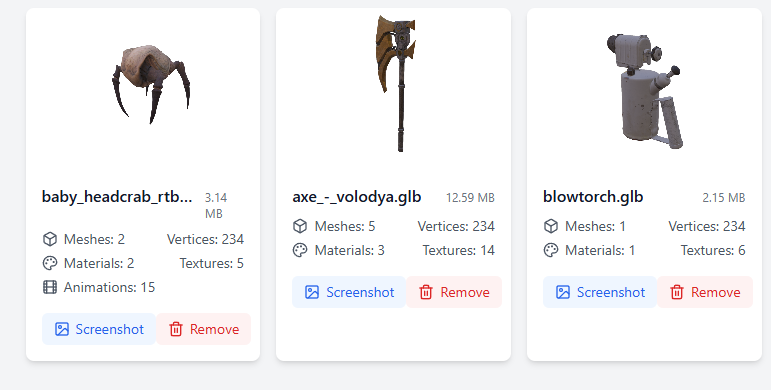
Upload and preview your 3D models. Simply drag and drop GLB files or click to select them. A screenshot will be automatically generated for each model. One may change background color, opacity and screenshot size in Settings.Download reports in HTML or PDF or zip-archive with all screenshots.
This tool is particularly useful for developers, designers, and content creators who need to quickly generate preview images of 3D models without setting up a full 3D engine environment.
Whether you’re preparing assets for a game, showcasing products online, or building a portfolio, this tool can save time and streamline your creative process.
More settings and functions will follow, suggestions are welcome!
This is pretty cool! Agreed that having an easy way to generate consistent screenshots (size, angle, background…) across models is a really nice time saver
Definitively useful I indeed have reached the point where I lose track of the 3d models in my current project
So fyi, my use case is cataloging assets.
Got some feature requests if you do not mind:
Allow directories to be dragged in (apparently this is possible according to google). Currently, I have models spread over 37 (sub-)dirs. So it would be very useful if I could drag and drop the root folder.
Allow filtering of file name (regex?). E.g.: For some models I use an actualModel.glb and anActualModel_ext.glb. The latter contains stuff like simplified bounding boxes or destruction cells for which I do not need a screenshot. (This is only useful when drag and dropping directories)
Display model directories as well or even display in actual categories.
3.1 Embed the model path (or maybe only the last 2 subdirs, idk) in the screenshot file name Points 3 are just for convenience so that the web view or the file name shows you instantly where the model is located.
Sure, directory handling and reporting is possible. I believe I’ll add a separate mode for it, in order not to deal with some browsers which have poor support (or its own syntax) for directories dragging.
Also, the report in this case should be done a bit in another way to be more informative.
Later I am planning to add some model stats, currently testing this feature.
Ohoh It is still not working. I tried the same files. It is different files though that look “unlit” and the display order is different, too (if that matters). The console log is similar, too.
Did some experimentaitons: I selected the 3 wood plank models and drag&dropped them into your app. I repeated this serveral times. I reloaded the browser in between trials. It consistently displayed the 1st plank (15x10) correct but the other 2 (15x25, 30x50) looked unlit again. Here is the files: woodPlankModels.zip (3.8 KB)
Let me know if I can do anything else.
Wait, come to think of it: could it be something with the uv channel? Babylon defaults to the 1st. I use the 2nd channel for all my models. Hm, but then why do some models work…
The same result for me with Chrome.
I believe this is Firefox issue…
But probably it is a good idea to update Babylon version and have a look.
I’ll do some update soon.


 I indeed have reached the point where I lose track of the 3d models in my current project

 I tried the same files. It is different files though that look “unlit” and the display order is different, too (if that matters). The console log is similar, too.
