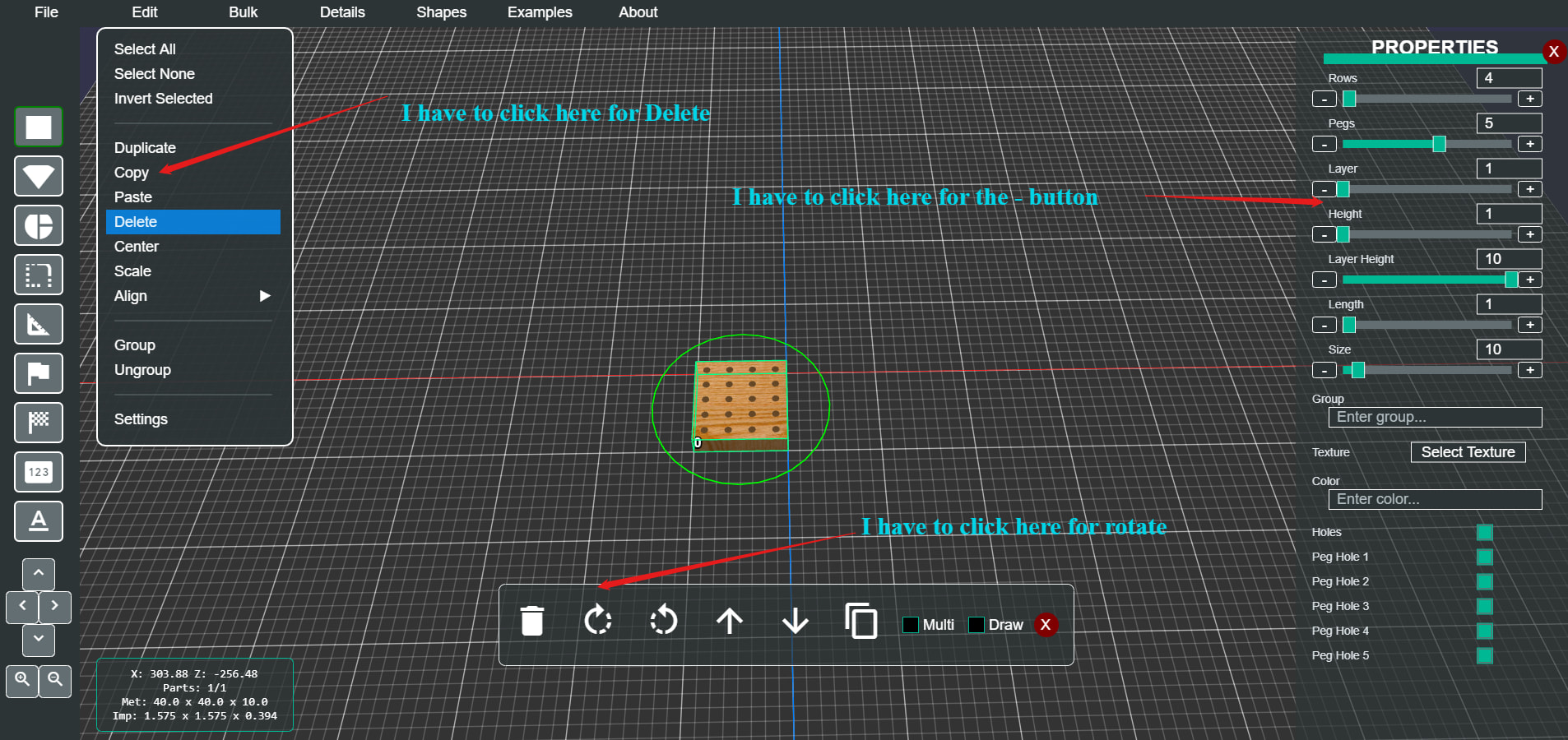
I have come across an odd issue in my app. This only happens on mobile devices and has not always been an issue but I don’t know when it started since I have not been testing on mobiles devices for a while.
Here is what is happening, the vertical touch position is off on all gui controls by 20 pixels or so. The image probably shows better of what is happening.
Since I don’t when when this started I am not sure how to track down the issue. Do I start by jumping back in the repo until I find a point in time that it was working correctly and keep moving forward in time until it stops working? That seems like it would take a lot of time of track it down that way.
Anyone have any ideas what could cause this before I start down the path of jumping around in time in the repo?
Hi @Trevor_Orr , can you reproduce this in a playground and let me know the particular device this happens on for that playground?
I setup the menu in a playground and it seems to work fine
This happens on my Samsung cell phone an Samsung tablet. Maybe I need to setup the entire UI and not just the menu on the playground.
I started commenting out UI components one at a time and was able to track down which UI component is causing the issue, now I just have to figure what the issue is in the component.
I finally tracked down the issue. I added some code to try and fix another UI issue I am having which did not fix the other issue and I forgot to remove it. After removing that code this issue is now resolved.
Great, glad you found it!
Apparently the original issue I was trying to fix is a know bug in Opera. Guess I will just have to deal with it until they fix it.