What's Babylon's approach for effective loading and unloading of assets? (Alternate title : "What do you mean I have to load all my shared meshes multiple times if they're in multiple scenes?"

Heads up, Giving a lot of context in this one :slight_smile:

I’m looking at how best to handle loading/unloading of assets.

From what I can tell, scenes aren’t a great way of managing rendering assets when you have to care about memory or load times, like on mobile, because by design you can’t share assets between scenes.

Context
Let’s say I’m making a multiplayer pokemon-like world (because of course I am) which has an overworld and smaller areas, houses, caves etc to explore.

  1. Walk through a door
  2. Engine loads the assets required for that ‘area’
  3. (ideally doesn’t have to reload any already loaded assets, like tiles, player sprites etc) so that memory and load times are protected)
  4. GameEngine creates new Babylon ‘scene’ and inserts a mix of already loaded assets and assets needed for just this scene
  5. GameEngine pauses rendering the ‘outside’ scene, renders the ‘inside’ scene
  6. Player goes back through door to outside area
  7. GameEngine unloads assets that were only required for that area, keeping the shared assets like player sprites etc in memory

8,9,10. rinse, repeat

My initial approach

  • initially thought I’d have multiple scenes, the overworld is a scene, a single instance of a house is a scene etc. I could definitively unload unused assets, e.g unload the house & NPC sprites when the player exits the house by calling scene.dispose() but the player assets wouldn’t be as the player is referenced by the other scene.

This means if I wanted to use the same assets for rendering the player AND I wanted to ‘know’ I can call scene.dispose() on the house scene and all non-shared assets will eventually be unloaded, I’d take performance hit of loading & keeping multiple instances of the same assets in memory (load the player mesh & animations & textures etc each time they need to be in a new scene) - that’s a memory hit and a loading time hit for an asset that’s already loaded. That seems like a really good reason to NOT use scenes.

Maybe I’m just structuring my whole approach wrong but I wanted to have each area be it’s own independent scene because :

  • It aligns with the approach of having each isolated area it’s own EntityComponentSystem-style EcsWorld, other entities don’t have to worry about stuff that’s going on in that world
  • Having the areas loaded up into a shared main scene works gameplay wise BUT now I need a way of manually tracking and disposing of any and all assets created as part of that little scene.
  • doing odd things like - Add an EcsContextComponent to entities which have an array of filters like [‘Outside’, ‘SceneAName’, ‘VisualInventory’] and only rendering entities from active ‘scenes’ breaks when things like physics are involved, you end up layering complexity on top of complexity, needing to apply additive physics layers too etc

The extra layer of sadness, asset caching

What’s making me extra sad about this is I was building out a nice ECS-style approach in which I have a BabylonRenderSystem that just loops through entities in an ECS world, loads the assets and keeps them in sync without the ECS having to know about babylon stuff. This all broke the moment I needed to do a scene transition because the caching layer made the assumption it could serve up assets from existing assetContainers.

  private async createMeshFromType(meshType: string | undefined, componentsById: { [x: string]: IComponent }): Promise<Mesh> {
    const meshcomponent = componentsById[MeshVisualComponentId] as MeshVisualComponent;
    const transformComponent = componentsById[TransformComponentId] as TransformComponent;

    if (meshcomponent.assetId) {
      const assetInfo = this.assetLoader.getAssetInfoById<MeshAssetInfo>(meshcomponent.assetId);
      const assetPath = this.assetLoader.getAssetPath(assetInfo.path);

      const useCache = true;
      let meshAssetContainer: babylon.AssetContainer = null as any;
      if (useCache) {
        if (this.assetLoader.getAssetCacheItem(`${assetPath}:assetContainer`)) {
          meshAssetContainer = this.assetLoader.getAssetCacheItem(`${assetPath}:assetContainer`);
        } else {
          const asset = await this.assetLoader.getAssetFromPath(assetPath);

          const url = URL.createObjectURL(new Blob([asset]));
          meshAssetContainer = await babylon.LoadAssetContainerAsync(url, this.scene, {
            pluginExtension: ".glb",
          });
          this.assetLoader.addAssetCacheItem(`${assetPath}:assetContainer`, meshAssetContainer);
        }
      } else {
        meshAssetContainer = await babylon.LoadAssetContainerAsync(assetPath, this.scene);
      }

      const meshContainer = meshAssetContainer.instantiateModelsToScene();
      return meshContainer.rootNodes[0] as Mesh;
      
    }

}

But now it can’t just follow

  • just loop through entities
  • if the entity doesn’t exist, create it
    • if the assets for the entity don’t exist, load them and cache the assetContainer for next time

because it now has to know about the concept of scenes and that needs to be communicated up and down the stack because the assetCache can’t simply load an asset anymore, it has to know the target scene at load time and that can’t change - this means

  • my asset layer needs to know way more about what’s going on, the asset caching layer needs to respond to scene change events
  • I can only ‘cache’ assets to be re-used in that scene
  • I have to blow away the asset cache when the scene is disposed, because an assetContainer throws an exception when trying to load an asset from a disposed scene (which makes sense in narrow context, but not in this wider use case)

Don’t read this all as a dig at Babylon, I can’t imagine the # of counter-intuitive trade-offs that have had to be made to build this thing.

I have zero doubt that there’s an engine reason for loaded assets being hard tied to scenes, but as a user this leaves me in a pickle. I’m a bit scared and wondering if I should give up all the sweet Babylon stuff and just go back to using three.js, which does separate out asset loading from scenes three.js manual

So my question is : Help ! :smiley:

3 Likes

Maybe the scene is not the right level for you then. You can then have only one scene and use the AssetContainers to load / remove from the scene

We have to draw a line somewhere for asset isolation. I thought it was at scene level (inspired by blender and 3dsmax). My understanding is that you should consider that there is only one scene (like the engine) and use AssetContainer to isolate your resources while being able to share them

5 Likes

I know it’s probably impossible to change now, but it’s a real pain to load assets and use them where you want to. Having to attach to a scene everywhere is an additional complexity, so as to serialize/deserialize when cloning to another scene, which is not memory & cpu friendly.

When on top of that you want to use instances, and the model is kept for instances but not for thin instances, the scene hierarchy is getting messy quite quickly.

It’s so simple in three.js to use the same assets into different scenes and render with the same engine (avoiding shader recompilation) to 2 different canvas.

I’m still skeptical of a real use for babylon.js scenes compared to having everything in one scene and enabling/disabling parts as needed…

You should think about creating your own class like “Level” and “LevelManager” that handles the asset loading and unloading, disposing and environment changes. Respect Scene and AssetContainer for what they are and you will find an elegant solution. Forget following patterns from other engines as it’s just creating mental barriers :slight_smile: You probably want to fine-tune memory management within your manager anyway.

1 Like

Sure and I could rewrite the entire library too :distorted_face: But I’m fine, I could cope with the current system after wasting hours understanding how it works.
You are missing the point that the current level of isolation gives little meaning to scenes, as basically 1 engine = 1 scene. I’d like to be proven wrong and be given actual use cases where multiple scenes is really useful.

People have expectations when all other engines work in a specific way and that should be considered to ease adoption (as illustrated by the topic here from a newcomer)

Anyway this is not going to change so this kind of discussion is worthless

2 Likes

We use multiple scenes at Frame with a rendering loop that dictates which ones get updated dynamically to support our mini-map feature.

There are also demos floating around where you are in a cabin/cockpit as one scene and the outside is a secondary scene. Another case would be if you wanted to render a gun or hands on top of the stage in an FPS setup. (Both can also be achieved with layer masks, but sometimes a separation of concern is easier)

There are plenty of reasons to do this. If you need to pass assets around then you just load them into an asset container and initialize them in the correct context. Not to mention multi-canvas rendering with different scenes, there are quite a few reasons to do more than one scene per engine.

When I know that assets need to be shared between context at load time ill dump them all into asset containers in a map then use that as a library that I can initialize to where ever on demand. Sort of a load once and forget about it for the rest of runtime. You can do it on dynamically too if you don’t want to precache but that’s all just a matter of choice.

2 Likes

How do you “initialize to where ever”?

An AssetContainer belongs to a single scene AFAIK.

The scene is public and you can rebuild the root node along with other methods to achieve that, but it requires some steps.

Honestly for what you are trying to do, I would just create transform nodes for each of your inside buildings and parent all the meshes to them. Then enable and disable the transform nodes and warp the camera where it needs to be during the transition screen. Then you can just have one scene anyways.

1 Like

Exactly. There are many ways to manage your scene hierarchy easily through variables, tags or metadata. The choice just depends on if you are serializing, have access to the vars or not.

Maybe BJS could benefit from an abstract Level class and manager but I don’t think it currently needs it. Probably will do if we dive deeper into Large worlds and want Level + tile streaming out-of-the-box similar to UE.

To reiterate, I want this to be a forward-looking discussion. I’m thinking out loud in this post not to bash Babylon but so that others can better understand and help. I’m new to implementing this kind of stuff

Shared worlds
Playing though the implications of this it doesn’t play nicely when needing isolated worlds. Remember this is multiplayer, if I’m dynamically creating these scenes they’d need to be done on a per client basis. Previously I could isolate each scene at the EcsWorld level and only send valid data to entities if they’re in that EcsWorld

I now can’t just say “Hey create a new isolated EcsWorld & associated scene, position these entities in it and only replicate events to other clients in this scene” without taking a massive perf penalty.

  • I may have to do some …funky… stuff with layering multiple ECSWorlds into a single scene and possibly offsetting all entities spawned with a transform by some world-specific ‘notScene’ offset
  • I’ll also need to ensure all the lighting etc is disabled
  • the combination of EcsWorld layers will be different for every client
  • I’d really hoped to be able to pause the rendering of different scenes but let their components continue to get updates in the background if required, this way I could ‘push’ and ‘pop’ simple scenes onto a stack
  • I haven’t tested how physics objects are going to behave with being toggled off then enabled again etc
  • I don’t know how other things, like particle systems are going to behave when they’re yanked in and out of reality
  • I don’t know the impact of performance, is there still a performance hit for assets that are set to not visible?

It feels like there’s going to be a lot more edge-cases and headaches with doing this ‘hot-swapping’ approach.

We may just try reloading the required assets for the prototype but I hate that, it’s kicking a massive can down the road.

That’s a lot of risk and it’s why I’m asking about it here, if we have to switch engines the earlier we make that decision the better. It’d suck to lose access to the other stuff Babylon offers. I even got serverside stuff like nullEngine, gltf asset loading and physics playing nicely yesterday :slight_smile:

Reusing assets in small, isolated scenes
It’s also painful if I want to render the same assets in isolated contexts. For example we’re looking to have a system for rendering some inventory items similar to

To prevent double-loading of assets I’d have to reuse the main scene - bit painful if we want to be able to render the existing scene at the same time (think of a ‘you got an item’ popup that shows the new item in 3d with the rest of the game in the background)

Caveat
I initially thought some of this additional complexity is because I’m using an Entity Component System, but as mentioned I think I’d face these exact same challenges without it because I’m trying to find an isolation mechanism.

I’m sure enforcing no asset reuse between scenes ‘buys’ Babylon some valuable assumptions it can make under the hood, but I want to express that restriction is causing me a heck of a lot of pain for 4 of the 5 first use-cases for which I’d assumed (I know, I know) it was appropriate.

1 Like

It’s refreshing you shared this statement.

BJS as far as my understanding is not meant to be a game engine, and its inspiration is far less influenced by game engines compared to other alternatives. I believe this is the value of BJS, not having the bias or a complicated API. The motivation of keeping the repo up-to-date is completely organic and supported by the community who believe their time is valued by the outcome. I highly suggest you contribute and propose something by proof-of-concept because you do have merit in what your saying. Others don’t have your same experience but we are all willing to listen/discuss. You’re describing a lot of requests/challenges around networking which is a beast of a topic. AAA Game Engines have spent many years and billions $ on getting a good balance of networking APIs for developers, and this is usually not enough for most games and developers.

Here is the example with 2 scenes - https://playground.babylonjs.com/?inspectorv2=true#P3E9YP#257

    container.scene = secondScene
    container.addToScene()
1 Like

Thanks for sharing this.
A box from the first scene is added to the container, then the container is moved to the second scene. The box is only displayed on the second scene.
So… the AssetContainer still belongs to a single scene. No sharing there, nor instantiation from the same container to multiple scenes?

Edit: worse: the box is present is the rootNodes of firstScene, but not in secondScene

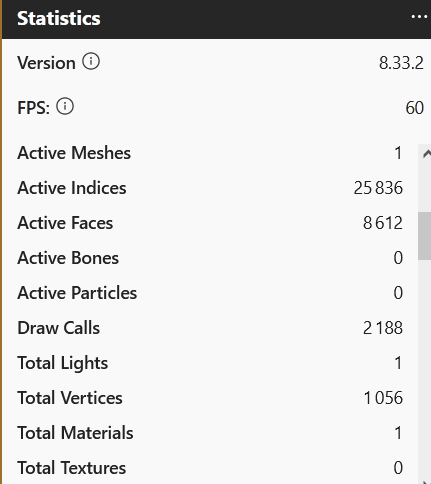
Also, maybe unrelated, but when you switch to the second scene, the draw calls quickly rise infinitely, so either there’s a bug with the counter, or the engine does not like having multiple scenes (removing the box & container changes nothing)

1 Like

cc @ryantrem for that bug

2 Likes

In this case, a mesh is being created in one scene and then added to a different scene, which is not a valid operation and causes various perf counters related to the mesh to be incremented but never cleared. Ideally we should probably be checking if the mesh’s scene does not match the scene it is being added to and throw an error.

I think regarding AssetContainers the idea was more about having a single scene, and using AssetContainers to dynamically add/remove sets of entities to/from the scene to limit the size of the scene at any given time.

1 Like

Thanks for checking this. But I’m not sure it’s because of this invalid operation.

When the box & containers are removed, the counter still increments

Hmm you’re right, for some stats like indices the cause is what I described above, but for draw calls specifically it is a different cause, where Inspector is currently designed to inspect a single scene. For draw calls, this is actually an engine stat, but the when the original scene stops rendering, nothing is triggering the draw call count to reset. Really the fix for this is going to need to be for Inspector to better handle multi-scene scenarios, so I’ve logged an issue to track this as part of our Inspector v2 work.

2 Likes

There was the time when scene property was necessary for meshes, materials and AssetContainers (before Babylon 6? Or 7?). Since then it became optional, and this allows to change the container scene property. This, together with KeepAssets class, gives a lot of flexibility.

If it is not a valid operation there should be some warning, like it was before the scene property was non-optional. Maybe the problem is more related to perf counters? Anyway, if it is not possible to switch containers between scenes, how this PG works? :slight_smile:

1 Like

Sorry I missed this reply. I would not have expected that scene to work since the box is created in one scene and then used in another scene. @sebavan or @Evgeni_Popov any thoughts on this one?