In this playground I create a simple mesh and load a GUI onto it using parseFromSnippetAsync, it works perfectly.
Whereas in my real code I have to use parseFromURLAsync. Everything else is the same but it fails to work if I use .parseFromURLAsync(‘./assets/ui/MainMenu-guiTexture.json’, true) with an error saying it needs to be a POT texture.
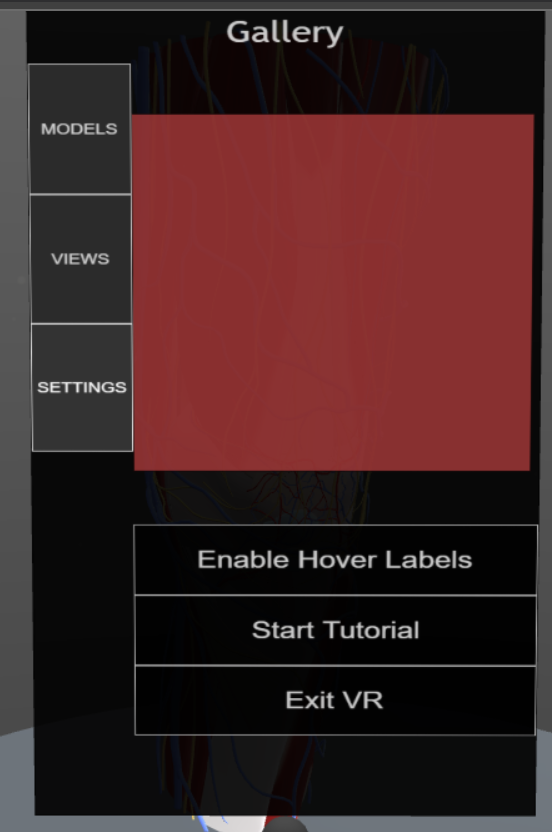
If I use .parseFromURLAsync(‘./assets/ui/MainMenu-guiTexture.json’, false) then it loads but doesn’t render the layout correctly, see image below.
CORS policies seem to prevent me some exactly mirroring the code in a playground. So other than the screen shot I’m not sure how to show that it doesn’t work
If I set the gui editor size to 512 x 1024, a POT size, then it displays as it does in my application. So I’m guessing that is the error. It’s imposing a POT size whereas the playground does not.
I put your file in one of my github repo and it still works for me for a size of 500 x 800 (at least the display is the same than in https://playground.babylonjs.com/#O06SZ5#12):
Do you pass true as the second parameter to parseFromURLAsync in your project?
So, it looks like your system is running WebGL1, as non-POT support is a requirement of WebGL2. Can you check if my PG works for you (check which engine is being used by looking at the browser console)?
WebGL2 should be used by default if it is supported. Only if disableWebGL2Support: true is added to the options when building the engine will WebGL2 support not be tested.
So I don’t understand why it doesn’t work in your project if my PG works on your device… Or could it be that canvasRef.current does not support WebGL2 for some reasons?
Try logging canvasRef.getContext(“webgl2”) and see what value is returned (do this before calling new Engine()).