Hi,
I want know what im doing wrong about animation change, because when i change animation it make the character bones from old animation keep in the same way on the new animation.
The foot of walk animation keep the same when i change to idle animation.
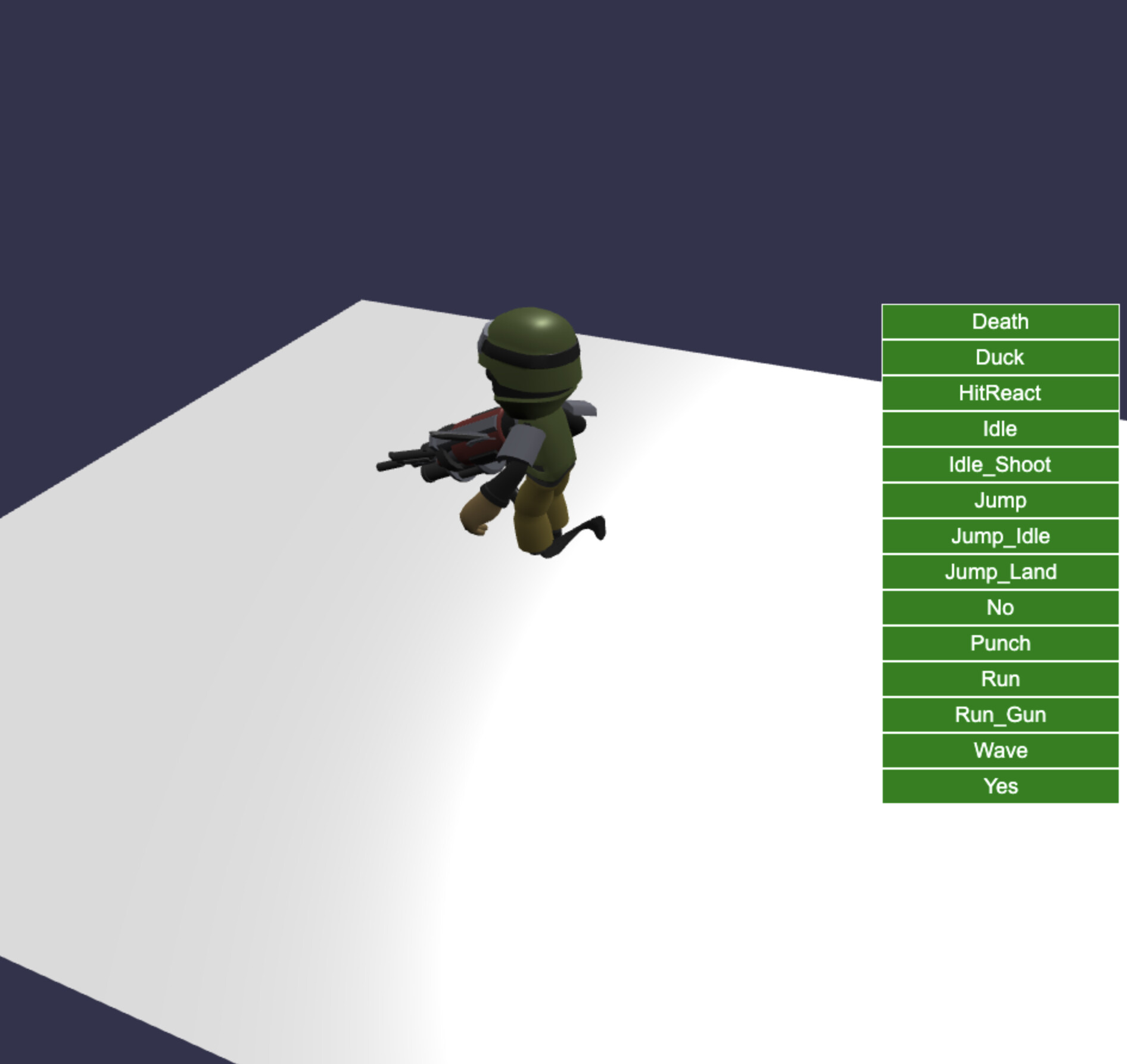
My code:
import * as BABYLON from ‘babylonjs’;
import * as GUI from ‘babylonjs-gui’;
import ‘babylonjs-loaders’;
import ‘./style.css’;const canvas = document.getElementById(‘renderCanvas’);
const engine = new BABYLON.Engine(canvas, true);const createScene = async function () {
const scene = new BABYLON.Scene(engine);const camera = new BABYLON.ArcRotateCamera(
‘camera’,
-Math.PI / 2,
Math.PI / 2.5,
3,
new BABYLON.Vector3(0, 0, 0),
scene
);camera.fov = 1;
camera.attachControl(canvas, true);const light = new BABYLON.HemisphericLight(‘light’, new BABYLON.Vector3(1, 1, 0));
light.intensity = 0.5;
scene.addLight(light);const ground = BABYLON.MeshBuilder.CreateGround(‘ground’, { width: 10, height: 10 });
scene.addMesh(ground);// Import character model and setup animations
BABYLON.ImportMeshAsync(“/models/character.glb”, scene).then((result) => {
// Log available animations
console.log(“Available animations in result:”);
result.animationGroups.forEach((animGroup, index) => {
console.log(Index: ${index}, Name: ${animGroup.name});
});if (result.animationGroups && result.animationGroups.length > 0) { // Stop all animations first scene.animationGroups.forEach(animGroup => { animGroup.stop(); }); // Play the desired animation - index 10 (Run) as example const animationIndex = 10; // Index 10 = CharacterArmature|Run console.log(`Playing animation ${result.animationGroups[animationIndex].name} (index ${animationIndex})`); result.animationGroups[animationIndex].play(true); // Create GUI interface const advancedTexture = GUI.AdvancedDynamicTexture.CreateFullscreenUI("UI"); const panel = new GUI.StackPanel(); panel.width = "220px"; panel.horizontalAlignment = GUI.Control.HORIZONTAL_ALIGNMENT_RIGHT; panel.verticalAlignment = GUI.Control.VERTICAL_ALIGNMENT_CENTER; advancedTexture.addControl(panel); const animationNames = result.animationGroups.map(ag => ag.name.replace("CharacterArmature|", "")); // Create buttons for each animation animationNames.forEach((name, index) => { const button = GUI.Button.CreateSimpleButton("btn_" + index, name); button.width = "200px"; button.height = "30px"; button.color = "white"; button.background = "green"; button.onPointerClickObservable.add(() => { // Stop all animations scene.animationGroups.forEach(animGroup => { animGroup.stop(); animGroup.reset(); }); // Play the selected animation result.animationGroups[index].play(true); }); panel.addControl(button); }); } else { console.error(`Error: Not enough animations. Total animations: ${result.animationGroups ? result.animationGroups.length : 0}`); }}).catch(error => {
console.error(“Error loading model:”, error);
});return scene;
};const scene = await createScene();
engine.runRenderLoop(function () {
scene.render();
});window.addEventListener(‘resize’, function () {
engine.resize();
});