Im really kind of stumped by some behavior that we are seeing with transparent materials. The behavior changes depending on when I toggle the depth pre pass or have frozen the material.
First, if I do no depth pre pass and no freeze it sorts incorrectly which is expected:
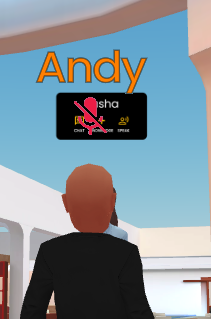
But then if I freeze the material with the depth pre pass everything sorts correctly buuuut then some of the icons then appear as a black box (not all the black box in the second image is a transparent typing indicator):
Finally which really makes me scratch my head is if I leave the materials as frozen but then take off in code the depth pre pass, fire up the inspector and on the materials through the inspector say they need a depth pass everything renders correctly.
Im not really sure why this is happening, I’ve tried to toggle the pre pass later in the code at the time of showing the indicator but that did not work as well and just does the black box.
We have tried a bunch of different setup and its either they don’t sort correct, clear out the transparencies behind them or render as a black box so I’m fairly confused now.
I believe all your transparent objects are always facing the camera (billboards)? If so, sorting them should work (use the mesh alphaIndex property for this). Also, if you can set up a reproduction in the Playground, it will help us investigate the issue.
UPDATE well it looks like the behavior is specific to our setup. I’m wondering if it has to do something with us having duel camera.
In the playground they render correct and I can never get them to do what they do in our setup even with the same properties so there is something else I’m not seeing that is causing it.
@Evgeni_Popov could it be related to the fact we have a First Person Camera (universal camera) and a Third Person Camera (ArcRotate) with the Third Person Camera a child of the first person and the activeCameras list being [ThirdPerson, FirstPerson]? It almost feels like its getting the depth values from the First Person camera but using them with the Third Person.
What I have also noticed that in our setup the orientation of the camera matters, where it will sort behind an object when looking one direction at a certain distance but then if I look the opposite and go to the same distance it will sort in front. This is really making me scratch my head.
The problem is that transparent meshes are instances, and sorting transparent instances does not work as expected because sorting is performed on the CPU side only with the master mesh, not with the instances. In your example, the two icon meshes that are sorted with the background are the _basis meshes, and since these meshes do not move, depending on the camera position, the sorting is incorrect.
One solution is to use clones instead of instances, but this is less efficient if you have a lot of transparent meshes:
Note that icon.doNotSyncBoundingInfo = true must be commented out, because the sorting step uses the center of the mesh’s bounding sphere.
OIT also works (scene.useOrderIndependentTransparency = true;) but this option can also affect performance.
Unfortunately, I don’t see any other solution…
We plan to look into a better way of managing transparent meshes, one that performs better than OIT. But I can’t give you a specific date.
Yeah we can not use clones, dang this sucks. So basically we are out of luck then? We had tested those other suggestions in the past and it created more problems then it fixed unfortunately.
I appreciate that you looked into this for me, thank you.
So odd enough, if we turn off the pre pass and set the alpha mode to just alpha test none of the sorting or discard glitches happen. What would be the difference between having the blending and just test that allows this to work correctly?
At least with this we can keep our instances, they are just a little more aliased but that is fine!
That’s because alpha tested only materials are not transparent materials, so they work the same as opaque materials, the difference being that if alpha for a pixel is less than a threshold value, the pixel is discarded and not updated.
It’s the easiest fix, if you don’t need transparency for your icons!




 We had tested those other suggestions in the past and it created more problems then it fixed unfortunately.