Contact hardening is PCSS Percentage Closer Soft Shadows so it hardens as it gets closer 
I noticed when using Exponential Filters (Including BLUR) it seems to put a dark overlay on the cube. Is that ARTIFACTS… And can i get rid of that dark overlay look ???
Yo @sebavan and @Deltakosh … The follow is a shot from Unity that i am trying to export to babylon.
The far left Cube is Lightmap Static… But the right two cubes are realtime using Blur Exponential Shadow Map… As you can see the cube itself got DARKER. If i use one of the other like Poisson or PCF… the shadows dont look blurred at all… But the cubes are not so dark.
Original Unity Shot:

Using Blur Exponential Shadow Map (Notice Darker cubes):

Using Percentage Close Filter (Notice not soft at all):

What do you think i can do about that ??
Using blur exponential you can try to play with the bias.
For pcf, I let @sebavan weight in but it could be useful to see the scene in the PG to try to play with options
In PCF to work the res of the shadow map needs to be smaller so the 5*5 kernel reaches a larger surface.
Nice example: https://www.babylonjs-playground.com/#199KHL#31
Yo @sebavan … Can you please try to help me understand the rhyme and reason behind the shadow map size setting.
In unity the bigger the “resolution” setting, the better quality the shadows. So i was basing the shadow map size on the unity quality settings:
Low Quality = 512
Medium Quality = 1024
High Quality = 2048
Very High Quality = 4096
I need a good factor or multiplier to use based on the unity setting shadow quality. If the resolution ha to be SMALLER for the PCF blur effect. What value should i use to multiply against the unity quality settings. Also is there such thing as too SMALL. Lets say 128 and 256 … Would that be too small ??? Does it matter the AMOUNT of items being rendered. So if 1 cube yeilds a good blur at 512… What if i had 10 cubes being rendered with he shadowmap… does that small 512 need to be bigger to fit all the other cube shadows.
Just trying to understand so i can use values from Unity instead of just saying no matter what quality unity has for the shaow map… babylon will use THIS hard coded value of 512 (for example).
You get where im going with this
Yo @Deltakosh … are there DIFFERENT bias factors for the different filters.
right now i use a FACTOR to multiply against the Unity Light bias. So my default factor is 0.001.
So if Unity has a Bias of 0.05 and i multiply by 0.001 that gives me 0.00005 for the actual babylon factor. When you say play with bias values… Should i be trying to closer to 0 or 1
and does it want different bias for different filters… Say i tried contact hardening… would it expect a different bias that the 0.00005 (calculated from Unity Bias 0.05 * My Babylon Bias Factor of 0.001)
Again just trying to come with values to use during the export so the user just uses the values from Unity and NOT need to use extra script to get a reference to the shadow generator and manually set this bias that works best for that filter settings.
You get where im going with this
Yo @Deltakosh … Playing with bias and normalbias ALTERS the shadow shape. but what seems ALOT better is to crank up depth scale to 5000. Is that a OK value for depth scale.
So here is shot that looks pretty good for a Unity Export To Babylon Values:
Using Hard Shadows With Exponential Shadow Map
bias = 0.0005
normal bias = 0.004;
depthScale = 5000;
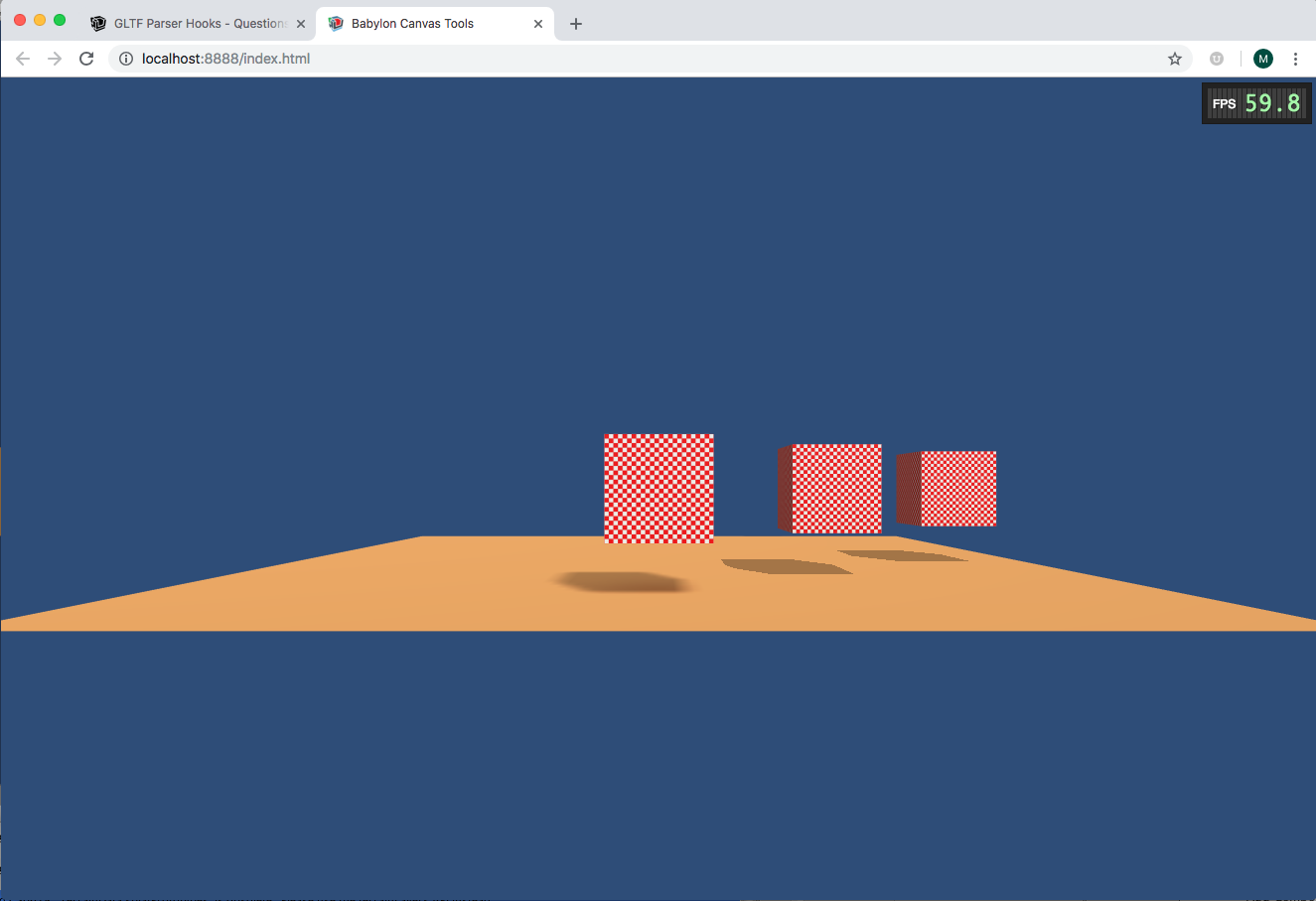
Note: the first cube in the foreground is using a Lightmap for its shadow. Which looks pretty freaking good as well 
PCF is a kind of blur with the 9 neighbors. so the smaller the res the bigger the blur. This is cause unlike PCSS we do 5 taps against 32 .
Oh yeah reducing the overall depth of the scene is BY FAR the best way to get more precision:
https://doc.babylonjs.com/babylon101/shadows#troubleshooting
Hey @bghgary … I know GLTF Spec is for right handed but if I make a custom gltf export that is in left handed, can I tell the Babylon Gltf loader NOT to transform anything … just keep thing in left handed system .
Not currently. I highly discourage writing a glTF in the wrong coordinate system.
I just REALLY dont like the FLIPPED Z values and rotations you have to do when using GLTF stuff in converted from left handed to right handed. I just wanna make a PERSONAL version that exports to left handed and have babylon GLTF NOT convert position.z and rotations.
Can you please show me in the babylon gltf loders where you do this conversion so i can disable that just use the left -handed values in my SPECIAL LEFT HANDED GLTF.
This wont be in the main Babylon js repo… Just my personal use in my personal projects
If you use the forceRightHanded flag from earlier and then set the scene back to left-handed, that should do what you want I think. This is a bit hacky of course.
If you go down this path, please make sure these kinds of glTF files never leave your ecosystem. Perhaps even add an extensions required property that indicate the asset is left-handed.
What do you mean set the scene back to left handed … you mean export to gltf in left handed coordinates and set the Babylon gltf loader to force right handed … that will flip or keep everything left handed in the end ???
scene.useRightHandedSystem = false
Yo @bghgary … I am setting FORCED RIGHT HAND on the loader:
BABYLON.SceneLoader.OnPluginActivatedObservable.add(function (loader) {
    if (loader.name === "gltf") {
        if (BABYLON.SceneManager.HandSystem === 1) {
            (<any>loader).coordinateSystemMode = BABYLON.GLTFLoaderCoordinateSystemMode.FORCE_RIGHT_HANDED;
        }
        console.warn("ACTIVATING GLTF LOADER SYSTEM: " + (<any>loader).coordinateSystemMode.toString());
        (<any>loader).dispose();
    }
});
But i dont seem to see any OnPluginReady event or something i can attach to when the ENTIRE scene load process has completed… NOT JUST when my extension finishes but the entire scene has been loaded and all extension parsed and the scene is ready to go.
That is where i wanna scene.UseRightHandedSystem = false … Then i can fire off all the script components and start the life cycle for each script component… AFTER the loader processed everything with the FORCE_RIGHT_HAND but BEFORE i initialize any script components so the scene will be in left mode by then.
What are you using to load assets? If you are using SceneLoader, there are callbacks for when the loader is done.
BABYLON.SceneLoader.Load()