Babylon Lite is the engine we always dreamed of building. Now made possible by today’s technology and more than a decade of learning.
For years we imagined what Babylon could look like if we started from a blank page, with no legacy to carry, building directly on top of modern GPU APIs and a modern toolchain - and distilling everything 13 years of building Babylon.js has taught us. Babylon Lite is that engine: a WebGPU-exclusive, tree-shakable, data-oriented renderer engineered for the smallest bundle size and maximum performance - while producing output that is pixel-for-pixel identical to Babylon.js.

Across our parity gallery, building the same scene in Babylon Lite ships about 19× less gzipped JavaScript, renders frames about 3.6× faster, starts up about 2.5× faster, and uses about 5× less memory than Babylon.js - all while drawing the identical image. (Figures are medians across the suite; the per-scene charts further down show the raw numbers.)
Babylon.js and Babylon Lite, together
We want to be crystal clear about one thing: this is not a replacement, and Babylon.js is not going anywhere. The two engines will continue forward side by side, and we are fully committed to both.
They simply optimize for different things, so you can pick the right tool for the job:
| If you want… | Choose |
|---|---|
| The smallest possible footprint and maximum performance, WebGPU-native, ship-only-what-you-use | Babylon Lite |
| A fast, flexible, unopinionated engine with the broadest feature set, WebGL + WebGPU, and rock-solid backward compatibility | Babylon.js |
Babylon.js was built around broad usability: simple APIs, a polished developer experience, a massive feature set, and long-term compatibility across countless use cases. That remains its strength.
Babylon Lite has a different center of gravity. It is built around minimal size and maximum performance first. It is intentionally narrower and more opinionated, and backward compatibility is not a first-class goal - that is the trade that buys the size and speed.
What is Babylon Lite?
Babylon Lite is a ground-up rethink of a 3D engine for the modern web:
- WebGPU exclusive. Zero WebGL fallback, no legacy wrappers, no abstraction layers for older APIs. It is built entirely around WebGPU paradigms - render pipelines, compute shaders, bind groups, command buffers.
- No classes: pure data + functions. Cameras, lights, meshes and materials are plain state objects. Behavior lives in standalone tree-shakable functions (
getViewMatrix(camera),addToScene(scene, entity), …). Nothing carries hidden references, which means trivial serialization, zero circular dependencies, and maximum dead-code elimination. - Obsessively tree-shakable. Every optional feature is an isolated module that is dynamically imported only when a scene actually uses it. Unused features cost zero bytes. A simple scene ships a handful of KB; a complex PBR + IBL scene only pays for what it touches.
- Modern toolchain. Built on Vite, with WGSL minification in production bundles and strict, modern TypeScript throughout.
Visually compatible - pixel-perfect with Babylon.js
Babylon.js has been lovingly crafted over the past 13 years to produce some of the most beautiful visual rendering available on the web. It’s literally in our mission statement: build one of the most powerful, beautiful, simple, and open web rendering engines in the world. With Babylon Lite, we’re proud to continue to carry this torch.
This is the part we are most proud of. Given the same scene setup, Babylon Lite and Babylon.js render the same pixels. We don’t copy Babylon.js code - we understand the math and write the minimum code that reproduces the exact same image. Every scene below is validated against a Babylon.js golden reference with an automated pixel-diff in CI.
How we measure it: each scene renders in both engines, and we compute the mean absolute difference (MAD) per color channel (0-255 scale) against an immutable Babylon.js golden screenshot. Every scene must stay under a tight per-scene threshold - the median across our suite is a MAD of 0.05, i.e. effectively indistinguishable. The diffs run in CI on Chrome’s SwiftShader Vulkan backend, so parity is enforced on every change, not just eyeballed once.

Same model, same lights, same IBL - identical result. The per-frame CPU time on each render tells the rest of the story: the same picture, drawn in a fraction of the time. You get Babylon.js-quality visuals with Lite’s footprint and speed.
The numbers
Measured live across our full parity test suite (100+ scenes), comparing the exact same scene built in each engine.
Bundle size
What you actually download is gzipped JavaScript, so that’s the number we lead with. On average, Babylon Lite ships ~19× less gzipped JavaScript than the equivalent Babylon.js scene (and ~30× less uncompressed). For the BoomBox PBR scene shown above, that’s 34 KB vs 675 KB gzipped (84.5 KB vs 2.8 MB raw). On focused scenes the gap reaches 50× smaller.

In every chart, green is Babylon Lite and blue is Babylon.js, and shorter bars are better.
Performance
Babylon Lite renders frames ~3–4× faster (RAF CPU time), starts up ~2.5× faster, and uses roughly 5× less memory - all while drawing the identical image.

A few more Babylon Lite renders
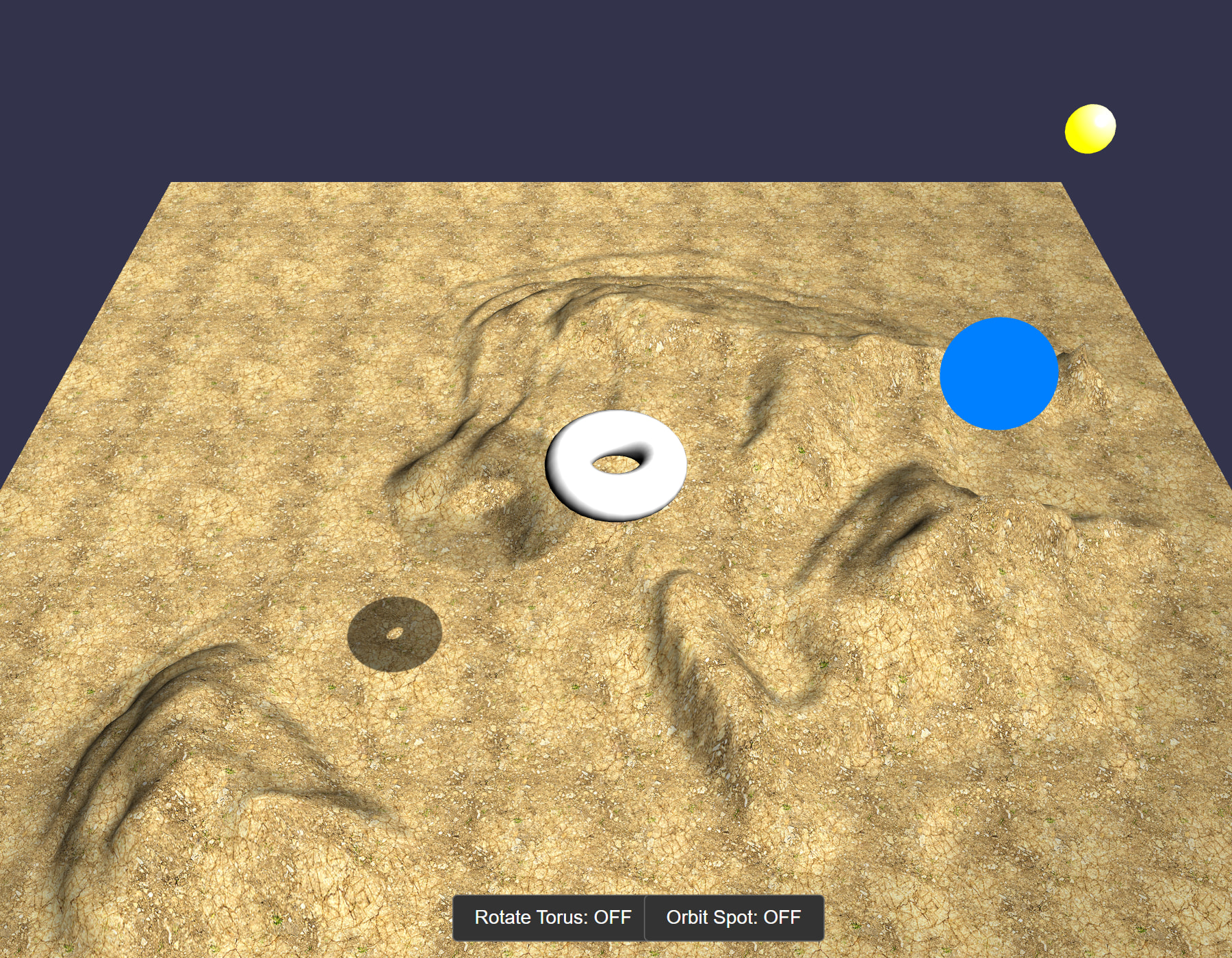
All rendered live in Babylon Lite on WebGPU - and each one matches its Babylon.js reference pixel-for-pixel.
Shadows + heightmap terrain:
Refraction in an IBL interior:

See it running - live demos
Static screenshots only tell part of the story. We’ve also built a gallery of standalone, production-bundled demos - real, interactive apps running live in your browser on Babylon Lite, each showing the exact size it ships (engine + demo code only).
 Explore the live demos at babylonjs.com/lite-demos

From a clean-room, GPL-free DOOM (id Tech 1) and a playable LibreQuake E1M1, to a streaming voxel sandbox, a Freeciv-style isometric strategy map, a scene-less raymarched Torus States shader, an OffscreenCanvas demo that keeps rendering inside a Web Worker while the main thread is blocked, a Mario-style platformer, Tetris, and Three.js’s Littlest Tokyo - every one runs on WebGPU and is ruthlessly tree-shaken. Many ship the entire experience in a tiny bundle: the DOOM player, for example, is about 43 KB gzipped.
Porting from Babylon.js
Moving a scene to Babylon Lite is meant to feel familiar. The API is different - there are no classes, and behavior lives in standalone functions rather than methods - but it is still similar in shape and naming, so the concepts carry over directly. We’re preparing extensive documentation to help you port your scenes, with side-by-side guides, an API map, and comprehensive examples.
Here is the exact same BoomBox PBR scene (the one shown above) in both engines:
Babylon.js
import { WebGPUEngine } from "@babylonjs/core/Engines/webgpuEngine";
import "@babylonjs/core/Helpers/sceneHelpers";
import { HemisphericLight } from "@babylonjs/core/Lights/hemisphericLight";
import { SceneLoader } from "@babylonjs/core/Loading/sceneLoader";
import { CubeTexture } from "@babylonjs/core/Materials/Textures/cubeTexture";
import { Vector3 } from "@babylonjs/core/Maths/math.vector";
import { Scene } from "@babylonjs/core/scene";
import "@babylonjs/loaders/glTF";

const engine = new WebGPUEngine(canvas, { antialias: true, adaptToDeviceRatio: true });
await engine.initAsync();

const scene = new Scene(engine);

const light = new HemisphericLight("hemi", new Vector3(0, 1, 0), scene);
light.intensity = 1.0;

await SceneLoader.ImportMeshAsync("", "https://playground.babylonjs.com/scenes/", "BoomBox.glb", scene);

scene.environmentTexture = new CubeTexture(
    "https://assets.babylonjs.com/core/environments/environmentSpecular.env",
    scene
);
scene.createDefaultCamera(true, true, true);
scene.createDefaultEnvironment({ createSkybox: true, createGround: true, skyboxSize: 1000 });

engine.runRenderLoop(() => scene.render());
Babylon Lite
import {
    createEngine,
    createSceneContext,
    createDefaultCamera,
    createHemisphericLight,
    loadGltf,
    loadEnvironment,
    addToScene,
    attachControl,
    registerScene,
    startEngine,
} from "@babylonjs/lite";

const engine = await createEngine(canvas);
const scene = createSceneContext(engine);

addToScene(scene, createHemisphericLight([0, 1, 0], 1.0));

addToScene(scene, await loadGltf(engine, "https://playground.babylonjs.com/scenes/BoomBox.glb"));

await loadEnvironment(scene, "https://assets.babylonjs.com/core/environments/environmentSpecular.env", {
    groundTextureUrl: "https://assets.babylonjs.com/core/environments/backgroundGround.png",
    skyboxUrl: "https://assets.babylonjs.com/core/environments/backgroundSkybox.dds",
    skyboxSize: 1000,
});

const cam = createDefaultCamera(scene);
attachControl(cam, canvas, scene);

await registerScene(engine, scene);
await startEngine(engine);
Notice the shape is the same: create an engine, build a scene, add a light, load a glTF, set up the environment and camera, then run. The difference is that Lite hands you plain data plus tree-shakable functions instead of classes and methods, which is exactly what lets the bundler strip everything you don’t use.
Frequently asked questions
Which browsers does it run on? Babylon Lite is WebGPU-only, so it runs anywhere WebGPU is available: Chrome and Edge 113+, and recent Firefox and Safari. There is no WebGL fallback by design.
Will Babylon.js features come to Lite? Yes - bringing Lite up toward Babylon.js feature parity is our top priority. Features land as isolated, tree-shakable modules so the engine grows without bloating your bundle.
Can I mix Babylon.js and Babylon Lite in one project? They are separate engines, so a given scene is built with one or the other. Because the APIs are similar in shape, the concepts and assets (glTF, .env, textures) carry straight across when you choose which engine fits a project.
Is it production-ready? Is the API stable? Lite is young and the API will keep evolving as we close the feature gap. It is fully open source and usable today - we’d love early adopters, with the caveat described next.
Does Babylon Lite guarantee backward compatibility? No - and this is one of the most significant differences from Babylon.js. Babylon.js treats backward compatibility as sacred; your code keeps working across versions. For Babylon Lite, backward compatibility is explicitly not a first-class goal: breaking changes are allowed when they protect bundle size, performance, or tree-shaking. We’ll make those changes with caution, communicate them clearly, and avoid churn where we can - but you should expect that upgrading Lite versions may require code changes, and pin a version accordingly. This is a deliberate trade: the freedom to break is part of what keeps Lite small and fast.
Does pixel-perfect mean exactly identical? It means visually indistinguishable, enforced by an automated per-scene MAD threshold in CI (see above). The goal is Babylon.js-quality output you can’t tell apart by eye.
What’s next
This is just the beginning. Our roadmap from here:
- Feature parity with Babylon.js. We’ll keep closing the gap, bringing Babylon Lite up to the same feature level as Babylon.js so that more and more scenes can be built in Lite without compromise.
- A Lite Viewer. A drop-in, ultra-light viewer for showcasing models and scenes with the smallest possible footprint.
- A Lite Playground and Sandbox. The tools you love from the Babylon ecosystem, reimagined for Lite, so you can prototype, share, and drag-and-drop assets in seconds.
And just as importantly: the next months will be all about listening to this community. We want to hear what’s missing, what you’d need before reaching for Lite, and where it should go next. Your feedback will directly shape the roadmap.
In short
- Babylon.js: fast, flexible, unopinionated, maximally compatible - the right default for most projects.
- Babylon Lite: WebGPU-only, classless, ruthlessly tree-shakable - when you need the smallest bundle and the highest performance, with pixel-identical results.
Two engines, one family, moving forward together. Pick the one that fits your project - and switch between them knowing the pixels won’t change.
Check it out
Babylon Lite is open source and available now. Explore the code, browse the scene gallery, play with the live demos, and follow along with development:
github.com/BabylonJS/Babylon-Lite
 Live demos: babylonjs.com/lite-demos
Star the repo, open an issue, and tell us what you’d want before reaching for Lite.
We can’t wait to hear what you think. 


 This would be useful for a migration strategy.
