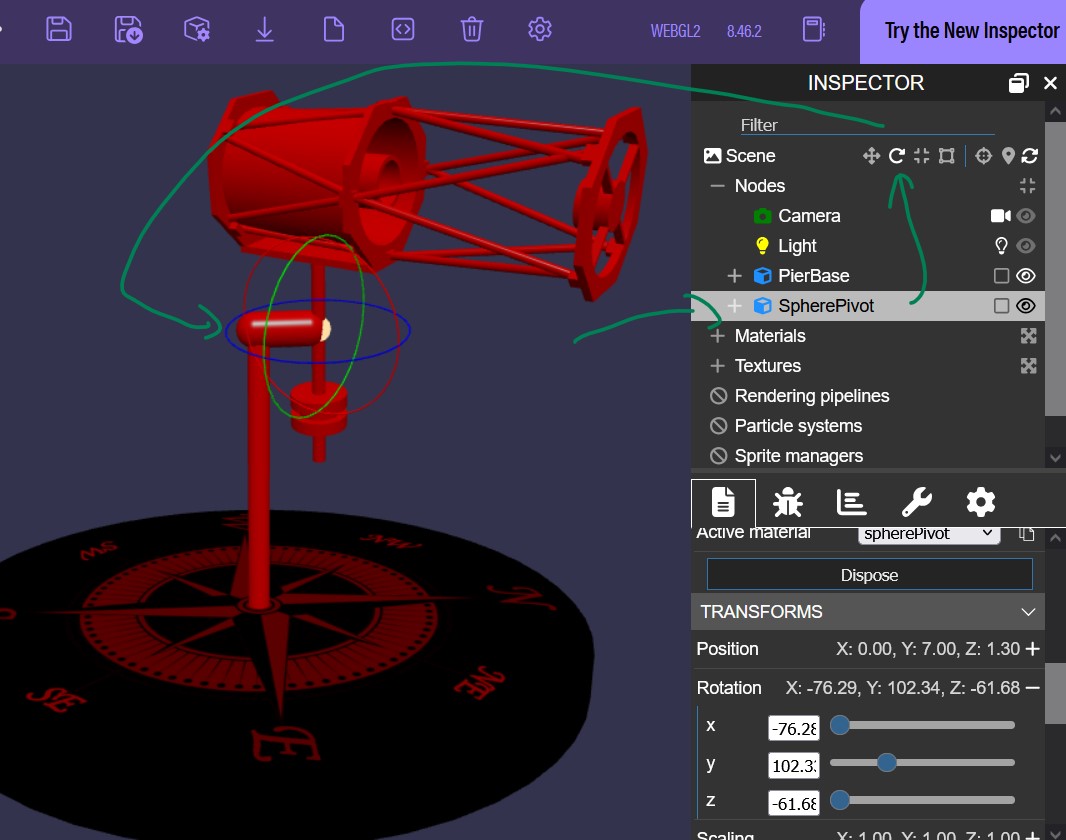
Hi, I’m a beginner and need some direction. Some background… I’m writing an Avalonia app that will eventually host this along with data coming from rest servers that host drivers for telescopes. Currently I’m using VS Code to work with Babylon.js because it’s seems easier. I’ll move the code over to my app one I’m happy with the 3d work.
I have a few issues but first I can’t seem to get my axes working correctly, as in real life. Using Inspector I select “SpherePivot” and use the Rotation slides. Leaving Y alone, X and Z correctly turn the appropriate axes, although the min/max are not in the correct spots. Y is suppose to represent the Altitude or the tilt. If I move Y is throws the other axes out of correct rotation. How would I tilt the telescope back from the pivot point and still maintain the same rotations for X and Z?
Eventually I’ll be binding all the axes from the drivers to my program using degrees so that it correctly shows the positions.
I hope this all makes sense, Any help appreciated!
I apologize for not fully figuring out all the telescope meshes and setting up a proper rotation hierarchy, but I want to convey the core idea.
Currently, you’ve added a camera and attached its control to an ArcRotateCamera that rotates around the object. However, what you actually need is to rotate the telescope itself — specifically its individual axes — at different angles.
camera.detachControl();
To simplify this example, I have detached the camera controls and linked the rotation to specific telescope elements instead. Try opening this example and use the arrow keys on your keyboard to rotate the telescope. The horizontal arrows will rotate it along the Y-axis, and the vertical arrows will adjust the tilt of the hinge.
The next step is to attach another camera inside the telescope lens using a TransformNode or by setting a parent. You will then be able to switch to this camera. In the end, you’ll have two cameras: one viewing the telescope, and another representing the telescope’s ‘eyes’. The rotation will be applied only to the telescope, and the attached camera will automatically follow its movement.
Thanks for replying. I’ll have to evaluate what you’ve setup but at first look it doesn’t follow the mechanical movements of a real scope. The only pivot point should be the spherePivot. It does seem to tilt but It lost the other 2 axes movements. telescope’s ‘eyes’ would not be needed, only need the view to see the orientation of the scope to the compass and to view that from different angles.
In the past I’ve use the HelixToolKit which has been in my production app for years but that only runs on windows.
The gizmos helped a lot. I ended up using axes from two different objects to get my needed movements. It would be nice to have all the movements from one object but couldn’t figure it out. Hopefully this should work.