Hi
We have this PG in one of your toturials:
I was wondering can we give water lego bricks as well a little bit rotation as well with the position movement?
There is a Rotate2d node but I do not know will this work.
Regards
Hi
We have this PG in one of your toturials:
I was wondering can we give water lego bricks as well a little bit rotation as well with the position movement?
There is a Rotate2d node but I do not know will this work.
Regards
@PolygonalSun @sebavan @Evgeni_Popov anyone?
You do not need to add @ to everyone, this was over the weekend and nw we will have a look shortly 
@peterimg My apologies for the delayed response. I’ve spent some time today thinking through your question and how best to answer it.
Yes you can indeed add rotation along with the position movement. As with anything in computer graphics, there are countless ways to accomplish a goal like yours. Let’s start here with this modified playground:
Lego Fun | Babylon.js Playground
If you pay close attention, you’ll be able to see that each Lego stud is now rotating around the local Y-Axis. Basically, it’s now “spinning” in y as it rises and falls.
This is due to introducing rotation math after the Mesh.position node, and before the WorldPos node in the Vertex shader.
This is really the important part. You can insert any type of translational data at this point to move the vertices of each instance in any way that you wish. In this case I’ve added the following nodes/math to allow the vertices of each stud to spin around it’s own origin.
Again, these nodes can be whatever you’d like them to be. While this simple example has each Lego stud spin around each local y axis for each instance, you could easily rotate the studs along X and Z as well. As the saying goes…”the world’s your oyster.”
I hope this helps you understand how and where you can modify this shader to add rotational transformation to the vertices of each instance in the Node Material.
Cheers!
Hi @PirateJC
That’s the problem. I cant rotate them at any other axis. Cause if I do that they start scaling and rotating.
If I change Y with X this happens:
I have darker “Side“ of it, Bottom facing up but the light is not changed.
This would be 70% of what I waned. And I need the light to work.
Could you take a look at that and tell me where to set the light?
Regards
Peter
Hi @PirateJC
I symplified the shader just to have a rotation and light. No reflections or anything fancy.
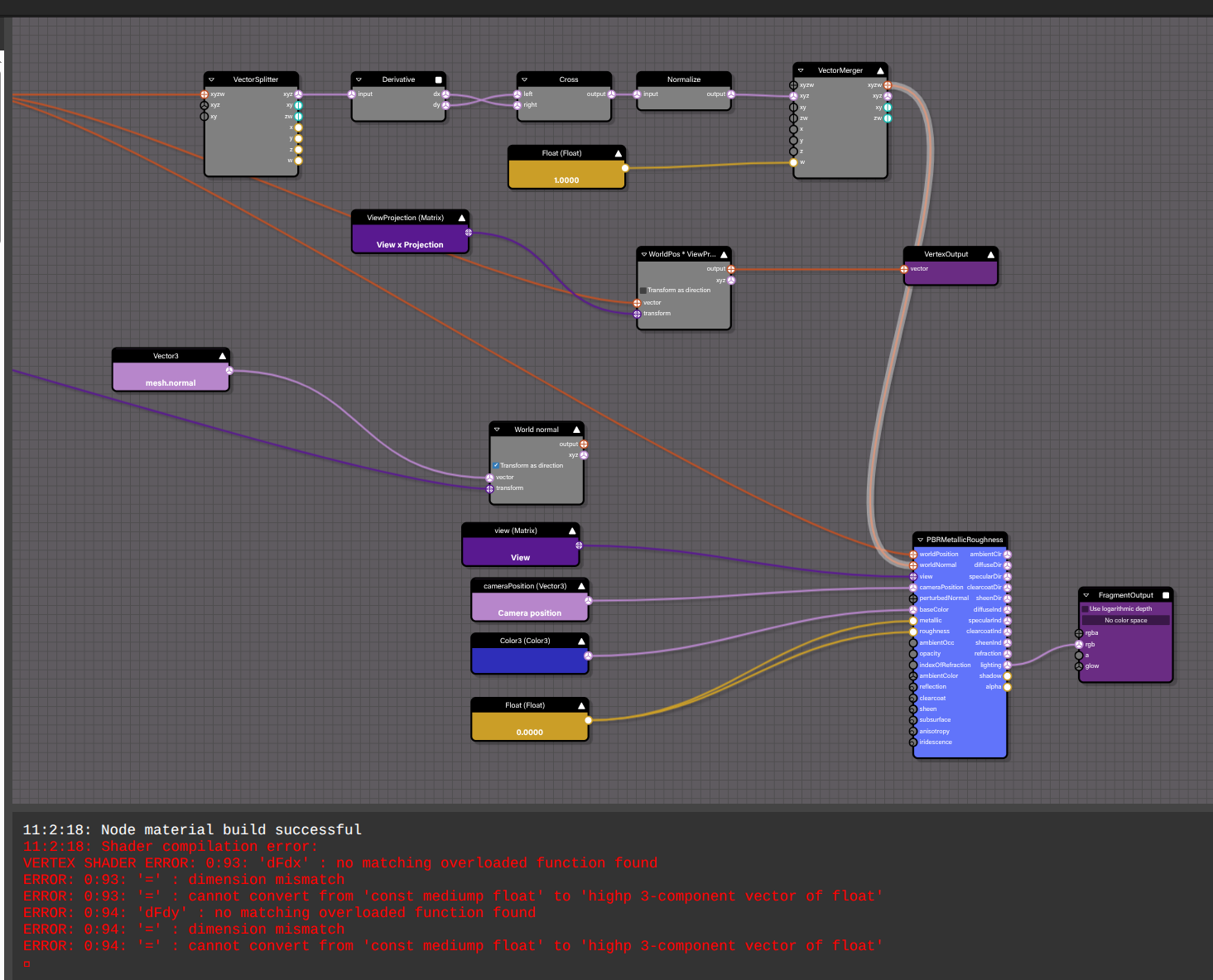
I found a PG that was able to recalculate normals from the world position but it throws an error now:
If you add that connection you will see it.
But it worked in the other @Evgeni_Popov ticket:
If I also use the vector 4 at the beginning it makes the same error:
I would love this to work.
Regards
Peter
Regarding your error, you cannot use Derivative block on a vertex shader part. It needs to be use in a fragment part. And unfortunately the PBRMetallicRoughness block will expect its world normal to come from a vertex shader.
Here is a fix without the PBR node:
Lego Fun | Babylon.js Playground
Hi @Deltakosh
That’s the whole point of my issue, to use it with PBR.
I already did have a fix with just the light.
How to fix it with PBR?
You can then “trick” the system by plugin it into the perturbNormal which is a fragment side property:
Lego Fun | Babylon.js Playground
@Deltakosh OK this looks like it has a potential. I will connect all in my app and let you know
Thanks
Good luck!
Hi @Deltakosh
It worked sort of ok. I needed negate the meshes normal but…
Now its ignoring mesh smooth groups. And ll my meshes are flat shaded all of the sudden 

Is there a way to add that back in?
new Peturbed normal is doing this. If I use World normal with Mesh normal all goes back to normal.
Is there a way to apply to meshNormal with worldNormal node transformations from our new calculated normals?
As long as you are not using mesh orignal normals this will happen.
In your case you are recreatibg the normal with the derivative so you are no more taking smooth groups in account
Instead of recreating the normal with the derivatives of the position (which leads to flat shading), you could try to transform the normal with the same transformation you use to transform the position?
I saw one of other threads about this.
But I do not know how to do it could you help me with figuring this out?
I was thinking I could transform matrix from World Normal by the calculated normal but its still looking flat.
I’m loading GLB files so I have parts smooth and pats sharp  I would need mix of them so having original normal’s sounds great.
But I cant get it to work
You can copy/paste the Rotation frame and use the copy to rotate the normal: