When adding lightmap texture in RGBD format to a material in inspector, it doesn’t understand that format and uses regular RGBA and it looks completely wrong.
Is there any possibility to add a tick to force inspector to understand the RGBD format?
It should not be difficult, the problem is how to integrate it in the UI…
cc @PatrickRyan but be patient, some of the team is on vacation this week.
No problem, take your time. I was only asking if it is doable, and now I know it is LOL
@joie, when loading in your RGBD texture, are you setting the flag to identify it as RGBD? @Evgeni_Popov, it seems that if we see a texture with this flag set, we should be able to display as RGBD without any UI for it.
I think I read your initial question wrong. @joie are you saying you are importing the image through the inspector, or are you loading the texture into your scene through code? If it’s code, then you should be able to set that flag. If you are doing it in the inspector, then we would need a dropdown on Format to be able to change to RGBD. In this case it should assume default as it currently does but then allow the user to change to any other format we support. This means the user will need to understand which format they need to assign to the texture, but if they are loading textures through the inspector, we have to expect them to know what the formats mean and how to pick the right one for the texture.
Answering your question, yes, we are loading the lightmaps via coding, but in the final release.
When doing the lookdev process, it is just me lurking around and changing things and parameters in order to liberate the coder from that tedious task, and I’m not coding guy at all.
So yes, I’m trying to iterate in the inspector and loading those ligthmaps via UI.
@joie, when you say lightmap, are you are speaking of an environment file (.env), or do you mean a lightmap assigned to a material? I am guessing from the context, you mean environment file and if so, how are you updating through the inspector?
There is an easy way to update the scene environment by clicking on the scene node right at the top of the inspector

Then you will see a link to the Env. texture and a button to Update the environment texture.
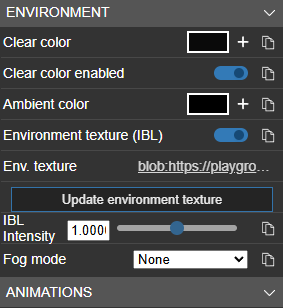
Clicking the button will allow you to choose another cube texture to be applied to the scene. As you can see in the image above, I have uploaded a new texture which appears as a blob in the scene. But when you click on the link you will see that the file loaded as a cube map and displays in scene correctly.

Is this what you are doing to update your environments?

@joie, I’ll admit I am confused about why you would want to use an RGBD image for a lightmap tagged as a shadow map. The RGBD file allows you to capture HDR values above 1.0, but when used as a shadow map, the values below 1.0 will darken the material as expected. But values over 1.0 would scale the base color value by the HDR value. So you would get darkened and lightened values all at the same time.
Can you explain what you are trying to achieve with passing HDR values to a light map used as a shadow map? If you can share an image of what you are trying to achieve - if it’s public - that would be helpful as well.
In earlier posts about lightmaps I was suggested to do so and use them as shadow map. In fact they work as expected that way because they act very much like the original Arnold render. I really don’t know if it is “technically correct”, but it LOOKS correct. when used without shadow map, everything looks washed out. I’ll try to show you some pics.
Thanks.
Here you can see the car with the lightmap applied with “as shadow map” ON:

And here with that feature OFF:

I’ve changed that feature in the car’s shader only in order for you to see the difference.
1 Like
@joie, it makes total sense to me looking at your renders that you want to use shadow map for this. But it appears you are only using LDR data in your texture (all values under 1.0) which is why I am confused about using and HDR file (RGBD) for this image. Unless the extra precision on your values is needed to smooth out the texture, you are adding cost to the shader as the alpha channel needs to be used to determine the HDR value on every pixel before being applied as a shadow map. If all values are LDR, then you would get better performance with a PNG or JPG image.
This is a bit confusing for me.
As far as I understand, lightmaps based on an HDR source file, must be converted to 8bit PNG, but in “RGBD” format, so they store the super bright colors in the alpha channel.
So I did that. I took the original .hdr file and converted to RGBD format.
But if I want to test it in the inspector, I don’t have any button to tell it the format is RGBD, so it understands it as regular RGBA format.
So now, our workflow is as follows:
Offline render bake to EXR file → Postprocess and fix errors and export to HDR file → Convert it to RGBD PNG format via this playground → apply that RGBD lightmap to objects via code.
FYI… The Babylon Toolkit does all this automatically. Here is a demo playground use the Unity Starter Assets as samplescene.gltf. This is ab interactive GLTF exported by the babylon toolkit and loaded in the playground … All material lightmaps are encoded in the gltf.
We encoded the EXR exported lightmaps from Unity to RGBD (and mark them ISRDBG). The toolkit will either pack the RGBD into 8-Bit Lossless PNG or WEBP. This is all done in one single step during the scene export from Unity to GLTF.
Sorry, we use MAYA to bake the lightmaps, so that ensures complete coherence between the reflection environment and the lighting of the scene. No Unreal or Unity used.
@joie, the confusion here is stemming from similar terms that mean different things based on the context. Let me detail this spelling out the terminology so that everyone can follow. Apologies if I am describing concepts that you already know.
What you are describing is Image Based Lighting (IBL) which is a cube map containing High Dynamic Range (HDR) data that is used in Physically Based Rendering (PBR) shaders. These are normally derived from an HDR file format like .hdr or .exr which contain 32-bit floating point values for each pixel. These files routinely carry pixel values in the 10s or 100s of thousands for pixels that represent the sun. When using data like this as an IBL, those values will contribute to the amount and direction of light on a material surface.
However, the size of storing that data in memory and on disk is prohibitive for real-time rendering, so we decided on creating an Environment (.env) file format to reduce the size of the data. This is where we convert the HDR format to Low Dynamic Range (LDR) values in RGB and a Divisor in the alpha channel. This divisor is a value that our maximum value of light is divided by to shift the value in RGB to the correct HDR format. By its nature, this format will clamp some values, but we get better fidelity in the lower range of values by giving up some upper range. So the whole purpose of our RGBD format is to represent values larger than 1.0 per pixel for applying Image Based Light.
The Lightmap that is available in our materials serves a slightly different purpose. Lightmaps are used for a couple of reasons. One is to light a mesh without the need for punctual lights in the scene. This will make the rendering cheaper because no lights need to be calculated. This can be useful for static, or background meshes where the light does not need to change. The other main use is to improve the quality of shadows on an asset by baking them with a ray tracer and then applying those shadows to the material itself. Again, for light that is not dynamic, this makes the render cheaper - as we don’t need to calculate a shadow texture - and improves the quality of the soft shadows. Typically, we use LDR images for lightmaps or shadowmaps because the shader is expecting LDR values.
For the image you showed above, you are using a shadowmap to darken the tones of your car based on the baked soft shadows. The texture - in this case - will be multiplied over your base color. And in your texture, you are using all LDR values (values less than 1.0 per channel per pixel). If you had values over 1.0, you would be getting hot spots in your material where the base color is actually getting brighter. Having HDR values (over 1.0) would imply that the pixels that the texture is applied to are actually emissive and casting light. I can see a possibility where you may want to do that, but that light wouldn’t affect other meshes in the scene as materials are not part of the lighting calculations and your render would clamp at 1.0 per pixel anyway, so the utility of making a material emissive through an HDR light map would be a more expensive method than using an emissive texture.
So, is there a case where you may want to use an HDR image for a shadow map? Possibly. Since you have access to HDR values, you will also increase your precision for values under 1.0 which could make your shadows smoother. Though you would need to test how much of an improvement you can gain for the extra expense of extrapolating HDR values from your RGBD texture. I hope this makes sense.
I get that, I am just saying, I also pack RGBD lightmaps from Unity EXR into a 8Bit png or webp and use that as shadowmaps.
All the lighting and shadows are using baked rgbd lightmaps as shadowmaps
And here was my example, just a reference