I really like your repo!
Notable Updates (Feb 2025)
Not much to write about, but a lot of coding was done.
Feature
- Game is now touch capable. Touch controls should be all up and working. Please (for your eyes sake) do not try with device resolutions < 500px.
Call for aid
- Added Elon Husk’s Raiders of the lost rice map. I had fun making this.

- Added camouflage passive ability for creeps. no pics for now, I still have a stack of abilities to add.
Full changelog is available on the fb page (really need a better place for it but wth). Enjoy!
1 Like
Q2 2025 Notable Updates
Some cool stuff were implemented, yay !
Features
- Game now uses gpu picker, so yes
scene.skipPointerMovePicking = true! Noticeable perf improvement in ffox with my dense mesh heavy stress test scene (see above posts). fps no longer dips during pointer moves which is a good thing! - All existing glsl shaders are ported to wgsl with some improvements, eg, the wgsl version of the water shader is many times more improved! This is preparatory (awaiting Milestone 2), still not using webGPU engine even on Chrome…for now. If the spec moves too slowly, its likely I’ll write a dedicated graphics engine… Yh, I want to eventually port to gpu only and draw calls will be a thing of the past, we’ll see…
- Added a long overdue outliner, done in old-style with new tech. Still gpu+cpu as gpu picker uses
async readPixelswhich causes artifacts. Perf is < O(n) for overlap detection with a slightly heavier memory requirement. Whatever gain from adding the gpu picker is spent here. Works great withrenderOverlayand the gpu picker.renderOutlineis very old tech not suitable with corners, hence this feature was badly needed. I liked the result a lot!
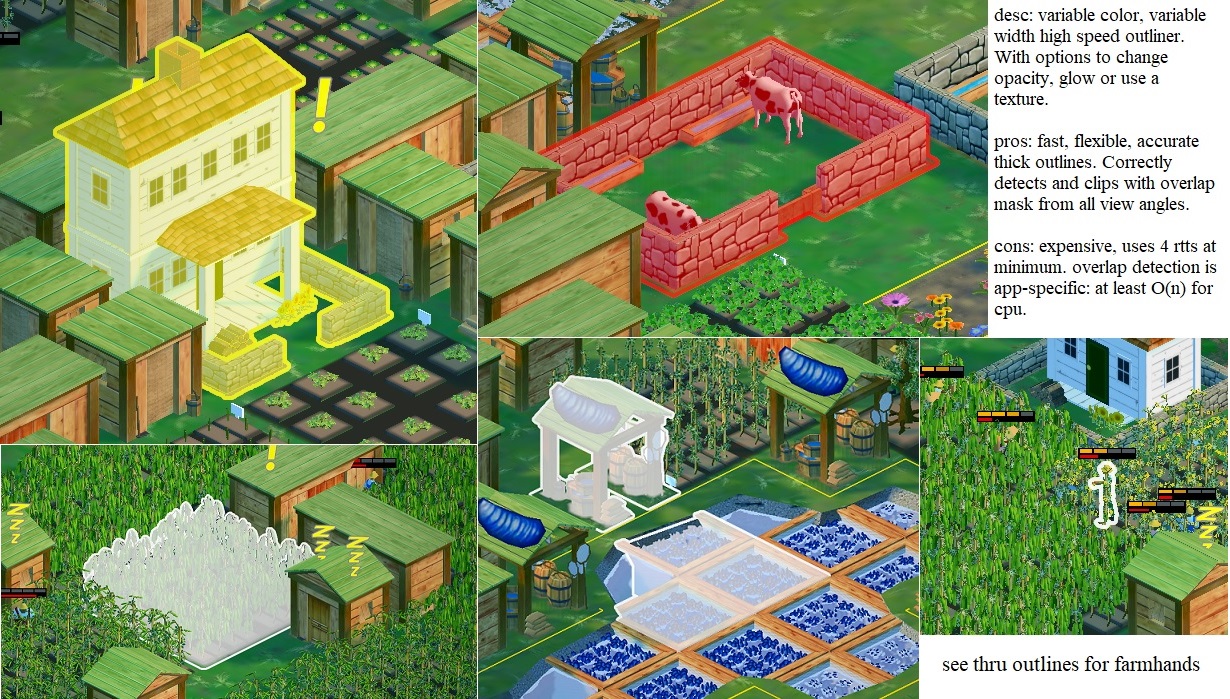
Still have bugs to squash but should be back on track for Call for aid development, cheers! 
7 Likes
I can not find back the demo link ?
If you are referring to the outliner, there’s no demo link, just a raw port. Alternatively, you can try in Seedborn with the guest login, hope it helps. Cheers!
2 Likes
Q3 2025 Notable Updates
- Site-wide rework to use css components. Added in-game theme picker.
- Experimental work on frame graphs. Not live but results are looking great!
- Upgrade security posture, drop all facebook associations as it does not meet enforcement standards. Yes, facebook login is no longer supported.
3 Likes
Q4 2025 Notable Updates
- The entire game has been rebased and upgraded to typescript, due to a corporate conformance advisory sitting in my inbox for months
 . Site-wide should complete by End Jan 2026.
Looking back on 2025
I feel this year has been a mixed bag of interruptions as far as Seedborn development is concerned. While most are positives, game dev has stalled. Hope to pick up after typescript rebase. For new devs working with bjs, my advice is
a) use Typescript
There has been a major ecosystem shift in web dev, more tools in ts than ever before and almost all more secure than current js counterparts.
b) work with the GPU picker
This feature is under-rated. Been using it > 6 mths and is amazing!
c) start working with frame graphs
Only for veterans, typical web dev usage do not need custom rendering. I understand the api is still in flux, but learning how to think of rendering as a graph gives you a head start.
Otherwise, I’m looking forward to webGPU and the perf it might give. Maybe 2026 will be the year. Shrugs.
Wishing all a Merry X’mas, Happy New Year and stay safe!


8 Likes
Have a great end of year !!!
1 Like
@phaselock I just tried playing the game but didn’t see the “Accept” button to get passed thew privacy policy pop up.

This was the error in thew Console:
Failed to load resource: net::ERR_BLOCKED_BY_CLIENT
This was using Brave with adblockers enabled, out of curiosity I tried with Firefox and it worked fine. Perhaps the ad-blockers & Brave built in blockers hid the Accept button.
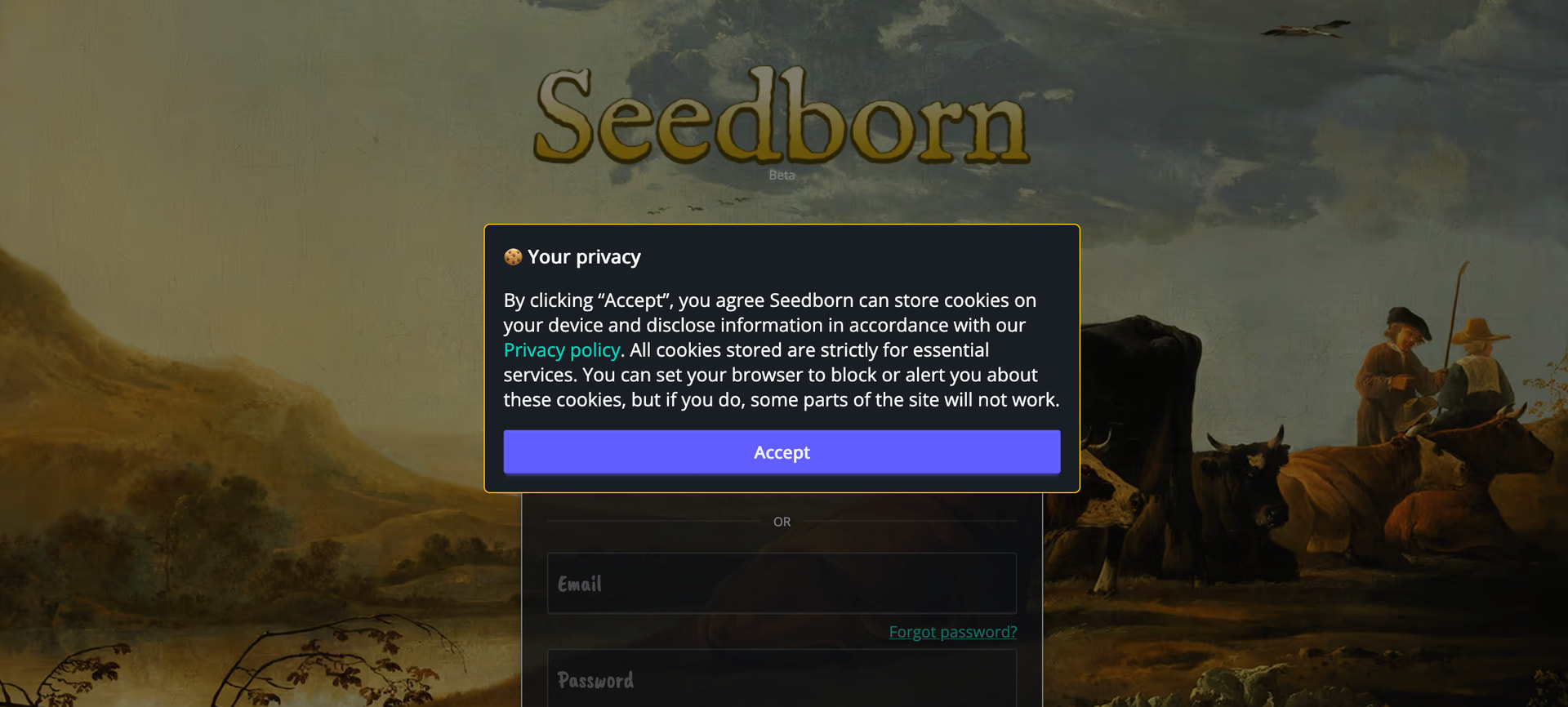
Thanks for trying out! I understand Brave’s adblocker is designed to block intrusive elements like the cookie popup. You can
a) disable all adblocking and tracking protections for Seedborn domain, there are no ads on-site.
b) modify how strictly Brave blocks trackers and ads in the settings.
c) or just use with Chrome/Firefox. These are the only supported browers atm.
There are no plans to actively support other browsers (safari, edge, brave etc. No manpower). Sorry for the inconvenience .
1 Like
A frame graph stress test (supposed to be done last yr before I got interrupted  ).
).
Browser: Chrome
version: v8.49.6
Interestingly, there is no visible difference against scene.render in Chrome other than some variance in stats. Firefox perf isn’t far behind, maybe about 5~10fps. This feature does not seem as scene heavy even with the horrible number of particle systems. I keep wondering what else I can do/optimize to squeeze more bandwidth, tho, hmm…
2 Likes
I don’t understand why performance is worse in Firefox, because the frame graph version should normally be (at least) equivalent to the standard pipeline version…
A few months ago, performance was slightly better, even in Firefox:
But I understand that the tests were not the same.
I don’t think its worse. You can see below capture in firefox (cut some behind-the-scenes ps for reduction compared to previous vid, still the same scene and setup), its quite comparable. But eyeballing the fps shows more dips into <40fps than Chrome from my end.
I like my current setup. A primary scene is thin-instance and mesh heavy but with fairly stable load/drawcalls. Another scene that’s volatile, instance/ps heavy with bursts/frame-to-frame changes (as above).
I don’t mind profiling the same stress scene (as captured in the other thread you quoted) tomorrow. Would be nice to get a perf summary every once in a while.
3 Likes
Performance test 050226: Chrome vs Firefox, scene.render vs framegraph
Stress test scene: see above

Don’t see any huge changes from Sept 2025’s, some minor improvements on ffox. Framegraph on Chrome is still the best setup by far. The rest are more or less than same. Hope it helps.
Thanks for the figures!
Note that if you want the count of active meshes to be accurate even with frame graphs, you should do what the stat pane does in the inspector:
let activeMeshesCount = scene.getActiveMeshes().length;
for (const objectRenderer of scene.objectRenderers) {
    activeMeshesCount += objectRenderer.getActiveMeshes().length;
}
1 Like
Whoo  Now we are talking. Over 10fps plus.
@phaselock What is the total vertex count in the benchmark scene? And are the 641 total or active meshes?
Got it, updated my debug ui, thanks! I don’t spend too much on stats cos it takes time away from game dev and sometimes the stat tracking consumes bandwidth as well.
Scene total verts: 589549
641 refers to total meshes as per scene.meshes.length. Active meshes is in the line above.
The stress test scene is strictly speaking occupying only a quarter of the available play area. I stopped adding in environment assets/eye candy when I saw the metrics, so I would not consider the stress scene a benchmark per se. I’d expect reasonable vertex count to be hovering around 1M+ in actual play for high level users.
Hope it helps, cheers!
1 Like
Q1 2026 Notable Updates
General
- TS-rebase is completed for entire site, backend upgraded, lots of refactors and optims. Glad its done tho ts6 is looming.
- Start migrating tooltip to use css anchoring positioning api, reduce pointermove event listeners.
- Added a coin vfx for picking gold crystals, selling produce, winning gold etc.
Call for aid
- Major re-balance and rework tower upgrade costs. Optimize ps for all AoE Towers (single emitter single ps to multi-emitter single ps) for perf.
- Added ps manager for creeps vfx. All creep ps are now greatly optimized (single emitter single ps to multi-emitter single ps). Comparison with previous ffox capture in Feb: 1040 ps is now reduced to a mere 47 ps! yay!.
- Added a whole bunch of icons for ui, tooltip etc.
- Added 6 x new creeps, 6 x new abilities, 1 x new map (all starter maps are up, yay!) for the intel track. Towers can be debuffed, creeps can be buffed. blah blah blah…

A whole bunch of content was added to cfa with lotsa improvements. I do like the PS manager tho, prolly my first time ever seeing 60fps in ffox for a stress scene  . Enjoy!
4 Likes
Q2 2026 Notable Updates
General
- Many minor reworks, move away from soft type validation to stricter schema chks on incoming data.
- Stylistic fixes. Also fixed accept cookie button not showing on Brave browsers, captcha overflowing containers etc.
Gameplay
- Outliner thickness now accounts for camera distance.
- Land boundary now use GPU based greased line.
- Added guards, lots of perf improvement, refactoring, bug fixes etc.
- Prep work for other types of characters other than existing farmhands.
Call for aid
- Added 4 maps with difficulty, new modes (random spawn, waves do not wait).
- Added 4 x new creeps, 2 x new abilities. Now at 26 creeps, 15 abilities.
- Creeps reworked to give bounty when killed, last hit is tracked.
- Towers can now be AoE debuffed by creep abilities, cf below. This means they can also be AoE buffed in future, opening up more user interaction possibilities.
- Now uses gpu picker for touch devices.

Was planning for more interesting Call for aid content this quarter but a surge in AI-led attacks coupled with advisories from local agencies meant I had to tighten up on code, both front and backend. And its still not quite complete, hope to get more game related work in Q3, cheers!
PS: This project is tagged as noai, I have updated the OP. All content on site is wholly built without any AI, including code, artwork etc.
5 Likes
Nice, congrats on the release