hi ,
this is my first project about product configuration , what is your opinion?
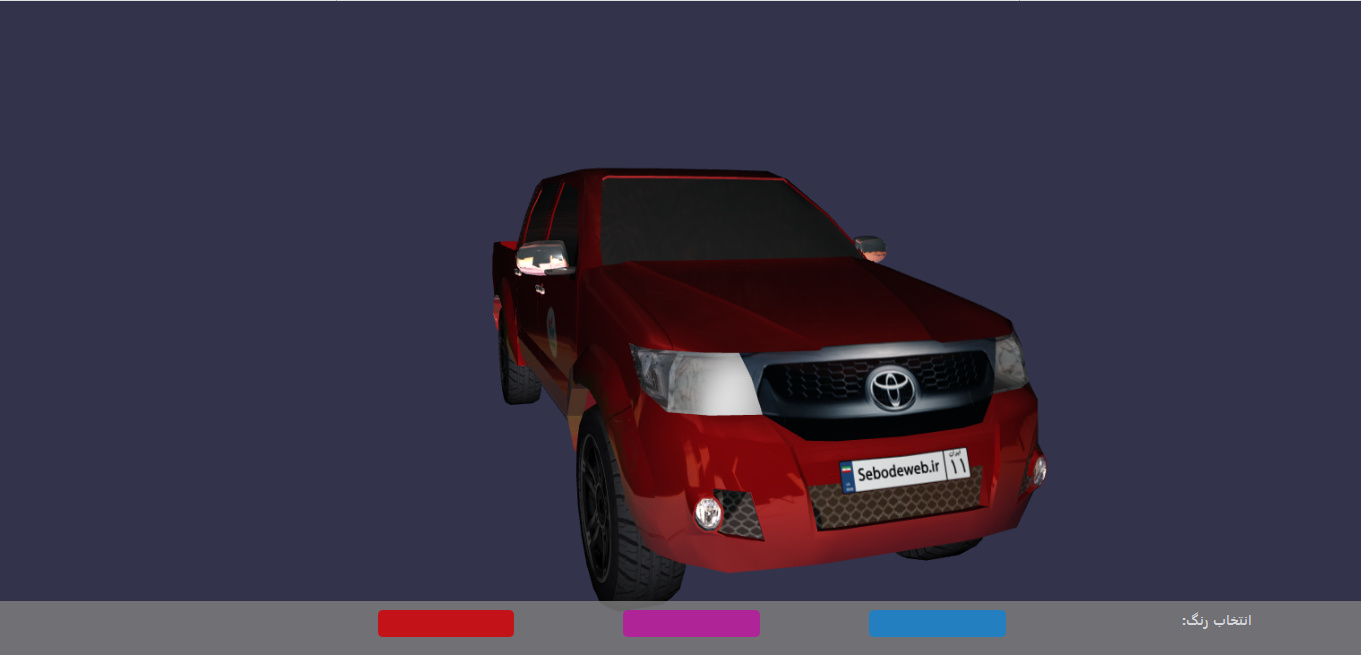
5 Likes
<!DOCTYPE html>
<html>
    <head>
        <meta http-equiv="Content-Type" content="text/html; charset=utf-8" />

        <title>Babylon.js sample code</title>

        <!-- Babylon.js -->
        <script src="https://code.jquery.com/pep/0.4.2/pep.min.js"></script>
        <script src="https://cdnjs.cloudflare.com/ajax/libs/dat-gui/0.6.2/dat.gui.min.js"></script>
        <script src="https://preview.babylonjs.com/ammo.js"></script>
        <script src="https://preview.babylonjs.com/cannon.js"></script>
        <script src="https://preview.babylonjs.com/Oimo.js"></script>
        <script src="https://preview.babylonjs.com/gltf_validator.js"></script>
        <script src="https://preview.babylonjs.com/earcut.min.js"></script>
        <script src="https://preview.babylonjs.com/babylon.js"></script>
        <script src="https://preview.babylonjs.com/inspector/babylon.inspector.bundle.js"></script>
        <script src="https://preview.babylonjs.com/materialsLibrary/babylonjs.materials.min.js"></script>
        <script src="https://preview.babylonjs.com/proceduralTexturesLibrary/babylonjs.proceduralTextures.min.js"></script>
        <script src="https://preview.babylonjs.com/postProcessesLibrary/babylonjs.postProcess.min.js"></script>
        <script src="https://preview.babylonjs.com/loaders/babylonjs.loaders.js"></script>
        <script src="https://preview.babylonjs.com/serializers/babylonjs.serializers.min.js"></script>
        <script src="https://preview.babylonjs.com/gui/babylon.gui.min.js"></script>

        <style>
            html, body {
                overflow: hidden;
                width: 100%;
                height: 100%;
                margin: 0;
                padding: 0;
                direction:rtl;
            }

            #renderCanvas {
                width: 100%;
                height: 100%;
                touch-action: none;
            }
            #control{
              padding-top:10px;
                bottom:0;
                background:#808080;
			    width:100%;
                height:50px;
                height: 50px;
				z-index: 2020;
				position: fixed;
                opacity:0.8;
                font-weight:bold;
                color:white;
			}
            .materialbase
            {
            width:10% !important;
            float:right;
            height:30PX;
            margin-right:8%;

            border-radius: 5px
            }
            #material1
            {
            background-color:#2092dd;

            }
             #material2
            {
            background-color:#ce22ab;

            }
              #material3
            {
            background-color:#e90b0b;

            }

        </style>
    </head>
<body>
    <div id="control">
        <div class="materialbase">color select :</div>
        <div class="materialbase" id="material1"></div>
        <div class="materialbase" id="material2"></div>
        <div class="materialbase" id="material3" ></div>

    </div>
    <canvas id="renderCanvas"></canvas>

    <script>
        var canvas = document.getElementById("renderCanvas");

        var createScene = function () {
            var scene = new BABYLON.Scene(engine);

            //Adding a light
            var light = new BABYLON.PointLight("Omni", new BABYLON.Vector3(20, 20, 100), scene);

            //Adding an Arc Rotate Camera
            var camera = new BABYLON.ArcRotateCamera("Camera", 0, 0.8, 100, BABYLON.Vector3.Zero(), scene);
            camera.rotation.x = 0; //rotation around x axis
            camera.rotation.y = 2.9;  //rotation around y axis
            camera.rotation.z = 0;
           camera.position.x = -25;
            camera.position.y = 6;
            camera.position.z = 68;
            //camera start animate
            var cam;
            var targetEndPos;
            var camEndPos;
            var speed = 45;
            var frameCount = 200;
            var ease = new BABYLON.CubicEase();
            ease.setEasingMode(BABYLON.EasingFunction.EASINGMODE_EASEINOUT);
            cam = scene.activeCamera;
            targetEndPos = new BABYLON.Vector3(0, 0, 0);
            camEndPos = new BABYLON.Vector3(25,5, 50);
            console.log("scd.  cam.position: ", cam.position);
            console.log("scd.  camEndPos: ", camEndPos);
            console.log("scd.  speed: ", speed);
            console.log("scd.  frameCount: ", frameCount);
            // console.log("actp.  frameCount: ", frameCount);
            // console.log("actp.  newPos: ", newPos);
            BABYLON.Animation.CreateAndStartAnimation('at4', cam, 'position', speed, frameCount, cam.position, camEndPos, 0, ease);
            BABYLON.Animation.CreateAndStartAnimation('at5', cam, 'target', speed, frameCount, cam.target, targetEndPos, 0, ease);
            console.log("setCamDefault run");
            //end camera animate

            //camera limit
            camera.attachControl(canvas, false);
            camera.lowerRadiusLimit = 20;
            camera.upperRadiusLimit = 100;
            camera.wheelDeltaPercentage = 0.1;
            //end limit
            var assetsManager = new BABYLON.AssetsManager(scene);
            var meshTask = assetsManager.addMeshTask("skull task", "", "hilux/", "hux02.babylon");


        	meshTask.onSuccess = function (task) {
        	    task.loadedMeshes[0].position = BABYLON.Vector3.Zero();
        	}
        	meshTask.actionManager = new BABYLON.ActionManager(scene);

            //this part cash texchers for change
        	var grass2 = new BABYLON.StandardMaterial("grass2", scene);
        	grass2.diffuseColor = new BABYLON.Texture("hilux/c02.jpg", scene);
        	grass2.diffuseColor = new BABYLON.Texture("hilux/c03.jpg", scene);
        	grass2.diffuseColor = new BABYLON.Texture("hilux/toyota_red.jpg", scene);
        	var material1 = document.getElementById('material1');
        	var material2 = document.getElementById('material2');
        	var material3 = document.getElementById('material3');
            //start here
        	material1.onclick = function () {

        	    scene.getMaterialByName("Material #126").diffuseTexture = new BABYLON.Texture("hilux/c02.jpg", scene);
        	};
        	material2.onclick = function () {

        	    scene.getMaterialByName("Material #126").diffuseTexture = new BABYLON.Texture("hilux/c03.jpg", scene);

        	};
        	material3.onclick = function () {
        	    //  scene.getMaterialByName("Material #129").diffuseTexture.dispose();
        	    scene.getMaterialByName("Material #126").diffuseTexture = new BABYLON.Texture("hilux/toyota_red.jpg", scene);

        	};
            //end


            // Move the light with the camera
            scene.registerBeforeRender(function () {
                light.position = camera.position;
            });

        	assetsManager.onFinish = function (tasks) {
        		engine.runRenderLoop(function () {
        			scene.render();
        		});
        	};

        	assetsManager.load();

            return scene;
        }

        var engine = new BABYLON.Engine(canvas, true, { preserveDrawingBuffer: true, stencil: true });
        var scene = createScene();

        engine.runRenderLoop(function () {
            if (scene) {
                scene.render();
            }
        });

        // Resize
        window.addEventListener("resize", function () {
            engine.resize();
        });


    </script>
</body>
</html>Good job!!!
1 Like
Nice work  congratulations.
Nice work, congratulations. Reflections on vehicle stands upside down. You can handle this problem by using normal bump for the bump channel. This will work. Overall a nice run. Reflections on vehicle stands upside down. You can handle this problem by using normal bump for the bump channel. This will work. Overall a nice work 
1 Like