This is created by blender and optimized by gltf-transform, containing 4000 nodes and 12000 animation channels, can be used in benchmarking and stress test.
All models here are provided for free, and if anyone want a license, CC0 or WTFPL.
AnimationStressTest4000.zip (6.7 MB)
And one with 10k nodes and 30k animation channels.
AnimationStressTest10k.zip (5.5 MB)
To benchmark animation, rendering overhead is minimalized with instancing:
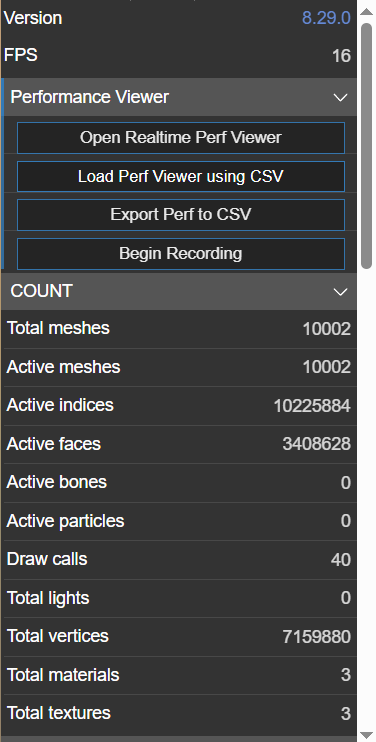
And a typical profile should just like:


The script to create the model is here, code is shared under WTFPL:
import bpy
import random
import math

# Function to create a mesh object using built-in primitives
def create_builtin_mesh(mesh_type, name):
    if mesh_type == 'CUBE':
        bpy.ops.mesh.primitive_cube_add(size=1, enter_editmode=False, align='WORLD', location=(0, 0, 0))
    elif mesh_type == 'SPHERE':
        bpy.ops.mesh.primitive_uv_sphere_add(radius=1, enter_editmode=False, align='WORLD', location=(0, 0, 0))
    elif mesh_type == 'CONE':
        bpy.ops.mesh.primitive_cone_add(radius1=1, depth=2, enter_editmode=False, align='WORLD', location=(0, 0, 0))

    # Get the last created object
    obj = bpy.context.object
    obj.name = name
    return obj

# Function to animate the object
def animate_object(obj, frame_start, frame_end):
    # Set initial random transformation
    obj.location = (
        random.uniform(-100, 100),
        random.uniform(-100, 100),
        random.uniform(-100, 100)
    )
    obj.rotation_euler = (
        random.uniform(0, 2 * math.pi),
        random.uniform(0, 2 * math.pi),
        random.uniform(0, 2 * math.pi)
    )
    obj.scale = (
        random.uniform(0.5, 2),
        random.uniform(0.5, 2),
        random.uniform(0.5, 2)
    )

    # Insert keyframes for the start
    obj.keyframe_insert(data_path="location", frame=frame_start)
    obj.keyframe_insert(data_path="rotation_euler", frame=frame_start)
    obj.keyframe_insert(data_path="scale", frame=frame_start)

    # Set final random transformation
    obj.location = (
        random.uniform(-100, 100),
        random.uniform(-100, 100),
        random.uniform(-100, 100)
    )
    obj.rotation_euler = (
        random.uniform(0, 2 * math.pi),
        random.uniform(0, 2 * math.pi),
        random.uniform(0, 2 * math.pi)
    )
    obj.scale = (
        random.uniform(0.5, 2),
        random.uniform(0.5, 2),
        random.uniform(0.5, 2)
    )

    # Insert keyframes for the end
    obj.keyframe_insert(data_path="location", frame=frame_end)
    obj.keyframe_insert(data_path="rotation_euler", frame=frame_end)
    obj.keyframe_insert(data_path="scale", frame=frame_end)

    # Set interpolation to linear
    for fcurve in obj.animation_data.action.fcurves:
        for keyframe in fcurve.keyframe_points:
            keyframe.interpolation = 'LINEAR'

# Clear existing objects
bpy.ops.object.select_all(action='DESELECT')
bpy.ops.object.select_by_type(type='MESH')
bpy.ops.object.delete()

# Create 4,000 unique meshes using built-in primitives
mesh_types = ['CUBE', 'SPHERE', 'CONE']
for i in range(4000):
    mesh_type = random.choice(mesh_types)
    mesh_obj = create_builtin_mesh(mesh_type, f"Mesh_{i}")

    # Animate the object over 1 minutes (60 seconds at 24 fps)
    animate_object(mesh_obj, frame_start=1, frame_end=60 * 24)

# Set the scene frame range
bpy.context.scene.frame_start = 1
bpy.context.scene.frame_end = 60 * 24
And the model can be loaded into playground: