Hey everyone!
My 3 year old son has wanted me to build a game called “Underwater Truck Train” where you drive a train that looks like trucks underwater. Pretty deep, pun intended!
I decided that since I’ve been wanting to move away from Unity I would use BabylonJS. I experimented with the awesome work being done on the BabylonJS Editor but decided that for my workflow I didn’t need a lot of what it was offering and instead wanted to keep everything in Blender, a tool I’m very familiar with.
So I took inspiration from projects like Armory3D and the Blender Game Engine and built an addon and a Babylon runtime that makes BJS+Blender function like Unity.
What it is
Author in Blender: attach components (colliders, rigid bodies, scripts, cameras, particles, GUI, etc.), export a .glb + .scene.json manifest, and load everything in Babylon with Havok physics and TypeScript behaviors.
Links
- WIP live demo: Babylon Level
- Docs: Babylon Level Kit — Documentation
- Source: GitHub - Elevons/Blender2BabylonKit · GitHub
- Blender add-on: install
babylon_level_kit_extension.zipfrom the repo (Blender 4.2+ / 5.x)
How it works
- glTF carries meshes, hierarchy, lights, cameras, animation
- Sidecar manifest carries ECS-style components matched by stable GUIDs (renames don’t break links)
- Behaviors are TypeScript classes with
@exposedfields edited in Blender
Supported today (high level)
- Physics: colliders, rigid bodies, constraints, triggers, collision layers (Havok V2)
- Scripts: lifecycle + collision/trigger hooks, Input Actions,
@exposed/@inputMap - Cameras, audio, 2D GUI, 3D GUI, particles, MSDF text
- Scene: IBL/skybox, fog, atmosphere, post-processing (bloom, DOF, SSAO, LUTs, …)
- Materials: Node Material Editor JSON with scan/extract/override workflow
- Workflow: export validator, Live Link (Ctrl+S → browser reload), debug colliders + inspector
- Prefabs via linked
.blend+ library overrides
Full feature list: Babylon Level Kit — 13 — Feature List
Dev tooling (optional)
- Babylon Launcher — local hub at
:3200to pick project/level, start Vite, build/serve docs, manage MCP - bjs-mcp — Cursor MCP for behavior authoring
- Extensive documentation
Status
At the moment I’m just sharing this to let people know it exists. Feel free to modify it as you’d like but it is currently under active development.
Conventions and architecture are documented in the repo (including STYLE_GUIDE.md).
Screenshots:

^ Shows Component based system in Blender

^ Shows BJS Scene editor panel in Blender, including post procesing, environment fog, input manager.

^ Shows BJS Material Override editing in Blender

^ In game shot of WIP starter project.
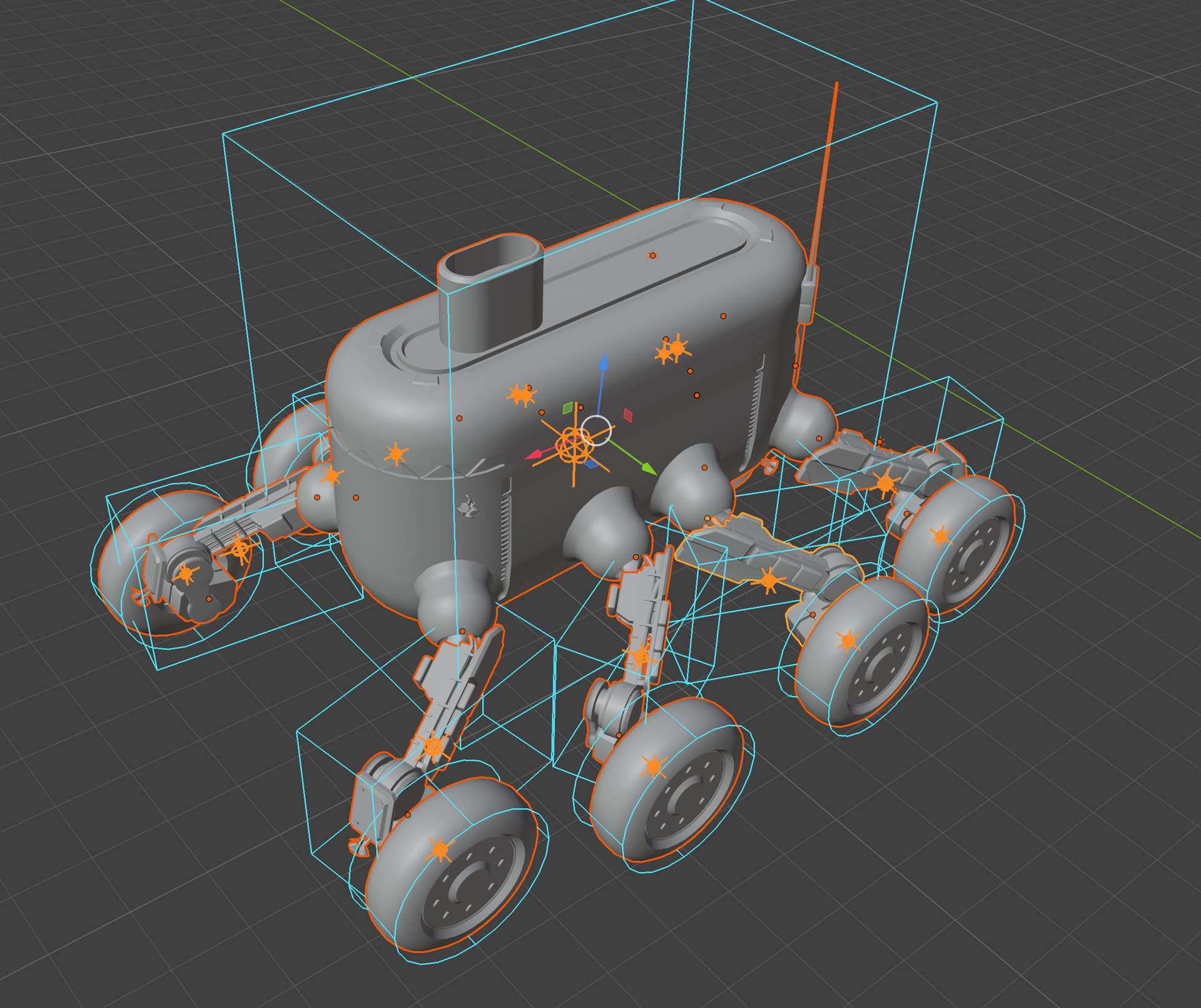
^ In-editor shot showing collision geometry and center of mass previews.