How can I create a beautiful outline for meshes aka "Cell Shading"

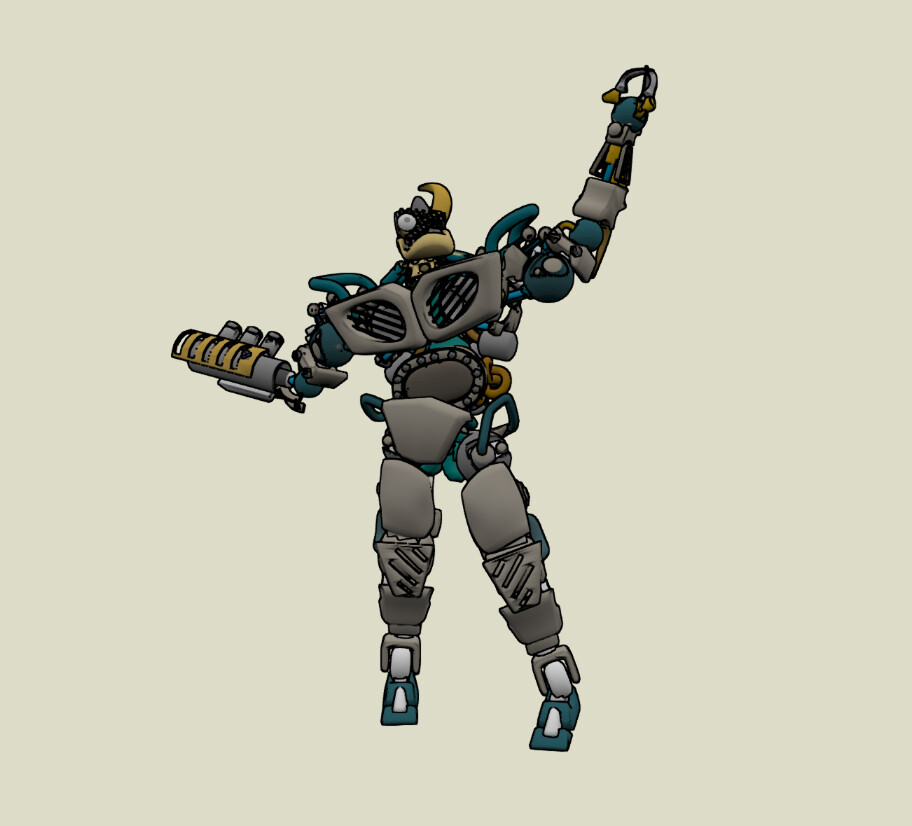
Good afternoon. I want to create an outline for meshes(Cell Shading), as in CAD programs, for example in SketchUp. I tried the built-in enableEdgesRendering method, tried to write shaders, used postprocesses, but I don’t like the way it looks. I want clear, thin lines along all the edges. Like for example in these screenshots:

How can I get such lines for any loaded model without manually adjusting for each model?

I found these articles and tried to use them to achieve my goals, but it didn’t work out:

2 Likes

I’m interested by the answers ! :slight_smile:

did you try this:

            var box1 = BABYLON.MeshBuilder.CreateBox("box1", {size: 2}, scene);
            box1.position.x = -2.5;
                // Kanten für Box 1
                var box1Edges = [
                    // Untere Fläche
                    [new BABYLON.Vector3(-1, -1, -1), new BABYLON.Vector3(1, -1, -1)],
                    [new BABYLON.Vector3(1, -1, -1), new BABYLON.Vector3(1, -1, 1)],
                    [new BABYLON.Vector3(1, -1, 1), new BABYLON.Vector3(-1, -1, 1)],
                    [new BABYLON.Vector3(-1, -1, 1), new BABYLON.Vector3(-1, -1, -1)],
                    // Obere Fläche
                    [new BABYLON.Vector3(-1, 1, -1), new BABYLON.Vector3(1, 1, -1)],
                    [new BABYLON.Vector3(1, 1, -1), new BABYLON.Vector3(1, 1, 1)],
                    [new BABYLON.Vector3(1, 1, 1), new BABYLON.Vector3(-1, 1, 1)],
                    [new BABYLON.Vector3(-1, 1, 1), new BABYLON.Vector3(-1, 1, -1)],
                    // Vertikale Kanten
                    [new BABYLON.Vector3(-1, -1, -1), new BABYLON.Vector3(-1, 1, -1)],
                    [new BABYLON.Vector3(1, -1, -1), new BABYLON.Vector3(1, 1, -1)],
                    [new BABYLON.Vector3(1, -1, 1), new BABYLON.Vector3(1, 1, 1)],
                    [new BABYLON.Vector3(-1, -1, 1), new BABYLON.Vector3(-1, 1, 1)]
                ];
                box1Edges.forEach(function(edge){
                    var line = BABYLON.MeshBuilder.CreateLines("box1edge", {points: edge}, scene);
                    line.color = new BABYLON.Color3(1, 0, 0);
                    line.parent = box1;
                });
                // box1.renderOutline = true;

Thanks for the reply, but here is the code for the faces of a cube, and I need to circle “any” 3D model. And to “manually” draw the edges of models from hundreds to thousands of meshes is to kill.

I see. Maybe you can modify this example for your purposes: Porting example by ChatGPT (Porting from xeogl to Babylon.js) - Demos and projects - Babylon.js

Thanks, I see the shaders, I’ll go figure it out if it’s useful or not!

What about this?

1 Like

Hey @u4iha1, welcome :slight_smile:

Maybe it would be nice if you could show us what you tried and explained a bit more what’s wrong.

I can reach similar result with enableEdgesRendering :


So maybe you can explain a bit more what you look for ?

FYI: let’s not confused mesh edges (which is the screenshot above) and the global “shape” edges which is the one “Cel-shading” version of your Smurf. For this kind of rendering, a shader will be needed. I would advice to have a look at the toon shader tuto here :

A part is dedicated to this contour

I tried using postprocesses. The problem is in the drawing of the lines, some are too thick, some for some reason are displayed as dotted lines when you rotate the camera around the model - the lines are flashing.

1 Like

This is the effect I get when using enableEdgesRendering. It doesn’t seem pretty to me.

And here’s what a Wireframe looks like:

Can you repro your issue in a playground? That would help figuring this out :+1:

My project is 20k lines of code and I’m not sure if I can quickly create a project on the “playground”. But I’ll try to find the time and implement my problems in the sandbox.

For sure we don’t need all of your code : try to isolate a mesh on which you want your effect (export to GLB for example) and share a playground which loads this GLB. Since it’s a shading-related question, almost no code is needed :slight_smile:

1 Like

I understand, but the problem is that this is an Electron application created using the FSD architecture on React with all its features. To properly transfer everything to the sandbox, i will have to try :sweat_smile:

This thread may help - Outline Post-Process
There is a nice PG - https://playground.babylonjs.com/#WGZLGJ#10564

I believe just a sample GLB model will be enough to test outline for your case.

1 Like

Just call the GLTF exporter on a simple scene with the mesh you are using for testing :slight_smile:

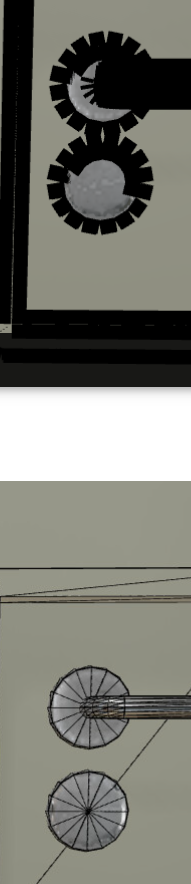
It would be interesting to know how these round meshes were made.

I mean, if the circles are composed of individual triangles, even a shader or post-process won’t deliver good results.

Thanks for the interesting links, I will definitely test it soon!

I can’t share/show these models. Now I’m looking for something similar, for demonstration and testing.

1 Like

For better edge lines with edges renderer I would suggest tweaking edges renderer properties mainly mesh.edgesWidth and epsilon parameter.