if you rotate the piece (right click), the light location seems to “stick” to the piece, always shining on the same side. If you move the piece to the upper left and rotate it, the reflection of the light changes depending on the orientation of the piece.
Gemini suggested calculating tangents, so I stole some tangent calculation Rust code from here:
which I included in the playground, but it doesn’t seem to work. I’m not sure I stole it correctly.
How can I make the light appear like it’s always shining from the same spot?
In my real project (jigsaw puzzle), I have a bunch of these pieces that all use the same material and normal map, but I need to rotate them individually.
The floor_bump.PNG is not suitable for normal mapping. If you compare it to appropriate normal mapping files, you will notice that the colors are different:
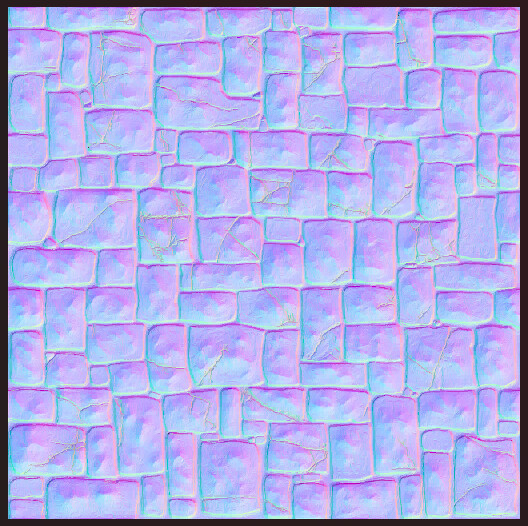
If you use a suitable file, you’ll notice that the specular lighting stays in the same place:
I shifted the light source direction to better demonstrate that the specular lighting remains fixed.
Here are some explanations (generated by AI) regarding the difference between “floor_bump” files and adapted normal map files:
Why floor_bump.PNG is not suitable for bumpTexture (normal mapping)
The shader code in bumpFragment.fx (line 58) processes the bump texture like this:
// perturbNormal reads RGB, maps from [0,1] to [-1,1], treats result as a tangent-space normal
normalW = perturbNormal(TBN, texture2D(bumpSampler, vBumpUV).xyz, scale);

// where perturbNormal does:
return perturbNormalBase(cotangentFrame, textureSample * 2.0 - 1.0, scale);
So bumpTexture always reads the RGB channels as a pre-computed tangent-space normal vector:
With a proper normal map (e.g., normalMap.jpg):
Stores normal directions as RGB. A flat surface → (0.5, 0.5, 1.0) = the characteristic purple/blue
* 2.0 - 1.0 correctly decodes to (0, 0, 1) — a flat upward normal
The TBN matrix rotates this into world space, reflecting mesh orientation
When the mesh rotates, the decoded world-space normals change correctly → light reacts to rotation
With a height/bump map (e.g., floor_bump.PNG):
Stores surface elevation as grayscale (R = G = B = same height value)
A medium gray pixel (0.5, 0.5, 0.5) → * 2.0 - 1.0 → (0, 0, 0) — a zero-length degenerate “normal”
A white pixel (1, 1, 1) → (1, 1, 1) → normalizes to (0.577, 0.577, 0.577) — a diagonal vector pointing nowhere meaningful
A dark pixel (0.2, 0.2, 0.2) → (-0.6, -0.6, -0.6) — another arbitrary diagonal
None of these represent actual surface curvature. The shader interprets height intensity as a 3D direction, which produces nonsensical normals
The fundamental difference:
A normal map stores pre-computed surface normal directions (derived from height gradients)
A height map stores scalar elevation values — to get normals you’d need to compute the spatial gradient (how height changes between neighboring pixels)
Babylon’s bumpTexture pipeline has no built-in height-to-normal conversion; it always reads RGB directly as normals
Thanks, that led me to the solution. When generating my normal map I was getting this hard blue, red, and green map. I was then mashing it down to a more normal-looking map by interpolating the values towards the standard (0.5, 0.5, 1.0) purple. The better (and easier) way was to just multiply the generated values by 0.5 and add 0.5. Now the lighting makes a lot more sense.