New Feature: The Node Particle Editor (NPE)

Hey team! It’s me with a new feature!
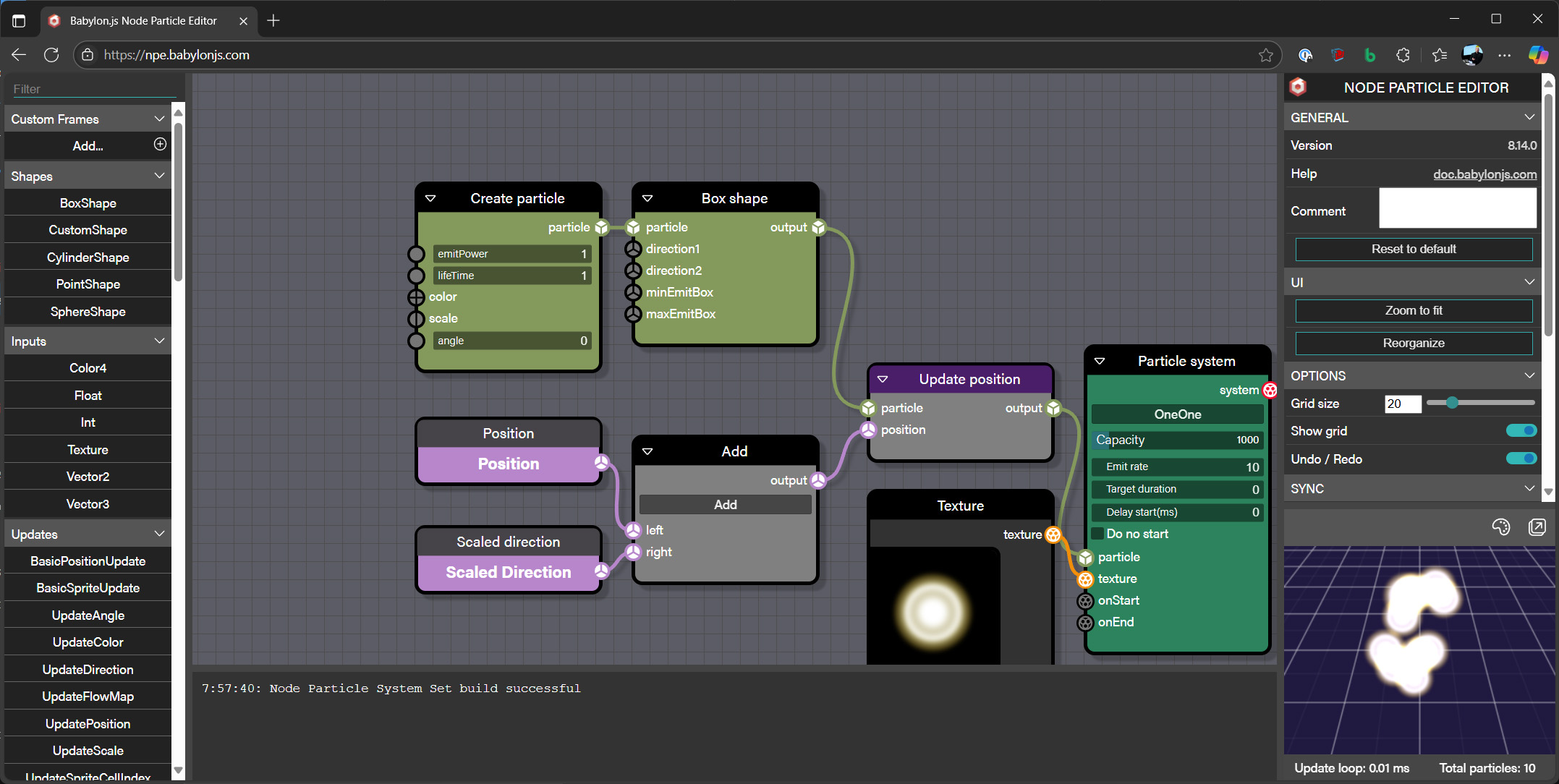
You can now design complex and intricate particle systems using the Node Particle Editor (NPE).
NPE screenshot

NPE

NPE lets you define one or multiple particle systems. It creates a ParticleSystemSet that can be used directly.

javascript

const npe = await BABYLON.NodeParticleSystemSet.ParseFromSnippetAsync("#8O4BJ2");
const particleSystemSet = await npe.buildAsync(scene);
particleSystemSet.start();

Here’s a complete example you can try out:
Babylon.js Playground

How To Use NPE

To use NPE, head to https://npe.babylonjs.com.

The default setup matches the one we just showed. Let’s dive deeper.
NPE screenshot

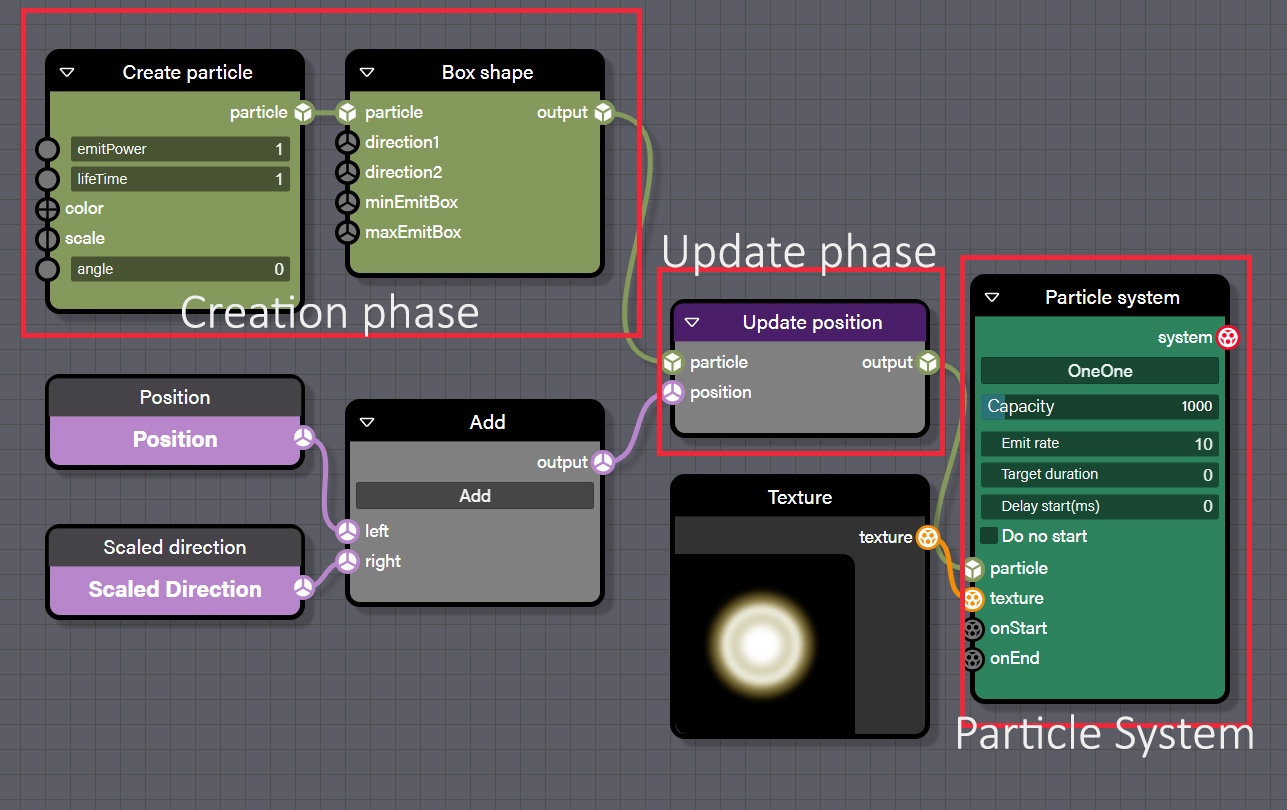
To set up a particle system, you’ll need three core components:

  • The particle system itself, defined by a ParticleSystem block
  • The creation logic, using at least a Create Particle block and a Shape block
  • The update logic

Note: For now, NPE only generates CPU-based particle systems.

The particle system block

This block defines the static properties of the system (like capacity or emitRate). You must provide, at a minimum, a particle input and a texture input.

Creation phase

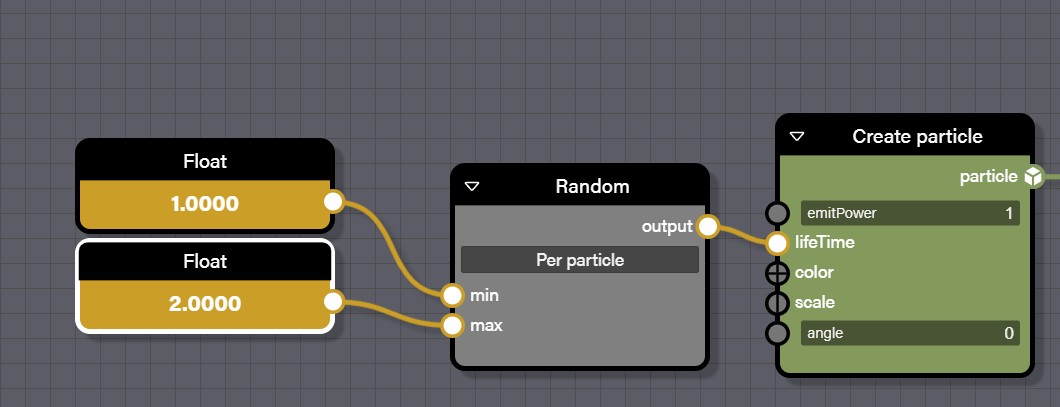
Every time a particle is created, this code runs. Each input is dynamic, meaning it’s evaluated per particle.
NPE screenshot

In this example, each new particle is given a randomly chosen lifetime between 1 and 2.

The shape blocks are how you define shape emitters

Update phase

The update logic is executed every frame for each particle. In this example, we update the position by adding the velocity (also known as scaled direction, i.e., direction adjusted for frame rate).
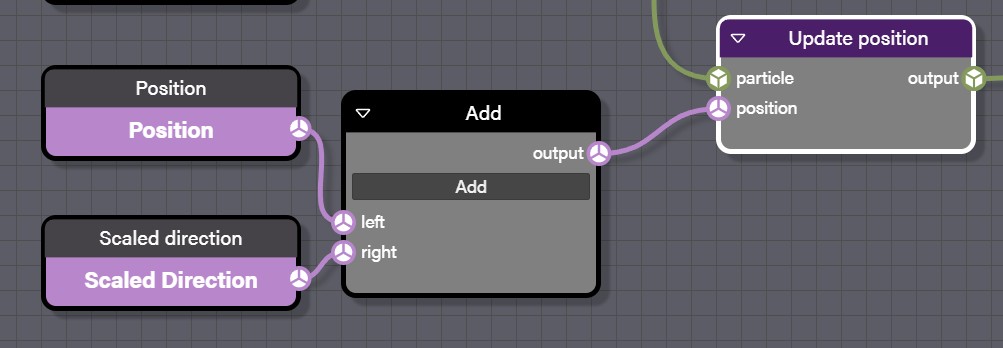
NPE screenshot

Each particle property can be updated:
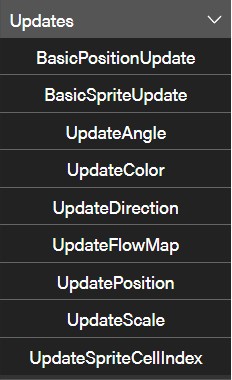
NPE screenshot

The blocks labeled Position and Scaled direction are contextual values — they reflect the intrinsic properties of a particle.

For basic behaviors, we offer direct function blocks so you don’t need to manually wire everything. For example, the earlier logic can be replaced with a BasicPositionUpdate:
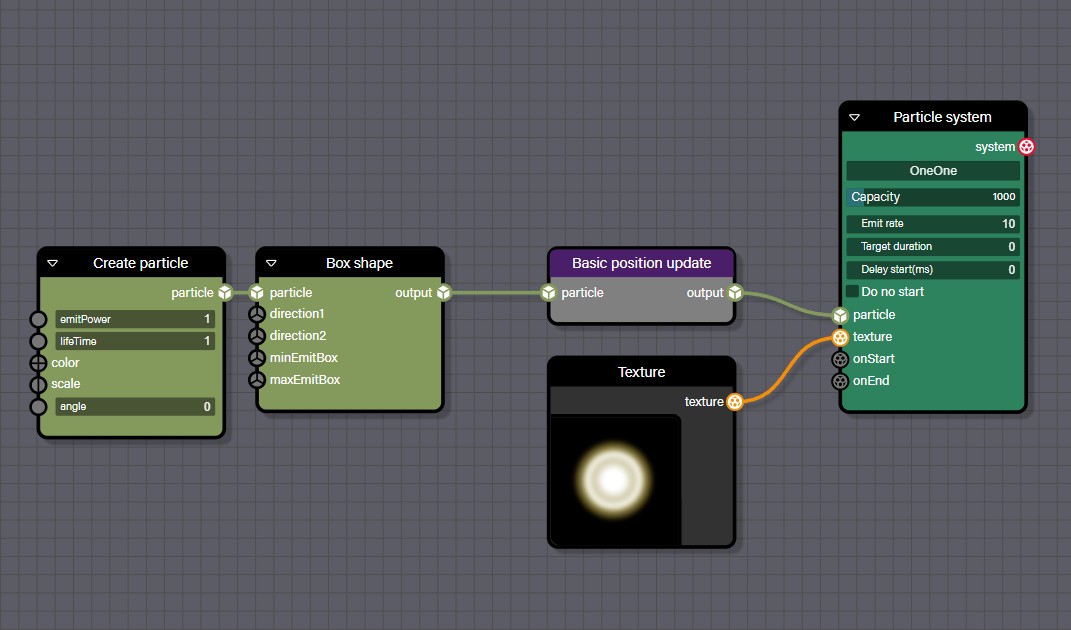
NPE screenshot

Managing random values

A core feature of any particle system is randomness. To support this, we provide three types of randomization blocks:

Random

The basic node for generating random values. It can generate values per particle, per system, or on every call.NPE screenshot
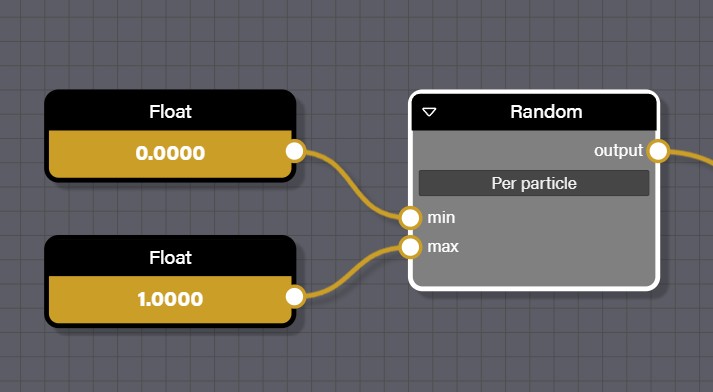
Gradient

Use this to create value ramps. Based on an input from 0 to 1, it picks the appropriate value from a range.NPE screenshot
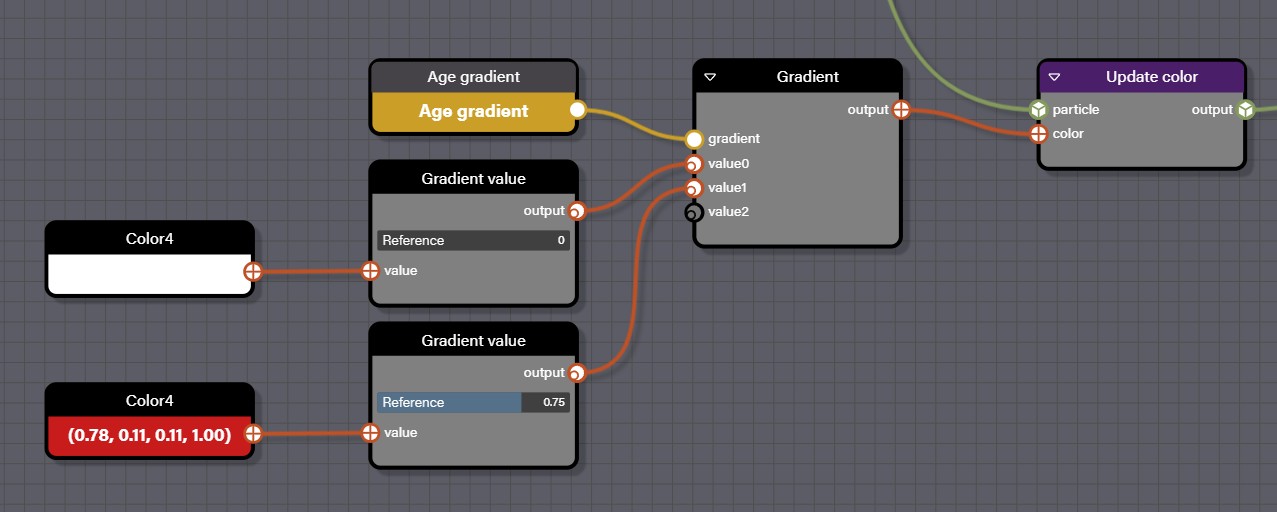
In this case, we use the AgeGradient contextual value (representing particle life from 0 to 1) to determine color. The particle is born white and fades to red, reaching full red at 75% of its lifetime.

Triggers

To add more complex behaviors, you can use triggers to link multiple particle systems—for example, to start a new one when a specific condition is met.

Here is a pretty complex example
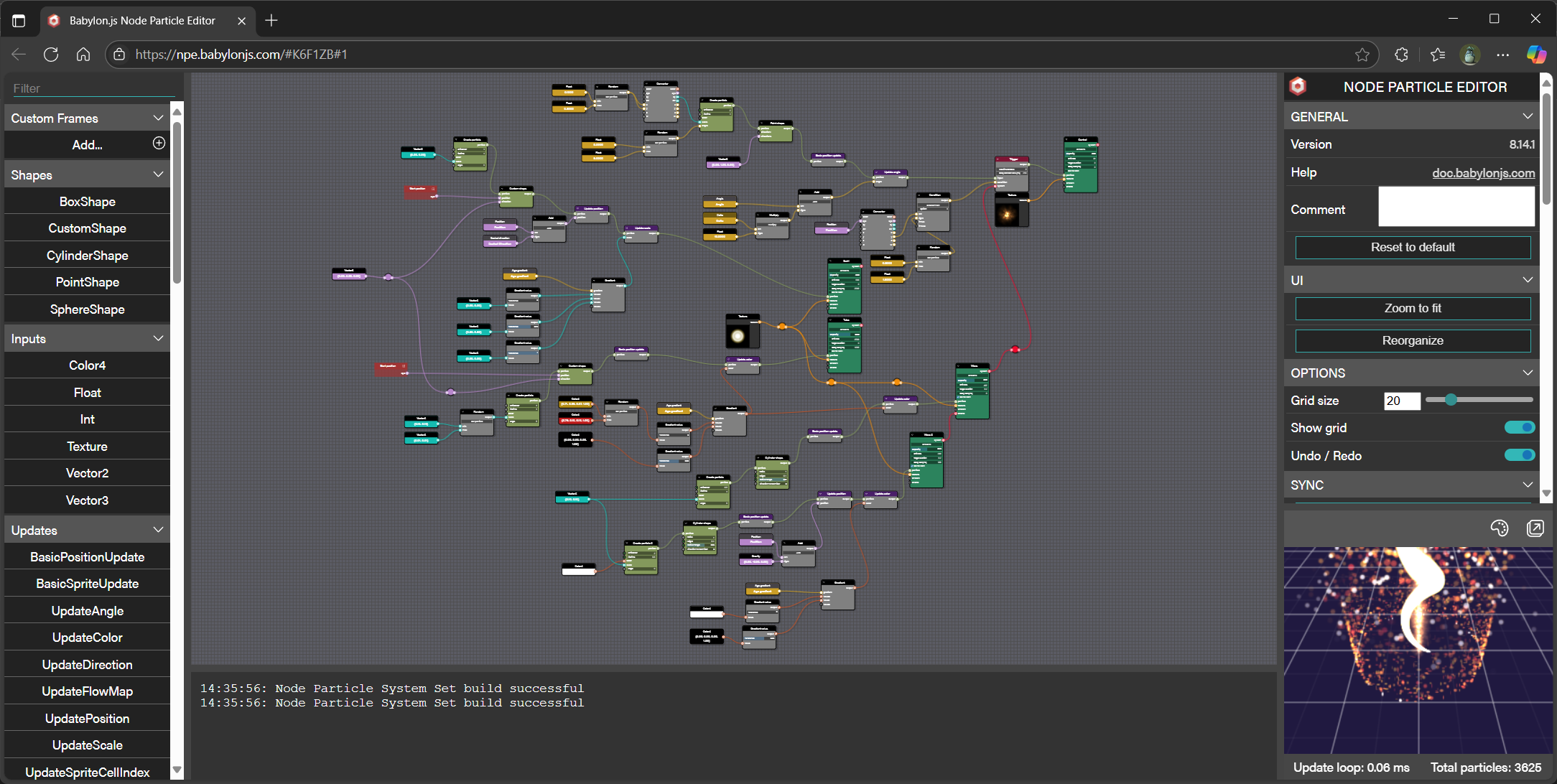
And more precisely on the top right corner:NPE screenshot
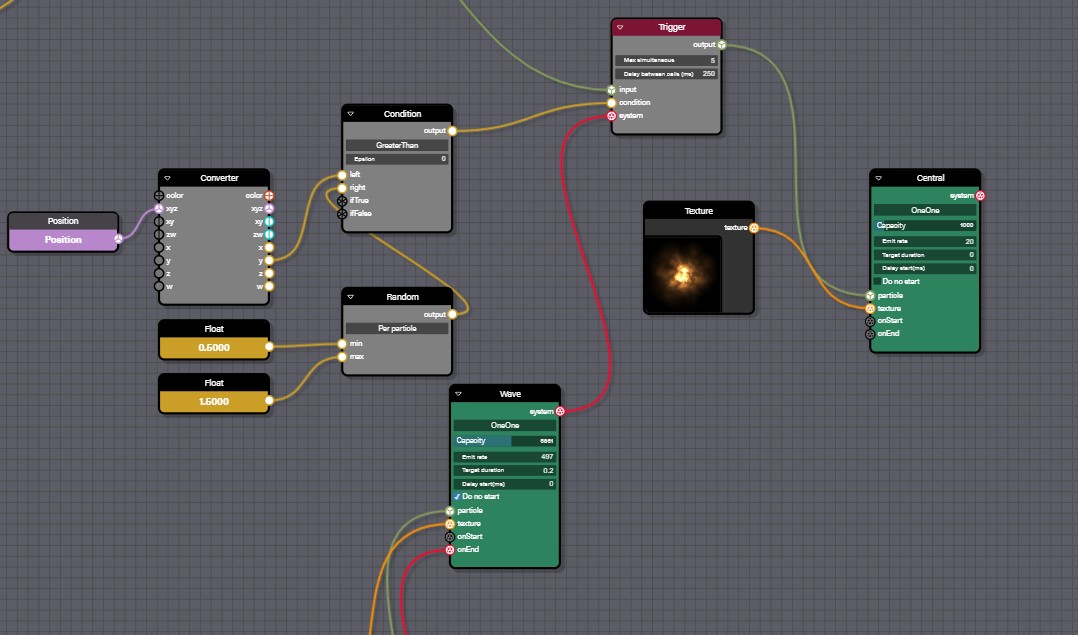
Here, we’ve introduced a Trigger block. This block must be connected to another particle system—it’s designed to start a clone of that system when a specific condition is met. You can also limit the maximum number of simultaneous systems to avoid overloading the CPU.

In our example, if a particle from the source system has a position.y greater than a random value between 0.5 and 1.5, it triggers a clone of the target system. However, this trigger will only fire once every 250ms, and no more than 5 instances can be active at the same time.

Another option is to use the onStart and onEnd events on each particle system:NPE screenshot
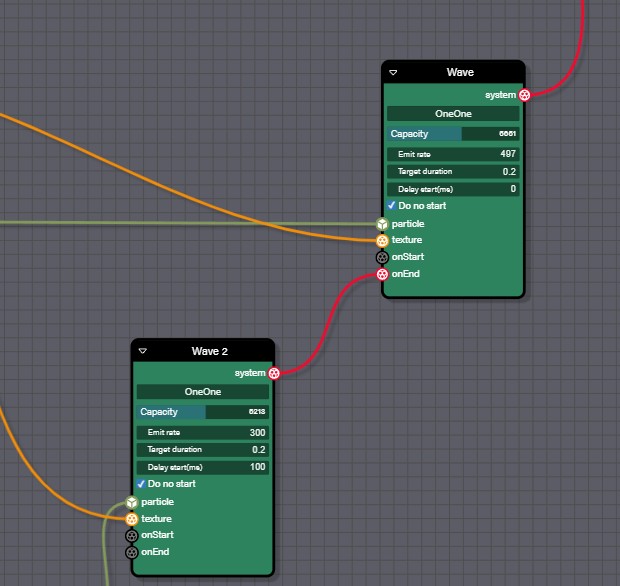
In this example, the “Wave2” particle system will start when the “Wave” system ends. For this to work, “Wave” must have a target duration—otherwise, it would loop endlessly and never emit an onEnd event.

Also note: “Wave2” is set to not start automatically.

Going further

I hope you will find it useful!!
Here is a link to an issue to track incoming features for NPE:

Node Particle Editor · Issue #16740 · BabylonJS/Babylon.js

Documentation: Node Particle Editor | Babylon.js Documentation

27 Likes

It’s like Christmas every day with you @Deltakosh! Whatever superfood or mind altering substance you’re consuming, you need to bottle and sell that :wink: Just kidding - I know it’s talent and hard work.

4 Likes

Haha! And honestly I had a lot of fun doing it!

3 Likes

It"s really impressive.

2 Likes

Awesome stuff :tada:

One wish: having a way to control the angle so it matches the particle direction. The closest I could get is this: Babylon.js Node Particle Editor (but only works from the right viewpoint)

I assume angle is in screen (camera) space, while direction is in local space - so would need a node to e.g. project direction to camera space :thinking:

We can introduce a project to screen node! Wanna create an issue for me on the repo?

I Ducking Love This!!

Thanks mate!

1 Like

Sure: [npe] Project to Screen node, e.g. for particle direction · Issue #16986 · BabylonJS/Babylon.js · GitHub

2 Likes

That was a super quick feature implementation ! :rocket:

And super simple to use - here is my updated PG

[update] seems like the alignment on the node isn’t saved properly in NPE, should be set to 0 in my example

Yup! I totally miss that serialization lol

PR is coming!

Adding missing serialization for alignAngleBlock by deltakosh · Pull Request #17019 · BabylonJS/Babylon.js

1 Like

And the video:

4 Likes

Hey i see only 2 methods Parse and ParseFromSnippetAsync in NodeParticleSystemSet

Is there plans to add ParseFromFileAsync similar to other classes like NodeMaterial etc?

Thanks!

No problem! Wanna do a PR? Happy to merge it

Hey, i never commited anything to babylon so im afraid that i’m not familiar with checkstyle etc

anyway i prepared method which i expect in NodeParticleSystemSet class at the end of file near other parse methods

/**
 * Creates a node particle system set from a snippet saved in a remote file
 * @param name defines the name of the particle system to create (can be null or empty to use the one from the json data)
 * @param url defines the url to load from
 * @returns a promise that will resolve to the new particle system
 */
// eslint-disable-next-line @typescript-eslint/promise-function-async, no-restricted-syntax
public static ParseFromFileAsync(name: Nullable<string>, url: string): Promise<NodeParticleSystemSet> {
    return new Promise((resolve, reject) => {
        const request = new WebRequest();
        request.addEventListener("readystatechange", () => {
            if (request.readyState == 4) {
                if (request.status == 200) {
                    const serializationObject = JSON.parse(request.responseText);
                    let output: NodeParticleSystemSet = NodeParticleSystemSet.Parse(serializationObject);

                    if (name) {
                        output.name = name;
                    }

                    resolve(output);
                } else {
                    // eslint-disable-next-line @typescript-eslint/prefer-promise-reject-errors
                    reject("Unable to load the node particle system set");
                }
            }
        });

        request.open("GET", url);
        request.send();
    });
}

not sure are there enough parameters etc

Thanks

It should be closer to the one in NodeMaterial:

/**
     * Creates a node material from a snippet saved in a remote file
     * @param name defines the name of the material to create
     * @param url defines the url to load from
     * @param scene defines the hosting scene
     * @param rootUrl defines the root URL for nested url in the node material
     * @param skipBuild defines whether to build the node material
     * @param targetMaterial defines a material to use instead of creating a new one
     * @param urlRewriter defines a function used to rewrite urls
     * @param options defines options to be used with the node material
     * @returns a promise that will resolve to the new node material
     */
    public static async ParseFromFileAsync(
        name: string,
        url: string,
        scene: Scene,
        rootUrl: string = "",
        skipBuild: boolean = false,
        targetMaterial?: NodeMaterial,
        urlRewriter?: (url: string) => string,
        options?: Partial<INodeMaterialOptions>
    ): Promise<NodeMaterial> {
        const material = targetMaterial ?? new NodeMaterial(name, scene, options);

        const data = await scene._loadFileAsync(url);
        const serializationObject = JSON.parse(data);
        material.parseSerializedObject(serializationObject, rootUrl, undefined, urlRewriter);
        if (!skipBuild) {
            material.build();
        }
        return material;
    }

you load the file with the scene to track dependencies, extract the json and then use the local json parser. Do you want me to do the change? It could be cool for you to contribute but I can do it :slight_smile:

I used ParticleHelper.ParseFromFileAsync as a proto for new method, not NodeMaterial one. not sure why ParticleHelper method doesn’t use _loadFileAsync

From what i see no need to have scene as parameter in this method. because scene will be used when “await npe.buildAsync(scene, true);” is called.

please commit if you can

Thanks

True! This is a good point! I’ll see what I will do

Actually you were right, your version was better