I saw the latest oculus browser has support for pass through camera access @RaananW !
7 Likes
This would be useful! We have an AR demo where I added manual calibration using two WebXR anchors with hand tracking, where the user places the anchors on specific points on the table so the virtual objects appear in the right spot.
With this, we could skip that step and just place a printed QR code on the table instead.
Sorry for the delay on this one. got some personal things that need my attention. It is still on my todo list, hope to check this out as soon as i can.
I can’t seem to get raw camera access to work on the quest 3. I am on the public test channel, so I assume I do have the latest version, but maybe I need to wait one more version? I checked the browser flags, nothing there is relevant.
Where did you see it? Any information from meta themselves?
Here is the “tweet” on Bluesky from two weeks ago:
“these are exposed as regular cameras”. So it’s basically not a webxr feature but uses GetUserMedia API?
Ok, will continue testing 
1 Like
Then there is this comment: To get passthrough camera support, enable "Experimental web platform features" in chrome://flags.
I totally missed that the first time I read the post! I’ve just checked and the flag is available in Oculus Quest Browser.
Here the official release note (version 38.2):
Dunno how to interpret that. “Added initial support for passthrough camera” has nothing to do with WebXR, and the flag itself is for web platform experiments. i.e. - a web feature, not a webxr feature.
I have these flags enabled, tried npth getUserMedia and the raw camera access, and nothing seems to give me access to any of the cameras. I’ll continue experimenting later. If any of you manges to get it to work - let me know
1 Like
It seems only some users are enabled to get the camera access (a suggested test on Discord is to try to access to the selfie camera, for instance: https://webcamtests.com/). Unfortunately i don’t have the access. I have asked for the access and there is no way to be enabled.
But that’s okay, in the meantime the journey continues on other fronts! 
1 Like
I do believe this is now available for all users on the Oculus Browser since the 40.1 release! https://developers.meta.com/horizon/release-notes/web/ FYI @RaananW
1 Like
But yeah, as you said Raanan - this isn’t a webxr features it’s just going to be regular getUserMedia stuff. Still sweet though.
I’ve been experimenting with camera passthrough on Meta Quest 3 in the browser, and I want to share with you what I’ve learned so far.
Premise: in the browser, you don’t get direct access to raw camera pixels or camera intrinsics. Instead, the passthrough is composited by the user agent, and your content is render on top of it. This means you can’t replicate native Unity solutions like Meta’s Passthrough Camera API samples.
Accessing the camera feed
The camera feeds are exposed by getUserMedia, targeting the specific devices you want to get the stream from. By calling enumerateDevices, you can list all the available devices included the cameras. The output is similar to:
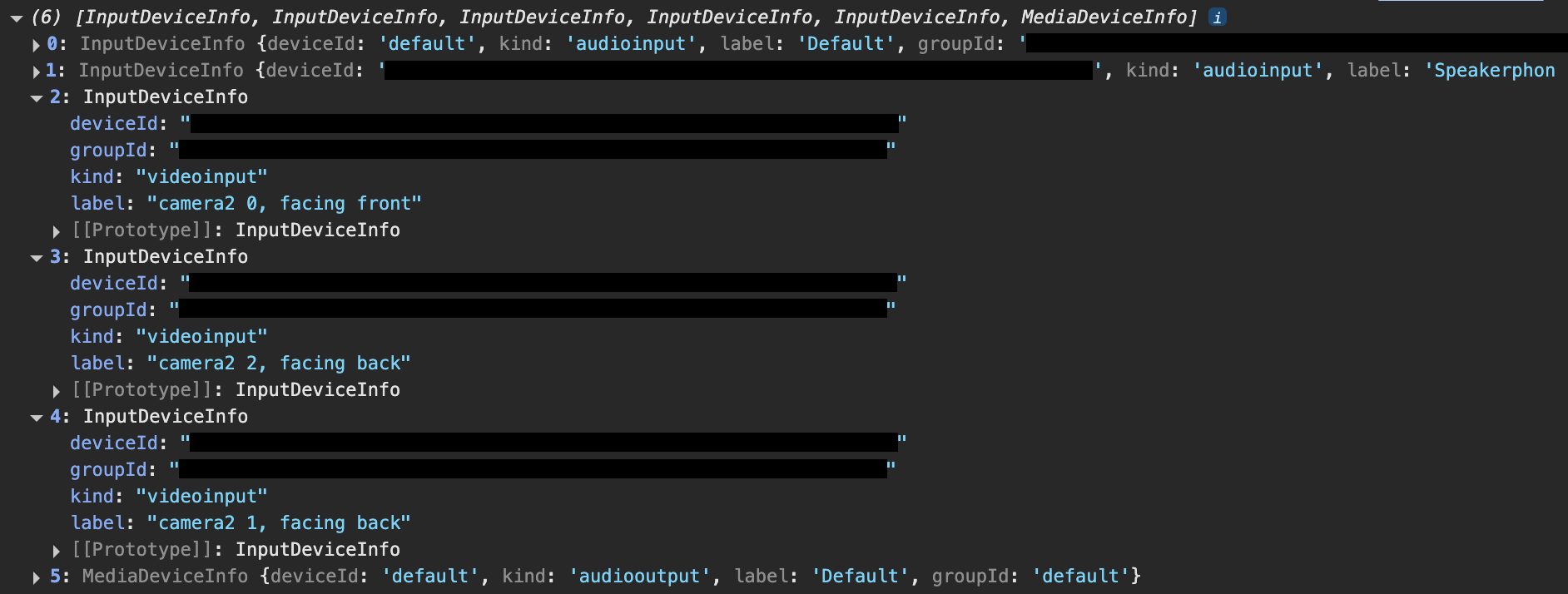
where:
-
“camera 2 0, facing front” → selfie camera
-
“camera 2 2, facing back” → right external camera (used in the sandbox)
-
“camera 2 1, facing back” → left external camera
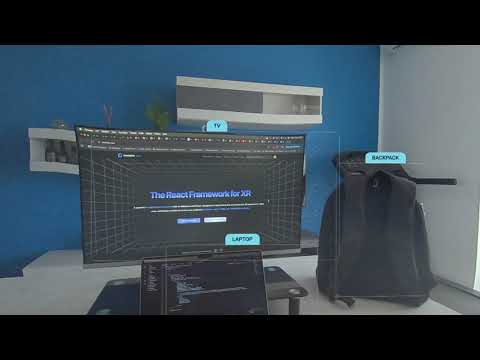
Once you have the stream, you can pass it to an ML model (I used TensorFlow’s coco-ssd) to get bounding boxes for detected objects.
Displaying detection results
There are two main ways to visualize these bounding boxes:
-
2D overlay (no depth)
You can map the detection results onto a fullscreen
AdvancedDynamicTextureand draw bounding boxes (e.g.,GUI.Rectangle). Because we don’t have exact camera intrinsics or lens distortion parameters, the mapping is approximate. You’ll likely need to apply manual offsets for proportions to look reasonable. -
3D meshes (with depth)
A better approach is to render the detected objects as 3D meshes in the scene, with depth and anchoring support.Depth Sensing
Depth sensing is a working feature, but in practice,getDepthInMetersis exposed only on the CPU path. The Quest 3 mainly supports GPU-based depth, so performance or compatibility may be limited in the browser.Hit Test
As a fallback, you can use WebXR’s hit test API to get real 3D positions of detected objects. This has two drawbacks:-
The user must to map their space beforehand (not a deal-breaker, since you can call initRoomCapture under the hood to reduce friction)
-
Ideally, you would want to enable hit tests against meshes, not just planes. For example:
-
const xtTest = featuresManager.enableFeature(WebXRHitTest, 'latest', {
    entityTypes: ['mesh', 'plane']
} as IWebXRHitTestOptions) as WebXRHitTest;
Unfortunately, this isn’t supported yet. You’ll get:
Failed to execute 'requestHitTestSource' on 'XRSession': Failed to read the 'entityTypes' property from 'XRHitTestOptionsInit': The provided value 'mesh' is not a valid enum value of type XRHitTestTrackableType
In short: you can access the raw camera streams and run ML detection, but the visualization is realistically limited to 2D overlays. A proper 3D placement isn’t possible in the browser right now, due to the lack of camera intrinsics, GPU depth access, and unsupported mesh hit testing.
I’ve prepared a sandbox that shows the detection results as a 2D overlay on top of the passthrough.
Hopefully, these notes and examples are useful for anyone experimenting with WebXR on the Quest 3, and can serve as a starting point for further discussion and comparison.
2 Likes
Is there an example that uses the passthrough in the playground? just wondering before I work on experimenting with it 
Nope, I’m going to create one today
2 Likes
These labels
are changed in:
- “camera 0, facing front” → selfie camera
- “camera 2, facing back” → right external camera (used in the sandbox)
- “camera 1, facing back” → left external camera
Here the playground:
If you haven’t granted camera permission before, you should be able to see the passthrough on the plane this way:
- The first time you enter in immersive mode, it should exit and ask for camera permission
- Click on “Allow” and reload the page
- Enter immersive mode again
3 Likes
Looking at this code, I don’t think it should be a WebXR native feature. This is as simple as using VideoTexture.CreateFromWebCamAsync
1 Like