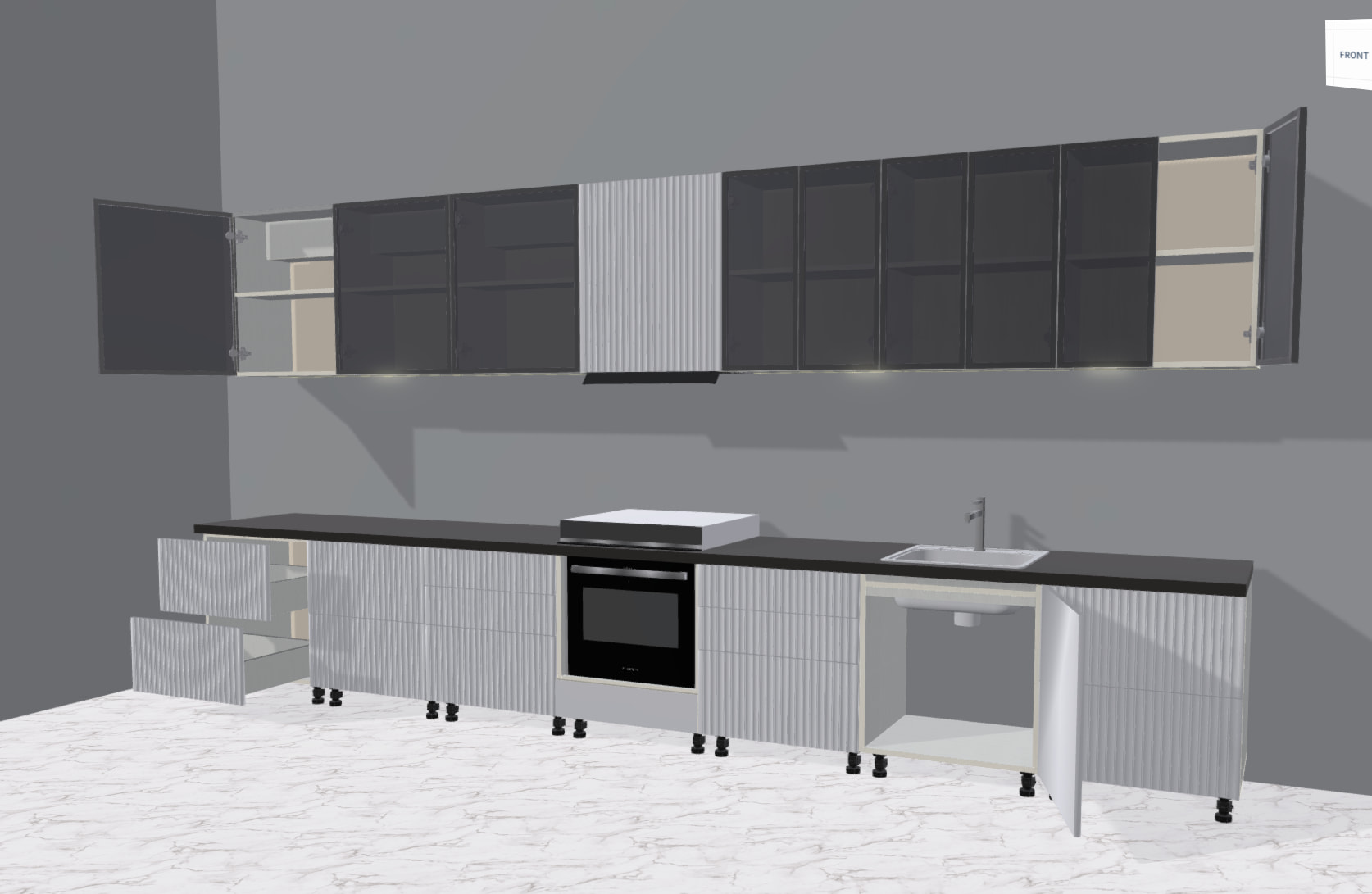
PBR Materials, need to play more with metallic roughness properties. Materials look too blend, need to add some proper reflections from IBL.Currently I can barely see any reflection on glass, wood, kitchen elements.
AO map and Lightmaps are kinda key for the scenes like this, but for that you probably need to bake both in CAD software to get proper results, which can be a challenge by itself.
These two steps will definitely improve the visuals dramatically. There is probably bunch of small tweaks and adjustments you can do on top of that, but I would try to tackle these two first and the see where you stand with it.
One challenge in our case is that this is an interactive kitchen configurator. Users can freely add, remove, resize, and move cabinets, so the scene is never static. Because of that, baking AO or lightmaps isn’t really feasible.
The PBR textures were created by my colleague, so there is a possibility that the issue comes from the textures themselves. We tried to make them in 4K, with proper normal maps, AO, roughness maps, and other channels to match the real-world materials as closely as possible.
The problem might be related either to the material setup, the way PBR is implemented, or simply how the material is configured and used inside the scene.
For example, I recently tested the same material in another engine, and the result looked completely different — and, in my opinion, significantly better. This makes me think that the issue might also be related to the rendering pipeline or material configuration rather than only the textures.
you could also try to force the irradiance to the fragment.
What I’m seeing is a over saturation from lighting. Maybe try dropping the environmentIntensity on the materials? It would also help to have the bump/normal textures to break up the specular on things.
Once you get the lighting and environment setup correct you can then apply a LUT or something to really home in the color profile.
We spent a lot of time experimenting with and fine-tuning the environment (IBL) texture. At this point, it has a pretty significant impact on the overall look of the scene.
We also had issues with materials created using the Node Material Editor, so we ended up switching to a standard PBR workflow instead, using AO, Metallic, and Roughness maps.
I went through quite a lot of iterations, trying different approaches, and what I have now is the absolute maximum I’ve been able to squeeze out of the visuals for a furniture configurator in Babylon.js.
It’s possible that I’ve overlooked something and there’s still room for improvement.
The current result is almost exactly what I was aiming for, and I think this is where I’ll stop. As far as my own experience and knowledge go, I’ve reached the limit of what I can achieve with this project.
I would switch to a pointlight and spotlight combination (everything is lit right now which makes it less realistic) and add a reflection texture to your hard shiny surfaces.
I’m also pretty certain your PBR channels are not being used correctly on the textures especially if it looks correct in other renderers. Id also really recomend turning down the environment intensity.
Hi! I’m the colleague that’s making the materials . If it’s ok I’d like to add to the conversation about how the materials are done. We’re creating them with the Babylon.js NME, connecting the texture nodes (albedo, metallic, roughness and normal) to the main PBR node, saving as .json files and importing them into our project. The materials we’re doing should resemble real life as close as possible, so unfortunately I can’t make the details any more evident than this (pls see the attached ss). We did start with an AO, but it proved to be unnecessary, so I’m not connecting it to the PBR node (either because I’ve been doing it wrong or it’s not suit for the goal we’re looking for) - in our case, the AO is basically a black&white, very blurred and low-opacity roughness, which makes the materials look darker (the AO is not geometry based, but rather implemented inside the materials, which is unnecessary, from my understanding, because our materials, even tho with small details, are more or less smooth).
As my colleague mentioned earlier, the project entails giving a person access to full customization (placement of objects, size of objects, adding/removing of light sources), so baking maps is unrealistic in our case. Are reflection textures realistic in this scenario (I’ve never use them but from what I’ve researched, it needs to also take real-time data to render)? I am not aware of screenspace AO, and I’m also not sure about the environment configurations, as it’s outside my role right now.
So what I’ve gathered:
→ AO and reflections should be geometry based, due to the specifics of our project, and take real-time data to render;
→ tweak environment settings some more;
If you have suggestions on what we could do better, or for me specifically from the material creation side, pls do let us know (been doing it for half a year and once we settled on a nme template I haven’t really derived from it, so feel free to share tips ).




 . If it’s ok I’d like to add to the conversation about how the materials are done. We’re creating them with the Babylon.js NME, connecting the texture nodes (albedo, metallic, roughness and normal) to the main PBR node, saving as .json files and importing them into our project. The materials we’re doing should resemble real life as close as possible, so unfortunately I can’t make the details any more evident than this (pls see the attached ss). We did start with an AO, but it proved to be unnecessary, so I’m not connecting it to the PBR node (either because I’ve been doing it wrong or it’s not suit for the goal we’re looking for) - in our case, the AO is basically a black&white, very blurred and low-opacity roughness, which makes the materials look darker (the AO is not geometry based, but rather implemented inside the materials, which is unnecessary, from my understanding, because our materials, even tho with small details, are more or less smooth).
 ).
).


