Hey everyone - as 8.33.0, individual side panes (tabs) can be re-docked to any of the four quadrants (top left, top right, bottom left, bottom right), and your layout is saved. This is also now live in Playground and Sandbox. Each side pane title bar has a “…” on the far right, or you can right click directly on a tab. You can also reset the layout to the default from the settings pane.
If this feature is heavily used, we may add drag & drop re-docking in the future, but it’s not part of the initial implementation.
I added this to the feature ideas in the tracking issue. I think the only tricky thing is that there is limited room for commands on individual scene explorer tree items. If it became too many, we could potentially have a section in the settings pane that lets you define the priority of commands, and maybe we show just the first few, and the rest go into a context menu.
Also, when using Inspector v2 in your own projects, its very easy to add this kind of functionality. I created a quick sample to show this since it is an example of how the Inspector v2 extensibility can be leveraged. Check it out here: https://codesandbox.io/p/sandbox/gmqqn7
You mean actually enabling glow outline in the scene, correct? Generally we avoid making scene modifications that could conflict with what the app itself is actually doing in the scene. I wonder about either using diagnostic scene functionality though like enabling the bounding box, or even using html overlays to help understand what object is selected?
Do you mean right-click the object in the scene, or right click the enable picking button? Since when you pick an object, scene explorer selects and scrolls to that entity, isn’t it already pretty quick to access the commands on that entity?
Similar to my comment in my reply to @labris, wouldn’t it be more discoverable to just put all this in a context menu on the scene explorer item itself (again, have all these be commands, but only the first few show up inline, the rest are available from a context menu)?
Thanks for the continued feedback and ideas, keep them coming!
I would like to highlight that contributions are more than welcome on that project. We really want to provide the best inspector ever! We need you guys!!
This is not currently implemented, and we aren’t quite sure yet how this will work in Inspector v2. Is closing windows still important if they can be re-docked?
From the screenshot it looks like some kind of css layout issue. Maybe the canvas parent doesn’t disable overflow or something? If you use Inspector v1 in your app does it behave differently? Can you provide your project (or a simple repro) through codesandbox or stackblitz?
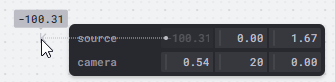
@ryantrem This might be already on the drawing board or suggested by others (I haven’t read the entire thread), but I really like the way Tweakpane handles numeric and 2D/3D point components - it makes adjustments really easy by either keyboard entry or dragging a custom slider that can be optionally constrained to a range or unconstrained. It’s also very space efficient - doesn’t use up a huge amount of space, unlike traditional slider + numeric input fields.
Here is a small experiment with enabling/disabling Service Definitions - react18
(Didn’t try React 19 yet).
I wonder what will be the best way to share different extensions and services among users, so that they could easily use them in their Inspector installation.
Correct, I do share the same concern absolutely and this is definitely a feature that will be time consuming/require careful consideration. My mind went through: “could we have an additional scene for the highlight and other inspector visual effects”. I wish I had time to do a POC. I do see value in the user visually and easily knowing which node is actually selected.
I put my mindset into a user that has lots of repetitive tasks… maybe it’s deleting meshes in a scene. Shortcuts are the quickest (shortcut configurator?), Right-click Context Menu is most user-friendly in terms of first adoption. I don’t like the idea of mouse travel for repetitive tasks, this is known accessibility challenge. I see Inspector very quickly being a great GLB / BJS production tool, for general users. My opinion is by default; out-of-the-box it should be incredibly user friendly and powerful. @inteja ‘s example of introducing that innovative multi-float control is a great example of improving ‘productivity’.
We may have to rename inspector to prospector (jokes)
Any way I can see the code? A few ways I can think of that we could deal with this in a robust way:
If you want control over all side panes (whether they are visible or not) at runtime, we could add a function to IShellService that can hide/unhide panes.
If you want UI to be able to do this, we could potentially add a feature that allows panes to be
“closed” (hidden) and re-opened (through some menu or something).
If you just want control over your own panes visibility at runtime, you can already do this (but I think you want control over all panes if I’m understanding correctly).
If you want control over which side panes are added just once when you first show inspector, we could add an option to the inspector options that is a callback that lets you filter out side panes.
If you want control over which service definitions (e.g. features) are included when you first show the inspector, we could add an option to the inspector options that is a callback that lets you filter out service definitions.
Some we can add to the monorepo as optional extensions, which would mean they would be available to “install” in any usage of Inspector v2 (whether it is in Playground/Sandbox or your own app).
To be more exhaustive, we could have a totally separate community extension feed (I mentioned this briefly at the end of the original post). This would be community governed and could take on any external dependencies. If you wanted some extensions to be installed by default with your usage of inspector in your project, we could probably add options for this. If you wanted to bundle some extensions with your project that uses Inspector, we’d have to think about that a bit more (e.g. could extensions be published to an extension feed for dynamic installation, but also be published as npm packages (either npmjs.org or a github package feed or even just npm linked to source) that could be referenced at build time and be bundled with your project). Right now extension metadata is a subset of package.json to help enable such a possible future.
@labris I just re-tested this scenario and got no errors:
[10/27 10:27:41] D:\Repos\InspectorV2Test> node --version
v20.18.0

[10/27 10:28:06] D:\Repos\InspectorV2Test> npm create vite@latest

> npx
> create-vite

│
◇  Project name:
│  inspector-v2-react-19-test-2
│
◇  Select a framework:
│  React
│
◇  Select a variant:
│  TypeScript
│
◇  Use rolldown-vite (Experimental)?:
│  No
│
◇  Install with npm and start now?
│  Yes
│
◇  Scaffolding project in D:\Repos\InspectorV2Test\inspector-v2-react-19-test-2...
│
◇  Installing dependencies with npm...

[10/27 10:29:29] D:\Repos\InspectorV2Test> cd .\inspector-v2-react-19-test-2\

[10/27 10:29:36] D:\Repos\InspectorV2Test\inspector-v2-react-19-test-2> npm install @babylonjs/inspector@preview

added 138 packages, and audited 330 packages in 17s

47 packages are looking for funding
  run `npm fund` for details

found 0 vulnerabilities
After this I setup a test scene and called ShowInspector and everything worked. I did notice a non-fatal error in the console because of two React roots being created. There is probably a bit more work to do to have Inspector v2 detect if it is already in a React context and perhaps not create a new React root, but this shouldn’t block anything as far as I can tell.
Side pane collapse/expand and undocking (floating child window)
Hey everyone - As of 8.33.3, Inspector v2 now supports collapsing the side panes and also “undocking” them to floating windows. This is also live in Playground and Sandbox:
 Side pane re-docking