Hi, I’m trying to get the depth of field effect working in a project that should run on mobile devices but I can not make it work properly in the test device I have. I’m using the default render pipeline as in the guide here: Using the Default Rendering Pipeline | Babylon.js Documentation
but for some reason the image appears completely blurred in these examples in my device (they work fine on desktop and in other newer mobile devices I have for testing): https://playground.babylonjs.com/#8F5HYV#9
I think it may be something related to the Depth Renderer not generating the right depth texture due to some hardware limitations. The device specs are:
Android 7.0
Chrome 91
glRenderer: “Mali-T720”
glVendor: “ARM”
Is there a way to detect if the device is supporting the right texture format for the depth renderer to work for the DOF effect? Or to change the way the depth renderer is generated by the DOF effect so it can work in old devices?
@Danim unfortunately it looks like a driver issue on those ARM MALI devices we have seen already in the past.
You mentioned it could be around the depthRenderer and I would be more than happy to introduce a workaround in babylon if you figure the root cause for it ?
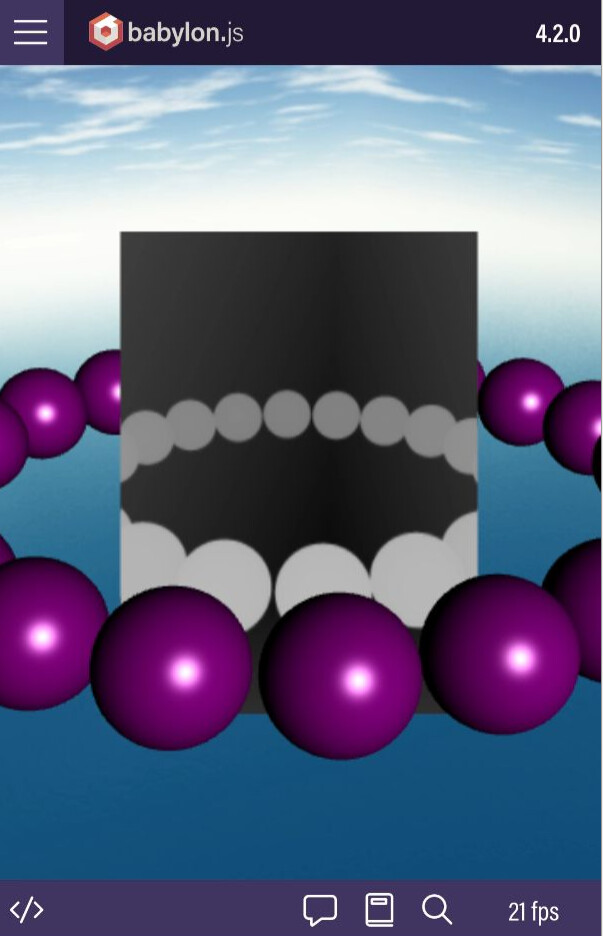
Thanks for your replies. I’ve made some tests in this playground from a previous post ( https://www.babylonjs-playground.com/#T5YWJQ#18 ) and these are the results of the depth buffer in the Android device:
I’m assuming that the standard render pipeline is enabling a depth buffer when I activate the depth of field, but it is providing a wrong image in the Android device and that’s why the image is completely blurred.
Can that be because of some gl extension incompatiblity on the device? If so, is there a way to detect it and generate a depth map in a different way so it can be used by the Depth of field post process?
Thanks everyone for your time and testing this. So, it seems to be a problem in that particular device hardware. Do you know if there’s any gl attribute or something that can be causing that depth texture corruption that I can check through code to block that postprocess from being executed if that attribute is not compatible in a device? Or maybe just blacklist that “Mali” hardware on my end.
I am not sure it is related to the depth texture, the color being different is expected. You could try forcing webGL1 by using the special flag in the engine option to ensure there is no R texture availble on your platform. At least you d compare our way to store depth in colored texture on both hardware ?
 we have seen already in the past.


 :
: