My NME : https://nme.babylonjs.com/#8Q4WWI#6
Playground : Babylon.js Playground
Description
I want to put nodematerial in nodematerial_A instead of color4
because I want to fade out from nodematerial_A to nodematerial_B
https://playground.babylonjs.com/#EZQ3N6#8 like this!
It’s not nodematerial, it’s textured
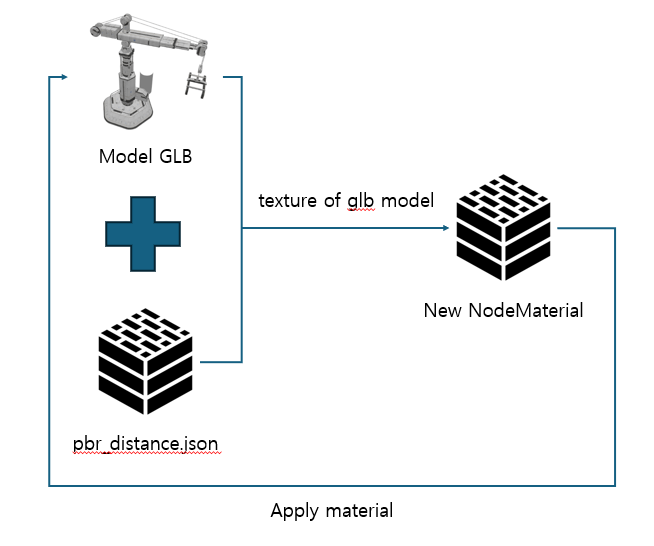
So the way I thought about it is to break down the model’s nodematerials and inject them into properties to make a copied nodematerial_A in the middle of a runtime! And then put it in Lerp
The second method is to implement it through overlay
-
So can I copy the nodematerial and put it in the lerp?
-
Which way do you think is better??
-
Is there a better way??
Please support everyone’s strength to me who is lacking!!
Thank you for reading this my story
Excuse me, but could you tell me how to do that..?
It is actually a ping to our resident tech artist (@PatrickRyan). He will swing by soon to help you 
But here technically the answer will be to have both shaders in one material and then have a float value to switch between both
Like that:
Babylon.js Node Material Editor
@qkrxotn7287, leave it to @Deltakosh to beat me to sharing an example. Basically, there isn’t a way to interpolate between two different node materials because you can only assign one material to a triangle at a time. So to interpolate between two different materials, you need to have both assigned to the same triangle as well as some sort of control to blend between them. This just isn’t possible in real time rendering for many reasons, the least of which is that it would be very expensive and bug prone.
In the example above, you need to have both shaders in one node material with a lerp to blend between them. However, due to the way shaders are computed, both paths will be computed entirely before determining which shader is rendered. In the case where your gradient is not 0 or 1 on the lerp, this makes sense as we need both pixel colors (one from each branch of the shader) to be able to blend. However, when you are fully on one or the other shader (your gradient is 0 or 1) you are still calculating the entirety of both paths in the shader. This is a perf hit as your shader is much more expensive to render since we are computing both states every frame.
In this case I would suggest you have one shader for each state and a mix shader for interpolations between them. Before you start your interpolation, change your material to your mix shader, do your interpolation, and then switch to the destination material. This way you are only paying the extra cost in the shader when the interpolation is happening and the render is cheaper when the material is static.
Another option, since you are going from wireframe to solid, is to double up your geometry and use two node materials. On one of the node materials you set the material.wireframe = true. This will give you your wireframe and you can use your node material to do whatever you like with alpha. This is an example of this method in a playground. I hope this answers your question, but please ping back if you have more.
NME :
https://nme.babylonjs.com/#IBF2PZ#1
Playground :
If the PG doesn’t load, please press the play button again!
I took out various textures from the model and made and applied the nodematerials, but they are very different from the original glb.. Did I miss something??
wireframe was trying to solve this problem but he still hasn’t done it yet.. haha
@qkrxotn7287, your playground link is also a link to NME. Do you have a PG link you can share so we can see what you are looking at?
Sorry, I must have uploaded it wrong because I was in a hurry. I modified the post, so can you take a look at it again??
Can’t you copy all the options of the previous material and make them the same?
@**Deltakosh
@PatrickRyan
@Cedric
**
Thanks to you, it was a really beneficial opportunity to create good features and learn the knowledge I lacked! Thank you for letting me know!