We definitely still have some feature work left for Inspector v2, but when you say “as Inspector v1 is currently so effortlessly convenient to use,” can you expand on this a bit more? We definitely want to know about anything you are finding more difficult in v2 compared to v1!
Using a shadow dom/root would be tricky as Inspector basically injects itself in the middle of the dom tree, basically going into the container element of your canvas, and re-hosting your canvas. But the css-in-js solution is very clean as it only generates styles at runtime when needed (e.g. a component is actually rendered that uses a style), class names are effectively globally unique, and any generated styles are removed when Inspector is closed/hidden.
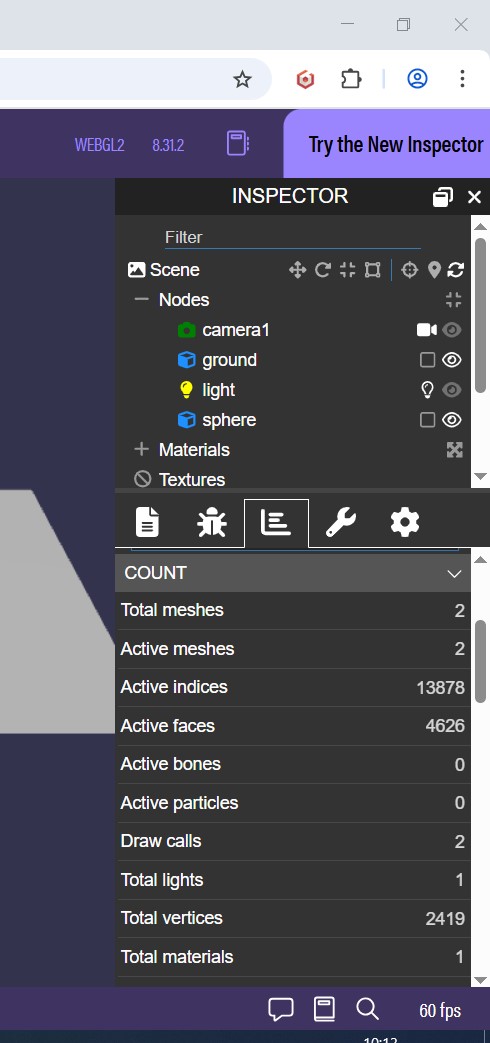
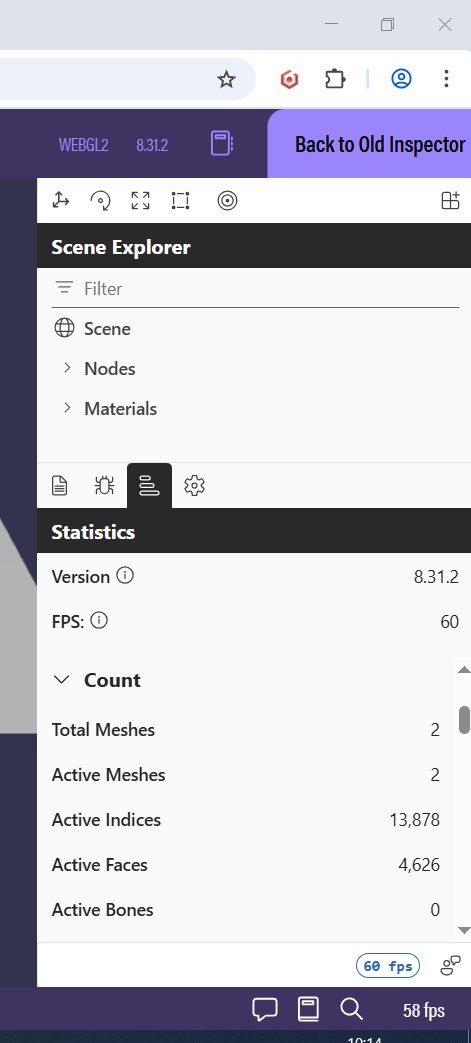
Please compare the two screenshots below. I am getting much less information now. Often, to debug/perf review I need to move the camera and then I want to see all stats at once; and do not want to move, scroll, move,… Also, now we need to make multiple screenshots in order to share perf stats.
You can break dragging if you move the mouse while dragging the separator (in screenshot above between scene expl/stats) to an invalid spot. Try to move the mouse slightly above the separator origin (while dragging). On release, gets stuck in drag mode. This is the cursor you are looking for:
Yes! We are overhauling the UI for all of our tools (including node editors) for 9.0! They will use the same shared controls as InspectorV2 – so getting feedback on the UX / battletesting the controls functionality in InspectorV2 Preview is super helpful!
@Joe_Kerr thanks so much for taking the time to look at the Inspector v2 preview and give feedback! Please don’t worry about reporting things that may just not be implemented yet, as feedback like this from the community helps us prioritize! Now for a few follow up questions for clarifications:
Just to be 100% sure I’m understanding the feedback, it’s about “information density” in the new UI, correct? Like in the same amount of vertical space, you see less information about the scene and the mesh you have selected, correct?
Yikes that looks like a bug! I will log an issue shortly with bugs and feedback and share it back on this thread!
I’m not sure what you mean by “debugNode”. Can you share a screenshot of what you are referring to from Inspector v1?
Yep this one is known and one of the unfinished things as of “preview.”
If I understand, you mean being able to have a filter string like -collider or something that would show everything that doesn’t have “collider” in it, correct? Or when you say “general category filter” you mean something like being able to hide all transform nodes (except those that are in the parent chain of a non-transform node, like a mesh), is that right?
Everyone please feel free to comment either in the issue or in this thread regarding the “requests.” More community signal on these requests will help us understand how to prioritize and where to invite community contributions.
I love the new look! And it feels faster moving around and selecting different nodes. Nice work!!
I personally prefer a bit more of a compact look, like if the Scene Explorer items min-height was 24px instead of 32px.
We haven’t integrated with debugLayer yet, which means currently you must explicitly call the new ShowInspector function.
I didn’t understand how to display the V2 inspector with the ShowInspector(scene) function explicitly ?
There I see in the doc only with the use of import { ShowInspector } from “@babylonjs/inspector”; but nothing with normal use < script src=‘’>
It would be good to explain also with the use without npm
Hey @Dad72 - for preview, we don’t have a UMD package yet, and right now the plan is that UMD will be the way to use Inspector v2 directly in the browser without any bundling. I’ve clarified that in the original post under the What does “preview” mean? section. I will keep this thread updated as we make progress on the remaining feature and parity work, including when the UMD package is ready to go!
What is the minimal Inspector v2 setup (in other words, how to achieve a minimal configuration, minimum panes etc)? Is it possible to have all the panes custom and hide the default panes?
From the API we export (the public API), ShowInspector(scene) is pretty much the minimal configuration, which includes the panes you see in Sandbox/Playground. There are lower level APIs that are not currently exposed that have no default panes, but these are basically “internal” APIs right now. Can you share more of what you are thinking?
@ryantrem When do you expect us to start reporting bugs? Since it’s a preview release, I assume you’re already aware of some issues, so I don’t want to report duplicates.
I need to revert to v1 since a critical feature isn’t working: the ability to enable or disable a TransformNode.
 Can’t wait for this new version to replace the old v1 inspector!